Stylized Neural Painting

Preprint | Project Page | Colab Runtime 1 | Colab Runtime 2
Official PyTorch implementation of the preprint paper "Stylized Neural Painting", accepted to CVPR 2021.
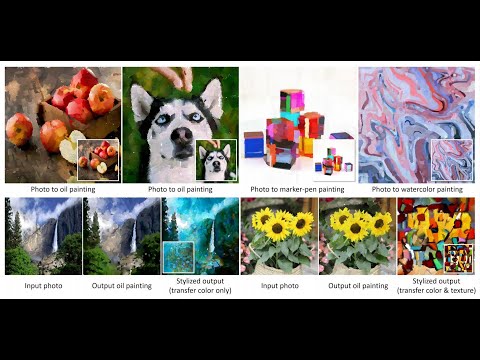
We propose an image-to-painting translation method that generates vivid and realistic painting artworks with controllable styles. Different from previous image-to-image translation methods that formulate the translation as pixel-wise prediction, we deal with such an artistic creation process in a vectorized environment and produce a sequence of physically meaningful stroke parameters that can be further used for rendering. Since a typical vector render is not differentiable, we design a novel neural renderer which imitates the behavior of the vector renderer and then frame the stroke prediction as a parameter searching process that maximizes the similarity between the input and the rendering output. Experiments show that the paintings generated by our method have a high degree of fidelity in both global appearance and local textures. Our method can be also jointly optimized with neural style transfer that further transfers visual style from other images.

In this repository, we implement the complete training/inference pipeline of our paper based on Pytorch and provide several demos that can be used for reproducing the results reported in our paper. With the code, you can also try on your own data by following the instructions below.
The implementation of the sinkhorn loss in our code is partially adapted from the project SinkhornAutoDiff.
License

One-min video result
**Updates on CPU mode (Nov 29, 2020)
PyTorch-CPU mode is now supported! You can try out on your local machine without any GPU cards.
**Updates on lightweight renderers (Nov 26, 2020)
We have provided some lightweight renderers where users now can easily generate high resolution paintings with much more stroke details. With the lightweight renders, the rendering speed also improves a lot (x3 faster). This update also solves the out-of-memory problem when running our demo on a GPU card with limited memory (e.g. 4GB).
Please check out the following for more details.
Requirements
See Requirements.txt.
Setup
- Clone this repo:
git clone https://github.com/jiupinjia/stylized-neural-painting.git
cd stylized-neural-painting
- Download one of the pretrained neural renderers from Google Drive (1. oil-paint brush, 2. watercolor ink, 3. marker pen, 4. color tapes), and unzip them to the repo directory.
unzip checkpoints_G_oilpaintbrush.zip
unzip checkpoints_G_rectangle.zip
unzip checkpoints_G_markerpen.zip
unzip checkpoints_G_watercolor.zip
- We have also provided some lightweight renderers where users can generate high-resolution paintings on their local machine with limited GPU memory. Please feel free to download and unzip them to your repo directory. (1. oil-paint brush (lightweight), 2. watercolor ink (lightweight), 3. marker pen (lightweight), 4. color tapes (lightweight)).
unzip checkpoints_G_oilpaintbrush_light.zip
unzip checkpoints_G_rectangle_light.zip
unzip checkpoints_G_markerpen_light.zip
unzip checkpoints_G_watercolor_light.zip
To produce our results
Photo to oil painting

- Progressive rendering
python demo_prog.py --img_path ./test_images/apple.jpg --canvas_color 'white' --max_m_strokes 500 --max_divide 5 --renderer oilpaintbrush --renderer_checkpoint_dir checkpoints_G_oilpaintbrush --net_G zou-fusion-net
- Progressive rendering with lightweight renderer (with lower GPU memory consumption and faster speed)
python demo_prog.py --img_path ./test_images/apple.jpg --canvas_color 'white' --max_m_strokes 500 --max_divide 5 --renderer oilpaintbrush --renderer_checkpoint_dir checkpoints_G_oilpaintbrush_light --net_G zou-fusion-net-light
- Rendering directly from mxm image grids
python demo.py --img_path ./test_images/apple.jpg --canvas_color 'white' --max_m_strokes 500 --m_grid 5 --renderer oilpaintbrush --renderer_checkpoint_dir checkpoints_G_oilpaintbrush --net_G zou-fusion-net
Photo to marker-pen painting

- Progressive rendering
python demo_prog.py --img_path ./test_images/diamond.jpg --canvas_color 'black' --max_m_strokes 500 --max_divide 5 --renderer markerpen --renderer_checkpoint_dir checkpoints_G_markerpen --net_G zou-fusion-net
- Progressive rendering with lightweight renderer (with lower GPU memory consumption and faster speed)
python demo_prog.py --img_path ./test_images/diamond.jpg --canvas_color 'black' --max_m_strokes 500 --max_divide 5 --renderer markerpen --renderer_checkpoint_dir checkpoints_G_markerpen_light --net_G zou-fusion-net-light
- Rendering directly from mxm image grids
python demo.py --img_path ./test_images/diamond.jpg --canvas_color 'black' --max_m_strokes 500 --m_grid 5 --renderer markerpen --renderer_checkpoint_dir checkpoints_G_markerpen --net_G zou-fusion-net
Style transfer

- First, you need to generate painting and save stroke parameters to output dir
python demo.py --img_path ./test_images/sunflowers.jpg --canvas_color 'white' --max_m_strokes 500 --m_grid 5 --renderer oilpaintbrush --renderer_checkpoint_dir checkpoints_G_oilpaintbrush --net_G zou-fusion-net --output_dir ./output
- Then, choose a style image and run style transfer on the generated stroke parameters
python demo_nst.py --renderer oilpaintbrush --vector_file ./output/sunflowers_strokes.npz --style_img_path ./style_images/fire.jpg --content_img_path ./test_images/sunflowers.jpg --canvas_color 'white' --net_G zou-fusion-net --renderer_checkpoint_dir checkpoints_G_oilpaintbrush --transfer_mode 1
You may also specify the --transfer_mode (0: transfer color only, 1: transfer both color and texture)
Also, please note that in the current version, the style transfer are not supported by the progressive rendering mode. We will be working on this feature in the near future.
Generate 8-bit graphic artworks

python demo_8bitart.py --img_path ./test_images/monalisa.jpg --canvas_color 'black' --max_m_strokes 300 --max_divide 4
Running through SSH
If you would like to run remotely through ssh and do not have something like X-display installed, you will need --disable_preview to turn off cv2.imshow on the run.
python demo_prog.py --disable_preview
Google Colab
Here we also provide a minimal working example of the inference runtime of our method. Check out the following runtimes and see your result on Colab.
Colab Runtime 1 : Image to painting translation (progressive rendering)
Colab Runtime 2 : Image to painting translation with image style transfer
To retrain your neural renderer
You can also choose a brush type and train the stroke renderer from scratch. The only thing to do is to run the following common. During the training, the ground truth strokes are generated on-the-fly, so you don't need to download any external dataset.
python train_imitator.py --renderer oilpaintbrush --net_G zou-fusion-net --checkpoint_dir ./checkpoints_G --vis_dir val_out --max_num_epochs 400 --lr 2e-4 --batch_size 64
Citation
If you use our code for your research, please cite the following paper:
@inproceedings{zou2020stylized,
    title={Stylized Neural Painting},
      author={Zhengxia Zou and Tianyang Shi and Shuang Qiu and Yi Yuan and Zhenwei Shi},
      year={2020},
      eprint={2011.08114},
      archivePrefix={arXiv},
      primaryClass={cs.CV}
}

 17 Oct 26, 2022
 5.3k Jan 03, 2023
 75 Oct 21, 2021
 37 Oct 30, 2022
 77 Oct 05, 2022
 1 Sep 11, 2021
 73 Oct 29, 2022
 383 Dec 16, 2022
 17 Nov 22, 2022
 2 Dec 29, 2021
 418 Dec 16, 2022
 224 Dec 28, 2022
 30 Dec 19, 2022
 406 Dec 24, 2022
 113 Dec 20, 2022
 65 Dec 01, 2022
 0 Jun 25, 2021
 32 Dec 10, 2022
 24 Nov 03, 2022
 4 Jun 24, 2022