curl-impersonate: A special compilation of curl that makes it impersonate Chrome & Firefox

Overview

curl-impersonate

Build and test Docker images

A special compilation of curl that makes it impersonate real browsers. It can impersonate the four major browsers: Chrome, Edge, Safari & Firefox. This curl binary is able to perform a TLS handshake that is identical to that of a real browser.

Why?

When you use an HTTP client with a TLS website, it first performs a TLS handshake. The first message of that handshake is called Client Hello. The Client Hello message that curl produces differs drastically from that of a real browser. Compare the following Wireshark capture. Left is a regular curl, right is Firefox. curl-ff-before
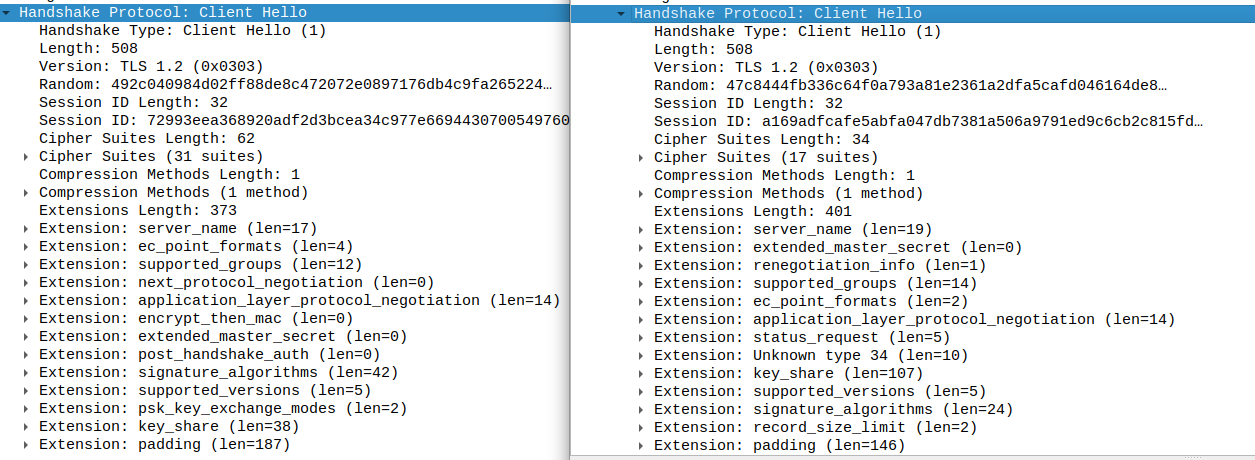
Some web services therefore use the TLS handshake to fingerprint which HTTP client is accessing them. Notably, some bot protection platforms use this to identify curl and block it. With the modified curl in this repository, the Client Hello message looks exactly like that of a real browser. This tricks TLS fingerprinters to think that it is a real browser that is accessing them.

How?

The modifications that were needed to make this work:

  • Compiling curl with nss, the TLS library that Firefox uses, instead of OpenSSL. For the Chrome version, compiling with BoringSSL.
  • Modifying the way curl configures various TLS extensions and SSL options.
  • Adding support for new TLS extensions.
  • Running curl with some non-default flags, for example --ciphers, --curves and some -H headers.

The resulting curl looks, from a network perspective, identical to a real browser. Compare: (left is curl-impersonate, right is Firefox):
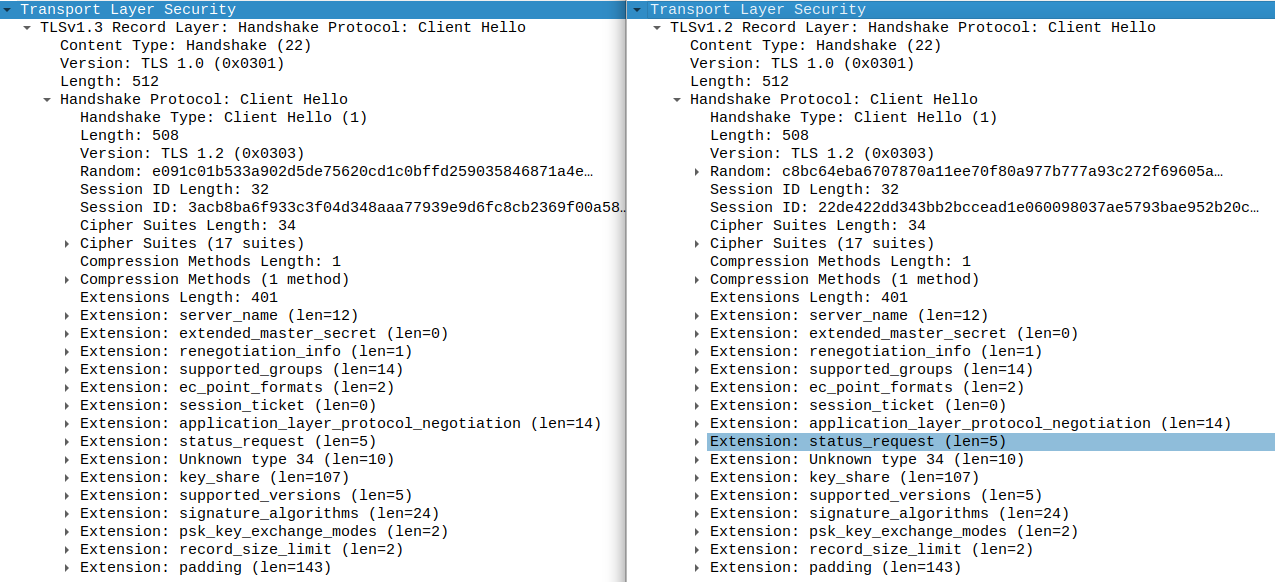
curl-ff-after

Read the full description in the blog post: part a, part b.

Supported browsers

The following browsers can be impersonated.

Browser Version Build OS Target name Wrapper script
Chrome 99 99.0.4844.51 Windows 10 chrome99 curl_chrome99
Chrome 100 100.0.4896.75 Windows 10 chrome100 curl_chrome100
Chrome 101 101.0.4951.67 Windows 10 chrome101 curl_chrome101
Chrome 99 99.0.4844.73 Android 12 chrome99_android curl_chrome99_android
Edge 99 99.0.1150.30 Windows 10 edge99 curl_edge99
Edge 101 101.0.1210.47 Windows 10 edge101 curl_edge101
Firefox 91 ESR 91.6.0esr Windows 10 ff91esr curl_ff91esr
Firefox 95 95.0.2 Windows 10 ff95 curl_ff95
Firefox 98 98.0 Windows 10 ff98 curl_ff98
Firefox 100 100.0 Windows 10 ff100 curl_ff100
Safari 15.3 16612.4.9.1.8 MacOS Big Sur safari15_3 curl_safari15_3

Basic usage

For each supported browser there is a wrapper script that launches curl-impersonate with all the needed headers and flags. For example:

curl_chrome99 https://www.wikipedia.org

You can add command line flags and they will be passed on to curl. However, some flags change curl's TLS signature which may cause it to be detected.

See Advanced usage for more options.

Installation

There are two versions of curl-impersonate for technical reasons. The chrome version is used to impersonate Chrome, Edge and Safari. The firefox version is used to impersonate Firefox.

Pre-compiled binaries

Pre-compiled binaries for Linux and macOS (Intel) are available at the GitHub releases page. Before you use them you need to install nss (Firefox's TLS library):

  • Ubuntu - sudo apt install libnss3
  • Red Hat/Fedora/CentOS - yum install nss nss-pem
  • macOS - brew install nss

The pre-compiled binaries are statically compiled with libcurl(-impersonate) for ease of use. If you wish to use libcurl-impersonate, please build from source.

Building from source

See INSTALL.md.

Docker images

Docker images based on Alpine Linux with curl-impersonate compiled and ready to use are available on Docker Hub. The images contain the binary and all the wrapper scripts. Use like the following:

# Firefox version
docker pull lwthiker/curl-impersonate:0.4-ff
docker run --rm lwthiker/curl-impersonate:0.4-ff curl_ff95 https://www.wikipedia.org

# Chrome version
docker pull lwthiker/curl-impersonate:0.4-chrome
docker run --rm lwthiker/curl-impersonate:0.4-chrome curl_chrome99 https://www.wikipedia.org

Distro packages

AUR packages are available to Arch users: curl-impersonate-chrome, curl-impersonate-firefox.

Advanced usage

libcurl-impersonate

libcurl-impersonate.so is libcurl compiled with the same changes as the command line curl-impersonate. It has an additional API function:

CURLcode curl_easy_impersonate(struct Curl_easy *data, const char *target);

You can call it with the target names, e.g. chrome98, and it will internally set all the options and headers that are otherwise set by the wrapper scripts. Specifically it sets:

  • CURLOPT_HTTP_VERSION
  • CURLOPT_SSLVERSION, CURLOPT_SSL_CIPHER_LIST, CURLOPT_SSL_EC_CURVES, CURLOPT_SSL_ENABLE_NPN, CURLOPT_SSL_ENABLE_ALPN
  • CURLOPT_HTTPBASEHEADER, CURLOPT_HTTP2_PSEUDO_HEADERS_ORDER (non-standard HTTP options created for this project).
  • CURLOPT_SSL_ENABLE_ALPS, CURLOPT_SSL_SIG_HASH_ALGS, CURLOPT_SSL_CERT_COMPRESSION, CURLOPT_SSL_ENABLE_TICKET (non-standard TLS options created for this project).

Note that if you call curl_easy_setopt() later with one of the above it will override the options set by curl_easy_impersonate().

Using CURL_IMPERSONATE env var

Experimental: If your application uses libcurl already, you can replace the existing library at runtime with LD_PRELOAD (Linux only). You can then set the CURL_IMPERSONATE env var. For example:

LD_PRELOAD=/path/to/libcurl-impersonate.so CURL_IMPERSONATE=chrome98 my_app

The CURL_IMPERSONATE env var has two effects:

  • curl_easy_impersonate() is called automatically for any new curl handle created by curl_easy_init().
  • curl_easy_impersonate() is called automatically after any curl_easy_reset() call.

This means that all the options needed for impersonation will be automatically set for any curl handle.

Note that the above will NOT WORK for curl itself because the curl tool overrides the TLS settings. Use the wrapper scripts instead.

Contents

This repository contains two main folders:

  • chrome - Scripts and patches for building the Chrome version of curl-impersonate.
  • firefox - Scripts and patches for building the Firefox version of curl-impersonate.

The layout is similar for both. For example, the Firefox directory contains:

Other files of interest:

Contributing

If you'd like to help, please check out the open issues. You can open a pull request with your changes.

This repository contains the build process for curl-impersonate. The actual patches to curl are maintained in a separate repository forked from the upstream curl. The changes are maintained in the impersonate-firefox and impersonate-chrome branches.

Comments
  • Distribute binaries, including a drop-in replacement for the shared library

    Distribute binaries, including a drop-in replacement for the shared library

    Thanks for publishing this.

    I see the release process is fairly automated, is it possible to use CI to automatically build binaries of this, and publish them as releases? I don't have experience in Github Actions, but I do in Gitlab CI. Both containers take 3 GB, but the binaries themselves are only ~7 MB.

    Another interesting build artefact would be to "bake in" the settings in curl_ff95 script in the build itself, and create a regular curl shared library. This could replace with the upstream libcurl file to use the new settings, or hacked around with LD_LIBRARY_PATH. It would need to be a different build per browser.

    Now curl is built in static mode. The library itself is in lib/.libs/libcurl.a.

    opened by somini 15
  • Impersonate Safari on Mac

    Impersonate Safari on Mac

    Safari being the second most used desktop browser according to some websites, it can be a good candidate for impersonation as well. I don't have access to a Mac right now.. Is anyone willing to share a Wireshark capture of a TLS session from Safari ? Bonus if it's HTTP/2 and if it can be decrypted as well (you can set up a local nginx with a self signed key for this).

    opened by lwthiker 13
  • Wrong host header using CURL_IMPERSONATE env var

    Wrong host header using CURL_IMPERSONATE env var

    When using libcurl and reusing the same connection, if I set the "Host:" header on the connection, and reuse it to make a request without the host header, the header is still included with the same value

    <?php
    putenv('CURL_IMPERSONATE=chrome98');
    $ch = curl_init();
    curl_setopt($ch, CURLOPT_URL, 'https://headers.cf');
    curl_setopt($ch, CURLINFO_HEADER_OUT, 1);
    curl_setopt( $ch, CURLOPT_ENCODING, "" );
    curl_setopt( $ch, CURLOPT_FOLLOWLOCATION, false );
    curl_setopt( $ch, CURLOPT_ENCODING, "" );
    curl_setopt( $ch, CURLOPT_RETURNTRANSFER, true );
    curl_setopt( $ch, CURLOPT_HTTPHEADER, ['Host: abc.com']);
    curl_setopt( $ch, CURLOPT_AUTOREFERER, true );
    
    curl_exec($ch);
    print_r(curl_getinfo($ch));
    
    //curl_reset($ch);
    curl_setopt($ch, CURLOPT_URL, 'https://headers.cf');
    curl_setopt( $ch, CURLOPT_HTTPHEADER, ['connection: Keep-Alive']); // i didn't set "host:" there


    echo curl_exec($ch);
    print_r(curl_getinfo($ch));
    

    ON the first request, this is what is sent

    GET / HTTP/1.1
    Host: abc.com <--- notice this
    sec-ch-ua: " Not A;Brand";v="99", "Chromium";v="98", "Google Chrome";v="98"
    sec-ch-ua-mobile: ?0
    sec-ch-ua-platform: "Windows"
    Upgrade-Insecure-Requests: 1
    User-Agent: Mozilla/5.0 (Windows NT 10.0; Win64; x64) AppleWebKit/537.36 (KHTML, like Gecko) Chrome/98.0.4758.102 Safari/537.36
    Accept: text/html,application/xhtml+xml,application/xml;q=0.9,image/avif,image/webp,image/apng,*/*;q=0.8,application/signed-exchange;v=b3;q=0.9
    Sec-Fetch-Site: none
    Sec-Fetch-Mode: navigate
    Sec-Fetch-User: ?1
    Sec-Fetch-Dest: document
    Accept-Encoding: gzip, deflate, br
    Accept-Language: en-US,en;q=0.9
    

    and this is sent on the second request

    GET / HTTP/1.1
    Host: abc.com <--- this is incorrect
    sec-ch-ua: " Not A;Brand";v="99", "Chromium";v="98", "Google Chrome";v="98"
    sec-ch-ua-mobile: ?0
    sec-ch-ua-platform: "Windows"
    Upgrade-Insecure-Requests: 1
    User-Agent: Mozilla/5.0 (Windows NT 10.0; Win64; x64) AppleWebKit/537.36 (KHTML, like Gecko) Chrome/98.0.4758.102 Safari/537.36
    Accept: text/html,application/xhtml+xml,application/xml;q=0.9,image/avif,image/webp,image/apng,*/*;q=0.8,application/signed-exchange;v=b3;q=0.9
    Sec-Fetch-Site: none
    Sec-Fetch-Mode: navigate
    Sec-Fetch-User: ?1
    Sec-Fetch-Dest: document
    Accept-Encoding: gzip, deflate, br
    Accept-Language: en-US,en;q=0.9
    connection: Keep-Alive
    

    if i remove the line putenv('CURL_IMPERSONATE=chrome98');, everything works fine : first request :

    GET / HTTP/1.1
    Host: abc.com <-- notice this
    Accept: */*
    Accept-Encoding: deflate, gzip, br
    

    second request

    GET / HTTP/1.1
    Host: headers.cf <--- this is correct this time
    Accept: */*
    Accept-Encoding: deflate, gzip, br
    connection: Keep-Alive
    
    opened by momala454 11
  • Libcurl certificate compression & more ?

    Libcurl certificate compression & more ?

    I'm using libcurl and php for curl-impersonate, i'm setting the ciphers, the ssl version, disable NPN, but i'm still missing the extensions 27 (compress_certificate) and 17513 (extensionApplicationSettings (boringssl))

    I can't set the parameters "--alps" and "--cert-compression brotli" using libcurl and PHP. The curl php extension doesn't support new parameters names (see https://github.com/php/php-src/blob/master/ext/curl/interface.c#L2306 ) What should I do to enable those 2 extensions ?

    edit: calling putenv('CURL_IMPERSONATE=chrome98'); or CURL_IMPERSONATE=chrome98 php /path/to/script.php beforehand doesn't help, the two tls extensions are still not enabled.

    My guess is that that both "alps" and "cert-compression" have not been yet added to the default parameters on curl-impersonate for libcurl.

    Using CURL_IMPERSONATE=chrome98 curl "http://...." is correctly adding the 2 extensions however

    opened by momala454 10
  • Have the headers changed a bit with Chrome 103?

    Have the headers changed a bit with Chrome 103?

    I checked my laptop's Windows Chrome 103 headers using your socat procedure, compared to the chrome101 curl-impersonate script's results I see extra headers for Connection:, Cache-Control:, and also DNT:. That last one might be due to my personal Chrome settings, not sure. Also the sec-ch-ua: string seems to be a bit different.

    Chrome 103:

    GET / HTTP/1.1\r
    Host: xx.xx.xx.xx:8443\r
    Connection: keep-alive\r
    Cache-Control: max-age=0\r
    sec-ch-ua: ".Not/A)Brand";v="99", "Google Chrome";v="103", "Chromium";v="103"\r
    sec-ch-ua-mobile: ?0\r
    sec-ch-ua-platform: "Windows"\r
    DNT: 1\r
    Upgrade-Insecure-Requests: 1\r
    User-Agent: Mozilla/5.0 (Windows NT 10.0; Win64; x64) AppleWebKit/537.36 (KHTML, like Gecko) Chrome/103.0.0.0 Safari/537.36\r
    Accept: text/html,application/xhtml+xml,application/xml;q=0.9,image/avif,image/webp,image/apng,*/*;q=0.8,application/signed-exchange;v=b3;q=0.9\r
    Sec-Fetch-Site: none\r
    Sec-Fetch-Mode: navigate\r
    Sec-Fetch-User: ?1\r
    Sec-Fetch-Dest: document\r
    Accept-Encoding: gzip, deflate, br\r
    Accept-Language: en-US,en;q=0.9\r
    

    curl-impersonate chrome101:

    GET / HTTP/1.1\r
    Host: localhost:8443\r
    sec-ch-ua: " Not A;Brand";v="99", "Chromium";v="101", "Google Chrome";v="101"\r
    sec-ch-ua-mobile: ?0\r
    sec-ch-ua-platform: "Windows"\r
    Upgrade-Insecure-Requests: 1\r
    User-Agent: Mozilla/5.0 (Windows NT 10.0; Win64; x64) AppleWebKit/537.36 (KHTML, like Gecko) Chrome/101.0.4951.67 Safari/537.36\r
    Accept: text/html,application/xhtml+xml,application/xml;q=0.9,image/avif,image/webp,image/apng,*/*;q=0.8,application/signed-exchange;v=b3;q=0.9\r
    Sec-Fetch-Site: none\r
    Sec-Fetch-Mode: navigate\r
    Sec-Fetch-User: ?1\r
    Sec-Fetch-Dest: document\r
    Accept-Encoding: gzip, deflate, br\r
    Accept-Language: en-US,en;q=0.9\r
    

    Related question: I tried setting custom headers via node-libcurl in my program, by passing an array to my .get() method's 'HTTPHEADER' option, like below, but in the resulting request socat is showing the Connection: and Cache-Control: headers end up at the end, despite my array passing them first. Is this a curl bug? Anyway to override it to get the right order like Chrome 103?

    let headers = [
        'Connection: keep-alive',
        'Cache-Control: max-age=0',
        'sec-ch-ua: ".Not/A)Brand";v="99", "Google Chrome";v="103", "Chromium";v="103"',
        'sec-ch-ua-mobile: ?0',
        'sec-ch-ua-platform: "Windows"',
        'Upgrade-Insecure-Requests: 1',
        'User-Agent: Mozilla/5.0 (Windows NT 10.0; Win64; x64) AppleWebKit/537.36 (KHTML, like Gecko) Chrome/103.0.0.0 Safari/537.36',
        'Accept: text/html,application/xhtml+xml,application/xml;q=0.9,image/avif,image/webp,image/apng,*/*;q=0.8,application/signed-exchange;v=b3;q=0.9',
        'Sec-Fetch-Site: none',
        'Sec-Fetch-Mode: navigate',
        'Sec-Fetch-User: ?1',
        'Sec-Fetch-Dest: document',
        'Accept-Encoding: gzip, deflate, br',
        'Accept-Language: en-US,en;q=0.9'
    ];
    let response = await aCurly.get('https://localhost:8443/', { SSL_VERIFYPEER: false, SSL_VERIFYHOST: false, HTTPHEADER: headers });
    

    socat result:

    GET / HTTP/1.1\r
    Host: localhost:8443\r
    sec-ch-ua: ".Not/A)Brand";v="99", "Google Chrome";v="103", "Chromium";v="103"\r
    sec-ch-ua-mobile: ?0\r
    sec-ch-ua-platform: "Windows"\r
    Upgrade-Insecure-Requests: 1\r
    User-Agent: Mozilla/5.0 (Windows NT 10.0; Win64; x64) AppleWebKit/537.36 (KHTML, like Gecko) Chrome/103.0.0.0 Safari/537.36\r
    Accept: text/html,application/xhtml+xml,application/xml;q=0.9,image/avif,image/webp,image/apng,*/*;q=0.8,application/signed-exchange;v=b3;q=0.9\r
    Sec-Fetch-Site: none\r
    Sec-Fetch-Mode: navigate\r
    Sec-Fetch-User: ?1\r
    Sec-Fetch-Dest: document\r
    Accept-Encoding: gzip, deflate, br\r
    Accept-Language: en-US,en;q=0.9\r
    Connection: keep-alive\r
    Cache-Control: max-age=0\r
    

    I tried editing the curl_chrome101 script to add these 2 headers in there, and same behavior: they end up at the bottom of the headers instead of top.

    opened by A-Posthuman 6
  • Failed to load NSS PEM library libnsspem.so. Using OpenSSL PEM certificates will not work.

    Failed to load NSS PEM library libnsspem.so. Using OpenSSL PEM certificates will not work.

    Hi, found this warning while running curl_ff95 (I guess happens on others too):

    * WARNING: failed to load NSS PEM library libnsspem.so. Using OpenSSL PEM certificates will not work
    

    Downloaded and ran the binary without installing anything else. Not sure if it affects anything.

    opened by jlcd 6
  • support build on Amazon Linux(or centos, redhat linux)

    support build on Amazon Linux(or centos, redhat linux)

    thought this should be quite similar to build on Ubuntu, tried for hours but failed

    my efforts include:

    • install build prerequisites by: sudo yum groupinstall "Development Tools"
    • upgrade cmake by: pip3 install cmake --upgrade
    • create symbolic link for ninjia-build by: ln -s /usr/bin/ninja-build /usr/bin/ninja
    • install nss by: sudo yum install libnss3.so libnssutil3.so
    • add search path(/usr/lib/) for lib nss in curl-impersonate.patch#:
      -+          search_paths="/usr/lib/$host /usr/lib/$host/nss"
      ++          search_paths="/usr/lib/ /usr/lib/$host /usr/lib/$host/nss"
      

    still failed when doing make firefox-build, the log suggested failed linking NSS:

    configure: WARNING: Using hard-wired libraries and compilation flags for NSS.
    checking if libnssckbi is in a non-standard location... /usr/lib
    checking for SSL_VersionRangeSet in -lnss_static... no
    configure: error: Failed linking NSS statically
    Makefile:198: recipe for target 'curl-7.81.0/.firefox' failed
    make: *** [curl-7.81.0/.firefox] Error 1
    

    the related log in ./curl-7.81.0/config.log is:

    ...
    configure:26797: checking if libnssckbi is in a non-standard location
    configure:26815: result: /usr/lib
    configure:26843: checking for SSL_VersionRangeSet in -lnss_static
    configure:26865: gcc -o conftest -I/home/ec2-user/apps/curl-impersonate/buil
    d/nss-3.75/dist/Release/../public/nss -I/home/ec2-user/apps/curl-impersonate
    /build/nss-3.75/dist/Release/include/nspr -Werror-implicit-function-declarat
    ion -O2 -Wno-system-headers    -I/home/ec2-user/apps/curl-impersonate/build/
    brotli-1.0.9/out/installed/include -I/home/ec2-user/apps/curl-impersonate/bu
    ild/nss-3.75/dist/Release/include -L/home/ec2-user/apps/curl-impersonate/bui
    ld/nss-3.75/dist/Release/lib -Wl,-rpath,/usr/lib    -L/home/ec2-user/apps/cu
    rl-impersonate/build/brotli-1.0.9/out/installed/lib conftest.c -lnss_static
     -Wl,--start-group -lssl -lnss_static -lpk11wrap_static -lcertdb -lcerthi -l
    nsspki -lnssdev -lsoftokn_static -lfreebl_static -lnssutil -lnssb -lcryptohi
     -l:libplc4.a -l:libplds4.a -l:libnspr4.a -lsqlite -lgcm-aes-x86_c_lib -lhw-
    acc-crypto-avx -lhw-acc-crypto-avx2 -lsha-x86_c_lib -lintel-gcm-wrap_c_lib -
    lintel-gcm-s_lib -Wl,--end-group -pthread -ldl -lbrotlidec-static -lbrotlico
    mmon-static -lz  >&5
    /usr/bin/ld: cannot find -lbrotlidec-static
    /usr/bin/ld: cannot find -lbrotlicommon-static
    collect2: error: ld returned 1 exit status
    configure:26865: $? = 1
    configure: failed program was:
    | /* confdefs.h */
    | #define PACKAGE_NAME "curl"
    | #define PACKAGE_TARNAME "curl"
    | #define PACKAGE_VERSION "-"
    | #define PACKAGE_STRING "curl -"
    | #define PACKAGE_BUGREPORT "a suitable curl mailing list: https://curl.se/mail/"
    ...
    

    any help is appreciated

    opened by DiveInto 6
  • Custom Client Hello values

    Custom Client Hello values

    Is it possible to set custom values of Client Hello packet? Like with usage of curl_easy_impersonate set values of for example CURLOPT_SSL_CIPHER_LIST or CURLOPT_SSL_EC_CURVES

    question 
    opened by Kaspek2480 5
  • On Mac: Can't execute curl-impersonate --cannot execute binary file

    On Mac: Can't execute curl-impersonate --cannot execute binary file

    Thanks for publishing this useful tool.

    Is it possible or any insights to run on Mac OS? currently it always throws error: ./curl_ff95 https://www.ha.com/c/search-results.zx ./curl_ff95: line 10: ./curl-impersonate: cannot execute binary file

    opened by icesmartjuan 5
  • /usr/bin/env: 'ash': No such file or directory when using as docker Multi-stage

    /usr/bin/env: 'ash': No such file or directory when using as docker Multi-stage

    1. Dockerfile :
    FROM php:8.1.1-cli-buster
    
    COPY --from=lwthiker/curl-impersonate:0.5-chrome /usr/local/bin/ /usr/local/bin/
    
    1. docker build -t test .

    2. docker run -it test bash

    3. curl_chrome101

    the following error will ocurrs:

    /usr/bin/env: 'ash': No such file or directory
    

    What is wrong here ?

    opened by foremtehan 4
  • "lwthiker/curl-impersonate:0.5.1-ff" is built using Alpine, not Debian

    It seems that something is potentially off with your generate_dockerfiles.sh script, as the non-Alpine images are, in fact, also Alpine:

    [email protected]:~/rss-bridge/rss-bridge$ sudo docker run -it lwthiker/curl-impersonate:0.5.1-ff sh
    / # apk
    apk-tools 2.12.7, compiled for x86_64.
    
    usage: apk [<OPTIONS>...] COMMAND [<ARGUMENTS>...]
    
    Package installation and removal:
      add        Add packages to WORLD and commit changes
      del        Remove packages from WORLD and commit changes
    
    System maintenance:
      fix        Fix, reinstall or upgrade packages without modifying WORLD
      update     Update repository indexes
      upgrade    Install upgrades available from repositories
      cache      Manage the local package cache
    
    Querying package information:
      info       Give detailed information about packages or repositories
      list       List packages matching a pattern or other criteria
      dot        Render dependencies as graphviz graphs
      policy     Show repository policy for packages
      search     Search for packages by name or description
    
    Repository maintenance:
      index      Create repository index file from packages
      fetch      Download packages from global repositories to a local directory
      manifest   Show checksums of package contents
      verify     Verify package integrity and signature
    
    Miscellaneous:
      audit      Audit system for changes
      stats      Show statistics about repositories and installations
      version    Compare package versions or perform tests on version strings
    
    This apk has coffee making abilities.
    
    opened by wrobelda 4
  • cannot build from source on macbook air

    cannot build from source on macbook air

    Sir, I follow the guide: https://github.com/lwthiker/curl-impersonate/blob/main/INSTALL.md#macos to build source code on MacBook air - m2 chip. All is ok until running gmake, here is the logs:

    > gmake firefox-build
    .... some other logs
    
    curl -L -o nss-3.77.tar.gz https://ftp.mozilla.org/pub/security/nss/releases/NSS_3_77_RTM/src/nss-3.77-with-nspr-4.32.tar.gz
      % Total    % Received % Xferd  Average Speed   Time    Time     Time  Current
                                     Dload  Upload   Total   Spent    Left  Speed
    100 82.2M  100 82.2M    0     0  1059k      0  0:01:19  0:01:19 --:--:-- 1226k
    tar xf nss-3.77.tar.gz
    # Native build, use NSS' build script.
    cd nss-3.77/nss
    ./build.sh -o --disable-tests --static --python=python3
    # Hack for macOS: Remove dynamic libraries to force the linker to use the
    # static ones when linking curl.
    rm -Rf /Users/ntopliu/workspace/GithubProjects/curl-impersonate/build/nss-3.77/dist/Release/lib/*.dylib
    NSPR [1/5] configure ...
    NSPR [2/5] make ...
    NSPR [3/5] NOT building tests
    NSPR [4/5] NOT running tests
    NSPR [5/5] install ...
    Building NSS requires an installation of gyp: https://gyp.gsrc.io/
    gmake: *** [Makefile:211: /Users/ntop/workspace/GithubProjects/curl-impersonate/build/nss-3.77/dist/Release/lib/libnss_static.a] Error 3
    

    I searched the directory nss-3.77/dist/Release/lib/ there is no libnss_static.a :

    libnspr4.a     libnspr4.dylib libplc4.a      libplc4.dylib  libplds4.a     libplds4.dylib pkgconfig
    

    I don't know what happened and how can I fix it.

    I also installed the gyp.

    pip3 install gyp-next
    Defaulting to user installation because normal site-packages is not writeable
    Requirement already satisfied: gyp-next in /Users/ntopliu/Library/Python/3.9/lib/python/site-packages (0.4.0)
    WARNING: You are using pip version 21.2.4; however, version 22.3.1 is available.
    You should consider upgrading via the '/Applications/Xcode.app/Contents/Developer/usr/bin/python3 -m pip install --upgrade pip' command.
    
    
    opened by ntop001 1
  • Why do we need the Accept header?

    Why do we need the Accept header?

    Hi, why do we need the Accept header among the impersonated browser headers?

    Also, sec-fetch-* and a few others change depending on how the request is made, so it doesn't make a lot of sense to keep them every requests. Why are they set for all requests?

    opened by jlcd 1
  • Any SaaS available?

    Any SaaS available?

    Great project. I've had success in impersonating chrome 101. Are there are any API services available that offer this as a SaaS? I have tried a number of web scraping APIs and none of them quite match the capabilities of curl-impersonate.

    opened by wup-one 0
  • Chrome 107 is experimenting with randomizing the order of TLS ClientHello extensions

    Chrome 107 is experimenting with randomizing the order of TLS ClientHello extensions

    See here:

    https://groups.google.com/a/chromium.org/g/blink-dev/c/zdmNs2rTyVI/m/MAiQwQkwCAAJ

    it's not clear to me if this is enabled on most installations yet, but there is a report here of some cases of encountering it:

    https://github.com/refraction-networking/utls/issues/132

    that project implemented a PR to address it:

    https://github.com/refraction-networking/utls/pull/133

    Something to keep an eye on apparently?

    opened by A-Posthuman 1
  • PyCurl Integration?

    PyCurl Integration?

    Hi, please help me make curl-impersonate to work via PyCurl. (I'm aware of #111)

    I'm on debian bullseye, i had compile the library myself.

    I had try:

    export LD_LIBRARY_PATH=/usr/local/lib CURL_IMPERSONATE=ff102 test

    Seems like the real libcurl.so get's loaded

    export LD_PRELOAD=/usr/local/lib/libcurl-impersonate-ff.so

    ImportError: pycurl: libcurl link-time ssl backends (nss) do not include compile-time ssl backend (gnutls)

    cd pycurl export C_INCLUDE_PATH=$C_INCLUDE_PATH:/home/user/Documents/curl-impersonate/build/curl-7.84.0/include python3 setup.py install --curl-config=/usr/local/bin/curl-impersonate-ff-config

    src/pycurl.h:33:10: fatal error: curl/curl.h: No such file or directory 33 | #include <curl/curl.h> | ^~~~~~~~~~~~~ compilation terminated. error: command '/usr/bin/x86_64-linux-gnu-gcc' failed with exit code 1

    Currently no success.

    opened by Flanco1 3
Releases(v0.5.3)
Owner
lwthiker
lwthiker
Code Repo for the ACL21 paper "Common Sense Beyond English: Evaluating and Improving Multilingual LMs for Commonsense Reasoning"

Common Sense Beyond English: Evaluating and Improving Multilingual LMs for Commonsense Reasoning This is the Github repository of our paper, "Common S

INK Lab @ USC 19 Nov 30, 2022
Amazon Forest Computer Vision: Satellite Image tagging code using PyTorch / Keras with lots of PyTorch tricks

Amazon Forest Computer Vision Satellite Image tagging code using PyTorch / Keras Here is a sample of images we had to work with Source: https://www.ka

Mamy Ratsimbazafy 360 Dec 10, 2022
Joint Channel and Weight Pruning for Model Acceleration on Mobile Devices

Joint Channel and Weight Pruning for Model Acceleration on Mobile Devices Abstract For practical deep neural network design on mobile devices, it is e

11 Dec 30, 2022
Source code to accompany Defunctland's video "FASTPASS: A Complicated Legacy"

Shapeland Simulator Source code to accompany Defunctland's video "FASTPASS: A Complicated Legacy" Download the video at https://www.youtube.com/watch?

TouringPlans.com 70 Dec 14, 2022
Subdivision-based Mesh Convolutional Networks

Subdivision-based Mesh Convolutional Networks The official implementation of SubdivNet in our paper, Subdivion-based Mesh Convolutional Networks Requi

Zheng-Ning Liu 181 Dec 28, 2022
AWS provides a Python SDK, "Boto3" ,which can be used to access the AWS-account from the local.

Boto3 - The AWS SDK for Python Boto3 is the Amazon Web Services (AWS) Software Development Kit (SDK) for Python, which allows Python developers to wri

Shreyas Srivastava 1 Oct 25, 2021
StyleGAN-Human: A Data-Centric Odyssey of Human Generation

StyleGAN-Human: A Data-Centric Odyssey of Human Generation Abstract: Unconditional human image generation is an important task in vision and graphics,

stylegan-human 762 Jan 08, 2023
ML course - EPFL Machine Learning Course, Fall 2021

EPFL Machine Learning Course CS-433 Machine Learning Course, Fall 2021 Repository for all lecture notes, labs and projects - resources, code templates

EPFL Machine Learning and Optimization Laboratory 1k Jan 04, 2023
The code from the paper Character Transformations for Non-Autoregressive GEC Tagging

Character Transformations for Non-Autoregressive GEC Tagging Milan Straka, Jakub Náplava, Jana Straková Charles University Faculty of Mathematics and

ÚFAL 5 Dec 10, 2022
AI Virtual Calculator: This is a simple virtual calculator based on Artificial intelligence.

AI Virtual Calculator: This is a simple virtual calculator that works with gestures using OpenCV. We will use our hand in the air to click on the calc

Md. Rakibul Islam 1 Jan 13, 2022
Implementation of trRosetta and trDesign for Pytorch, made into a convenient package

trRosetta - Pytorch (wip) Implementation of trRosetta and trDesign for Pytorch, made into a convenient package

Phil Wang 67 Dec 17, 2022
[CVPR 2022 Oral] Versatile Multi-Modal Pre-Training for Human-Centric Perception

Versatile Multi-Modal Pre-Training for Human-Centric Perception Fangzhou Hong1  Liang Pan1  Zhongang Cai1,2,3  Ziwei Liu1* 1S-Lab, Nanyang Technologic

Fangzhou Hong 96 Jan 03, 2023
This program will stylize your photos with fast neural style transfer.

Neural Style Transfer (NST) Using TensorFlow Demo TensorFlow TensorFlow is an end-to-end open source platform for machine learning. It has a comprehen

Ismail Boularbah 1 Aug 08, 2022
Real life contra a deep learning project built using mediapipe and openc

real-life-contra Description A python script that translates the body movement into in game control. Welcome to all new real life contra a deep learni

Programminghut 7 Jan 26, 2022
Repository for training material for the 2022 SDSC HPC/CI User Training Course

hpc-training-2022 Repository for training material for the 2022 SDSC HPC/CI Training Series HPC/CI Training Series home https://www.sdsc.edu/event_ite

sdsc-hpc-training-org 21 Jul 27, 2022
Scalable Attentive Sentence-Pair Modeling via Distilled Sentence Embedding (AAAI 2020) - PyTorch Implementation

Scalable Attentive Sentence-Pair Modeling via Distilled Sentence Embedding PyTorch implementation for the Scalable Attentive Sentence-Pair Modeling vi

Microsoft 25 Dec 02, 2022
The code succinctly shows how our ensemble learning based on deep learning CNN is used for LAM-avulsion-diagnosis.

deep-learning-LAM-avulsion-diagnosis The code succinctly shows how our ensemble learning based on deep learning CNN is used for LAM-avulsion-diagnosis

1 Jan 12, 2022
Data augmentation for NLP, accepted at EMNLP 2021 Findings

AEDA: An Easier Data Augmentation Technique for Text Classification This is the code for the EMNLP 2021 paper AEDA: An Easier Data Augmentation Techni

Akbar Karimi 81 Dec 09, 2022
It's like Shape Editor in Maya but works with skeletons (transforms).

Skeleposer What is Skeleposer? Briefly, it's like Shape Editor in Maya, but works with transforms and joints. It can be used to make complex facial ri

Alexander Zagoruyko 1 Nov 11, 2022
A large-scale video dataset for the training and evaluation of 3D human pose estimation models

ASPset-510 ASPset-510 (Australian Sports Pose Dataset) is a large-scale video dataset for the training and evaluation of 3D human pose estimation mode

Aiden Nibali 36 Oct 30, 2022