Generate text captions for images from their CLIP embeddings. Includes PyTorch model code and example training script.

Overview

clip-text-decoder

Generate text captions for images from their CLIP embeddings. Includes PyTorch model code and example training script.

Example Predictions

Example captions were computed with the pretrained model mentioned below.

"A man riding a wave on top of a surfboard."

A surfer riding a wave

A baseball player is swinging a bat at a ball.
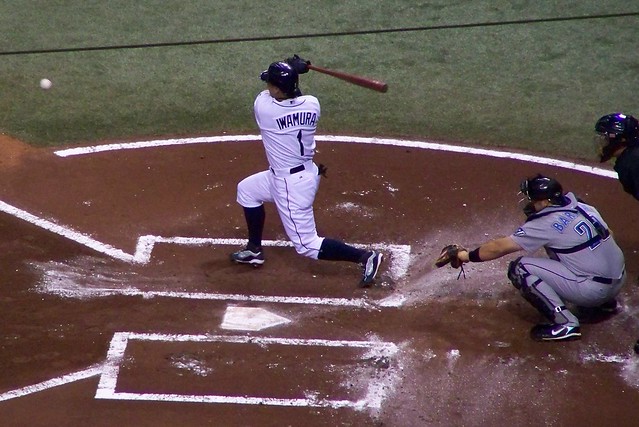
Baseball player

"A dog running across a field with a frisbee."

Dog with frisbee

Installation

Install for easier access to the following objects/classes:

  • clip_text_decoder.datasets.ClipCocoCaptionsDataset
  • clip_text_decoder.models.ClipDecoder
  • clip_text_decoder.models.ClipDecoderInferenceModel
  • clip_text_decoder.tokenizer.Tokenizer

The train.py script will not be available in the installed package, since it's located in the root directory. To train new models, either clone this repository or recreate train.py locally.

Using pip:

pip install clip-text-decoder

From source:

git clone https://github.com/fkodom/clip-text-decoder.git
cd clip-text-decoder
pip install .

NOTE: You'll also need to install openai/CLIP to encode images with CLIP. This is also required by ClipCocoCaptionsDataset to build the captions dataset the first time (cached for subsequent calls).

pip install "clip @ git+https://github.com/openai/CLIP.git"

For technical reasons, the CLIP dependency can't be included in the PyPI package, since it's not an officially published package.

Training

Open In Colab

Launch your own training session using the provided script (train.py):

python train.py --max-epochs 5

Training CLI arguments, along with their default values:

--max-epochs 5  # (int)
--num-layers 6  # (int)
--dim-feedforward 256  # (int)
--precision 16  # (16 or 32)
--seed 0  # (int)

Inference

The training script will produce a model.zip archive, containing the Tokenizer and trained model parameters. To perform inference with it:

import clip
from PIL import Image
import torch

from clip_text_decoder.model import ClipDecoderInferenceModel

device = "cuda" if torch.cuda.is_available() else "cpu"
model = ClipDecoderInferenceModel.load("path/to/model.zip").to(device)
clip_model, clip_preprocessor = clip.load("ViT-B/32", device=device, jit=False)

# Create a blank dummy image
dummy_image = Image.new("RGB", (224, 224))
preprocessed = clip_preprocessor(dummy_image).to(device)
# Add a batch dimension using '.unsqueeze(0)'
encoded = clip_model.encode_image(preprocessed.unsqueeze(0))
text = model(encoded)

print(text)
# Probably some nonsense, because we used a dummy image.

Pretrained Models

A pretrained CLIP decoder is hosted in my Google Drive, and can easily be downloaded by:

from clip_text_decoder.model import ClipDecoderInferenceModel

model = ClipDecoderInferenceModel.download_pretrained()

To cache the pretrained model locally, so that it's not re-downloaded each time:

model = ClipDecoderInferenceModel.download_pretrained("/path/to/model.zip")

Shortcomings

  • Only works well with COCO-style images. If you go outside the distribution of COCO objects, you'll get nonsense text captions.
  • Relatively short training time. Even within the COCO domain, you'll occasionally see incorrect captions. Quite a few captions will have bad grammar, repetitive descriptors, etc.
Comments
  • Decoding Text Embeddings Coded Using Hugging Face ClipTextModel

    Decoding Text Embeddings Coded Using Hugging Face ClipTextModel

    Suppose that I have text embeddings created using Hugging Face's ClipTextModel using the following method:

    import torch
    from transformers import CLIPTokenizer, CLIPTextModel
    
    class_list = ["i love going home and playing with my wife and kids", "i love going home", "playing with my wife and kids", 
    "family", "war", "writing"]
    
    model = CLIPTextModel.from_pretrained("openai/clip-vit-large-patch14")
    tokenizer = CLIPTokenizer.from_pretrained("openai/clip-vit-large-patch14")
    
    inputs = tokenizer(class_list, padding=True, return_tensors="pt")
    outputs = model(**inputs)
    hidden_state = outputs.last_hidden_state
    embeddings = outputs.pooler_output
    

    Questions:

    1. Is It possible to use the clip-text-decoder to convert the embeddings back to text?
    2. If it is indeed possible to do so, could you provide an example of how?

    Looking forward to receiving your feedback.

    opened by mbdzi 6
  • Fix string error when loading clip models.

    Fix string error when loading clip models.

    error

    The model name string ( VIT-xxx ) in the check_vision_backbone function is not compatible with the model name string ( ViT-xxx ) of the clip repository, which will cause at least one error in check_vision_backbone function or when loading the clip model.

    solution

    In this PR, the model name string in the check_vision_backbone function is modified to ViT-xxx to make it compatible with the clip repository.

    opened by Adenialzz 1
  • BLIP vision backbone

    BLIP vision backbone

    • Added blip backbone; still cleaning up last pieces
    • Bug fixes for training script, and remove debug code.
    • Fix dependencies in test workflow; update README statistics
    • Fix test issue with CUDA device
    • Update unit tests for newer Python, torch versions
    • Test up to Python 3.10
    • Test up to Python 3.9
    • Install lavis first
    opened by fkodom 0
  • Feature: Beam Search

    Feature: Beam Search

    • Add beam search, clip dependency to setup.py
    • Fix installation instructions
    • Remove main clause
    • Add '--beam-size' option to 'train.py' script.
    • Update README; propagate the '--beam-size' arg through eval functions
    • Update setup.cfg, add pre-commit hooks
    • Reformat images
    • Remove fixed image width
    • Add detail to README; comments to call method for beam search
    • Updated README headline
    opened by fkodom 0
  • Bug Fixes for Broken Tests

    Bug Fixes for Broken Tests

    • Cache the old fashioned way :)
    • Fix silly typo in test for image caption model
    • Apply black and isort formatting
    • Install latest version of 'black', reapply formatting
    • Fix flake8 issue (duplicate function definition), and install latest patch version of pytorch for tests.
    • Skip slow tests by default, add 'slow' marker to inference model tests.
    opened by fkodom 0
  • GPT2 Decoder

    GPT2 Decoder

    • Update model to use DistilGPT2 as a pre-trained decoder.
    • Removed tokenizer (no longer used), fixed bugs in Model source file, and updated model unit tests.
    • Backwards compatibility for 'gdown.download' method.
    • Update installation requirements, caption examples in README
    opened by fkodom 0
  • Upgrade CodeSee workflow to version 2

    Upgrade CodeSee workflow to version 2

    CodeSee is a code visibility platform.

    This change updates the CodeSee workflow file to the latest version for security, maintenance, and support improvements (see changelog below).

    That workflow file:

    • runs CodeSee's code analysis on every PR push and merge
    • uploads that analysis to CodeSee.
    • It does not transmit your code.

    The code analysis is used to generate maps and insights about this codebase.

    CodeSee workflow changelog:

    • Improved security: Updates permission to be read-only.
    • Improved future maintenance: Replaces the body of the workflow with a single github action: codesee-action. This makes it significantly easier for CodeSee to introduce future improvements and fixes without requiring another PR like this.
    • Improved Python support: The action now properly supports Python 3.11, and will continue to support new Python versions as they are released.
    opened by codesee-maps[bot] 1
  • Incompatible checksum error

    Incompatible checksum error

    I see the following error when trying to load the pretrained model.

        tokenizer=pickle.loads(tokenizer_buffer.read()),
      File "stringsource", line 6, in spacy.pipeline.trainable_pipe.__pyx_unpickle_TrainablePipe
    _pickle.PickleError: Incompatible checksums (102742709 vs 0x417ddeb = (cfg, model, name, vocab))
    

    Am I missing something?

    opened by dapurv5 0
Releases(1.4.4)
  • 1.4.4(Nov 7, 2022)

    What's Changed

    • Fix string error when loading clip models. by @Adenialzz in https://github.com/fkodom/clip-text-decoder/pull/12

    New Contributors

    • @Adenialzz made their first contribution in https://github.com/fkodom/clip-text-decoder/pull/12

    Full Changelog: https://github.com/fkodom/clip-text-decoder/compare/1.4.3...1.4.4

    Source code(tar.gz)
    Source code(zip)
  • 1.4.3(Nov 7, 2022)

    What's Changed

    • Refactor Dataset by @fkodom in https://github.com/fkodom/clip-text-decoder/pull/11

    Full Changelog: https://github.com/fkodom/clip-text-decoder/compare/1.4.2...1.4.3

    Source code(tar.gz)
    Source code(zip)
  • 1.4.2(Oct 26, 2022)

    What's Changed

    • Huggingface Evaluate by @fkodom in https://github.com/fkodom/clip-text-decoder/pull/9

    Full Changelog: https://github.com/fkodom/clip-text-decoder/compare/1.4.1...1.4.2

    Source code(tar.gz)
    Source code(zip)
  • 1.4.1(Oct 26, 2022)

    What's Changed

    • Datapipes by @fkodom in https://github.com/fkodom/clip-text-decoder/pull/8

    Full Changelog: https://github.com/fkodom/clip-text-decoder/compare/1.4.0...1.4.1

    Source code(tar.gz)
    Source code(zip)
  • 1.4.0(Oct 23, 2022)

    What's Changed

    • BLIP vision backbone by @fkodom in https://github.com/fkodom/clip-text-decoder/pull/7

    Full Changelog: https://github.com/fkodom/clip-text-decoder/compare/1.3.0...1.4.0

    Source code(tar.gz)
    Source code(zip)
  • 1.3.0(Oct 2, 2022)

    What's Changed

    • Feature: Beam Search by @fkodom in https://github.com/fkodom/clip-text-decoder/pull/5
    • Bug Fix: PyPI Release by @fkodom in https://github.com/fkodom/clip-text-decoder/pull/6

    Full Changelog: https://github.com/fkodom/clip-text-decoder/compare/1.2.0...1.3.0

    Source code(tar.gz)
    Source code(zip)
  • 1.2.0(Jan 29, 2022)

    What's Changed

    • Cache CLIP embeddings for the dataset, rather than recomputing them each time.

    • Reduce model file sizes by storing at lower precision

    • Add an ImageCaptionInferenceModel class for easier out-of-the-box use

    • Fix some broken unit tests

    • Better Data Caching by @fkodom in https://github.com/fkodom/clip-text-decoder/pull/3

    • Bug Fixes for Broken Tests by @fkodom in https://github.com/fkodom/clip-text-decoder/pull/4

    Full Changelog: https://github.com/fkodom/clip-text-decoder/compare/1.1.0...1.2.0

    Source code(tar.gz)
    Source code(zip)
  • 1.1.0(Dec 22, 2021)

    What's Changed

    • GPT2 Decoder by @fkodom in https://github.com/fkodom/clip-text-decoder/pull/2

    New Contributors

    • @fkodom made their first contribution in https://github.com/fkodom/clip-text-decoder/pull/2

    Full Changelog: https://github.com/fkodom/clip-text-decoder/compare/1.0.0...1.1.0

    Source code(tar.gz)
    Source code(zip)
  • 0.1.1(Nov 14, 2021)

  • 0.1.0(Nov 14, 2021)

Owner
Frank Odom
Director of Innovation at Plainsight. I like neural nets, and neural nets like me.
Frank Odom
CNN Based Meta-Learning for Noisy Image Classification and Template Matching

CNN Based Meta-Learning for Noisy Image Classification and Template Matching Introduction This master thesis used a few-shot meta learning approach to

Kumar Manas 2 Dec 09, 2021
Hack Camera, Microphone, Location, Clipboard With Just a Link. Also, Get Many Details About Victim's Device. And So On...

An Automated Tool to Hack Victim's Camera, Microphone, Location, Clipboard. Has 2 Extra Features. Version 1.1 Update Fixed Some Major Bugs Data Saving

ToxicNoob 36 Jan 07, 2023
Conditional Gradients For The Approximately Vanishing Ideal

Conditional Gradients For The Approximately Vanishing Ideal Code for the paper: Wirth, E., and Pokutta, S. (2022). Conditional Gradients for the Appro

IOL Lab @ ZIB 0 May 25, 2022
Python script for performing depth completion from sparse depth and rgb images using the msg_chn_wacv20. model in ONNX

ONNX msg_chn_wacv20 depth completion Python script for performing depth completion from sparse depth and rgb images using the msg_chn_wacv20 model in

Ibai Gorordo 19 Oct 22, 2022
Imposter-detector-2022 - HackED 2022 Team 3IQ - 2022 Imposter Detector

HackED 2022 Team 3IQ - 2022 Imposter Detector By Aneeljyot Alagh, Curtis Kan, Jo

Joshua Ji 3 Aug 20, 2022
Implementation of the paper "Fine-Tuning Transformers: Vocabulary Transfer"

Transformer-vocabulary-transfer Implementation of the paper "Fine-Tuning Transfo

LEYA 13 Nov 30, 2022
PyTorch implementation of paper "StarEnhancer: Learning Real-Time and Style-Aware Image Enhancement" (ICCV 2021 Oral)

StarEnhancer StarEnhancer: Learning Real-Time and Style-Aware Image Enhancement (ICCV 2021 Oral) Abstract: Image enhancement is a subjective process w

IDKiro 133 Dec 28, 2022
Keyword-BERT: Keyword-Attentive Deep Semantic Matching

project discription An implementation of the Keyword-BERT model mentioned in my paper Keyword-Attentive Deep Semantic Matching (Plz cite this github r

1 Nov 14, 2021
This is the repo for Uncertainty Quantification 360 Toolkit.

UQ360 The Uncertainty Quantification 360 (UQ360) toolkit is an open-source Python package that provides a diverse set of algorithms to quantify uncert

International Business Machines 207 Dec 30, 2022
Pytorch implementation of AREL

Status: Archive (code is provided as-is, no updates expected) Agent-Temporal Attention for Reward Redistribution in Episodic Multi-Agent Reinforcement

8 Nov 25, 2022
A Pose Estimator for Dense Reconstruction with the Structured Light Illumination Sensor

Phase-SLAM A Pose Estimator for Dense Reconstruction with the Structured Light Illumination Sensor This open source is written by MATLAB Run Mode Open

Xi Zheng 14 Dec 19, 2022
Pytorch based library to rank predicted bounding boxes using text/image user's prompts.

pytorch_clip_bbox: Implementation of the CLIP guided bbox ranking for Object Detection. Pytorch based library to rank predicted bounding boxes using t

Sergei Belousov 50 Nov 27, 2022
Signals-backend - A suite of card games written in Python

Card game A suite of card games written in the Python language. Features coming

1 Feb 15, 2022
Survival analysis (SA) is a well-known statistical technique for the study of temporal events.

DAGSurv Survival analysis (SA) is a well-known statistical technique for the study of temporal events. In SA, time-to-an-event data is modeled using a

Rahul Kukreja 1 Sep 05, 2022
Image Captioning on google cloud platform based on iot

Image-Captioning-on-google-cloud-platform-based-on-iot - Image Captioning on google cloud platform based on iot

Shweta_kumawat 1 Jan 20, 2022
Official repository of "DeepMIH: Deep Invertible Network for Multiple Image Hiding", TPAMI 2022.

DeepMIH: Deep Invertible Network for Multiple Image Hiding (TPAMI 2022) This repo is the official code for DeepMIH: Deep Invertible Network for Multip

Junpeng Jing 67 Nov 22, 2022
The official code for PRIMER: Pyramid-based Masked Sentence Pre-training for Multi-document Summarization

PRIMER The official code for PRIMER: Pyramid-based Masked Sentence Pre-training for Multi-document Summarization. PRIMER is a pre-trained model for mu

AI2 111 Dec 18, 2022
Refactoring dalle-pytorch and taming-transformers for TPU VM

Text-to-Image Translation (DALL-E) for TPU in Pytorch Refactoring Taming Transformers and DALLE-pytorch for TPU VM with Pytorch Lightning Requirements

Kim, Taehoon 61 Nov 07, 2022
Face and Body Tracking for VRM 3D models on the web.

Kalidoface 3D - Face and Full-Body tracking for Vtubing on the web! A sequal to Kalidoface which supports Live2D avatars, Kalidoface 3D is a web app t

Rich 257 Jan 02, 2023
🌳 A Python-inspired implementation of the Optimum-Path Forest classifier.

OPFython: A Python-Inspired Optimum-Path Forest Classifier Welcome to OPFython. Note that this implementation relies purely on the standard LibOPF. Th

Gustavo Rosa 30 Jan 04, 2023