Packaged, Pytorch-based, easy to use, cross-platform version of the CRAFT text detector

Overview

CRAFT: Character-Region Awareness For Text detection

Downloads PyPI version Conda version CI

Packaged, Pytorch-based, easy to use, cross-platform version of the CRAFT text detector | Paper |

Overview

PyTorch implementation for CRAFT text detector that effectively detect text area by exploring each character region and affinity between characters. The bounding box of texts are obtained by simply finding minimum bounding rectangles on binary map after thresholding character region and affinity scores.

teaser

Getting started

Installation

  • Install using conda for Linux, Mac and Windows (preferred):
conda install -c fcakyon craft-text-detector
  • Install using pip for Linux and Mac:
pip install craft-text-detector

Basic Usage

# import Craft class
from craft_text_detector import Craft

# set image path and export folder directory
image_path = 'figures/idcard.png'
output_dir = 'outputs/'

# create a craft instance
craft = Craft(output_dir=output_dir, crop_type="poly", cuda=False)

# apply craft text detection and export detected regions to output directory
prediction_result = craft.detect_text(image_path)

# unload models from ram/gpu
craft.unload_craftnet_model()
craft.unload_refinenet_model()

Advanced Usage

# import craft functions
from craft_text_detector import (
    read_image,
    load_craftnet_model,
    load_refinenet_model,
    get_prediction,
    export_detected_regions,
    export_extra_results,
    empty_cuda_cache
)

# set image path and export folder directory
image_path = 'figures/idcard.png'
output_dir = 'outputs/'

# read image
image = read_image(image_path)

# load models
refine_net = load_refinenet_model(cuda=True)
craft_net = load_craftnet_model(cuda=True)

# perform prediction
prediction_result = get_prediction(
    image=image,
    craft_net=craft_net,
    refine_net=refine_net,
    text_threshold=0.7,
    link_threshold=0.4,
    low_text=0.4,
    cuda=True,
    long_size=1280
)

# export detected text regions
exported_file_paths = export_detected_regions(
    image_path=image_path,
    image=image,
    regions=prediction_result["boxes"],
    output_dir=output_dir,
    rectify=True
)

# export heatmap, detection points, box visualization
export_extra_results(
    image_path=image_path,
    image=image,
    regions=prediction_result["boxes"],
    heatmaps=prediction_result["heatmaps"],
    output_dir=output_dir
)

# unload models from gpu
empty_cuda_cache()
You might also like...
TextBoxes++: A Single-Shot Oriented Scene Text Detector

TextBoxes++: A Single-Shot Oriented Scene Text Detector Introduction This is an application for scene text detection (TextBoxes++) and recognition (CR

TextBoxes: A Fast Text Detector with a Single Deep Neural Network https://github.com/MhLiao/TextBoxes 基于SSD改进的文本检测算法,textBoxes_note记录了之前整理的笔记。

TextBoxes: A Fast Text Detector with a Single Deep Neural Network Introduction This paper presents an end-to-end trainable fast scene text detector, n

Use Convolutional Recurrent Neural Network to recognize the Handwritten line text image without pre segmentation into words or characters. Use CTC loss Function to train.

Handwritten Line Text Recognition using Deep Learning with Tensorflow Description Use Convolutional Recurrent Neural Network to recognize the Handwrit

Code related to "Have Your Text and Use It Too! End-to-End Neural Data-to-Text Generation with Semantic Fidelity" paper

DataTuner You have just found the DataTuner. This repository provides tools for fine-tuning language models for a task. See LICENSE.txt for license de

This can be use to convert text in a file to handwritten text.

TextToHandwriting This can be used to convert text to handwriting. Clone this project or download the code. Run TextToImage.py give the filename of th

python ocr using tesseract/ with EAST opencv detector

pytextractor python ocr using tesseract/ with EAST opencv text detector Uses the EAST opencv detector defined here with pytesseract to extract text(de

Augmenting Anchors by the Detector Itself

Augmenting Anchors by the Detector Itself Introduction It is difficult to determine the scale and aspect ratio of anchors for anchor-based object dete

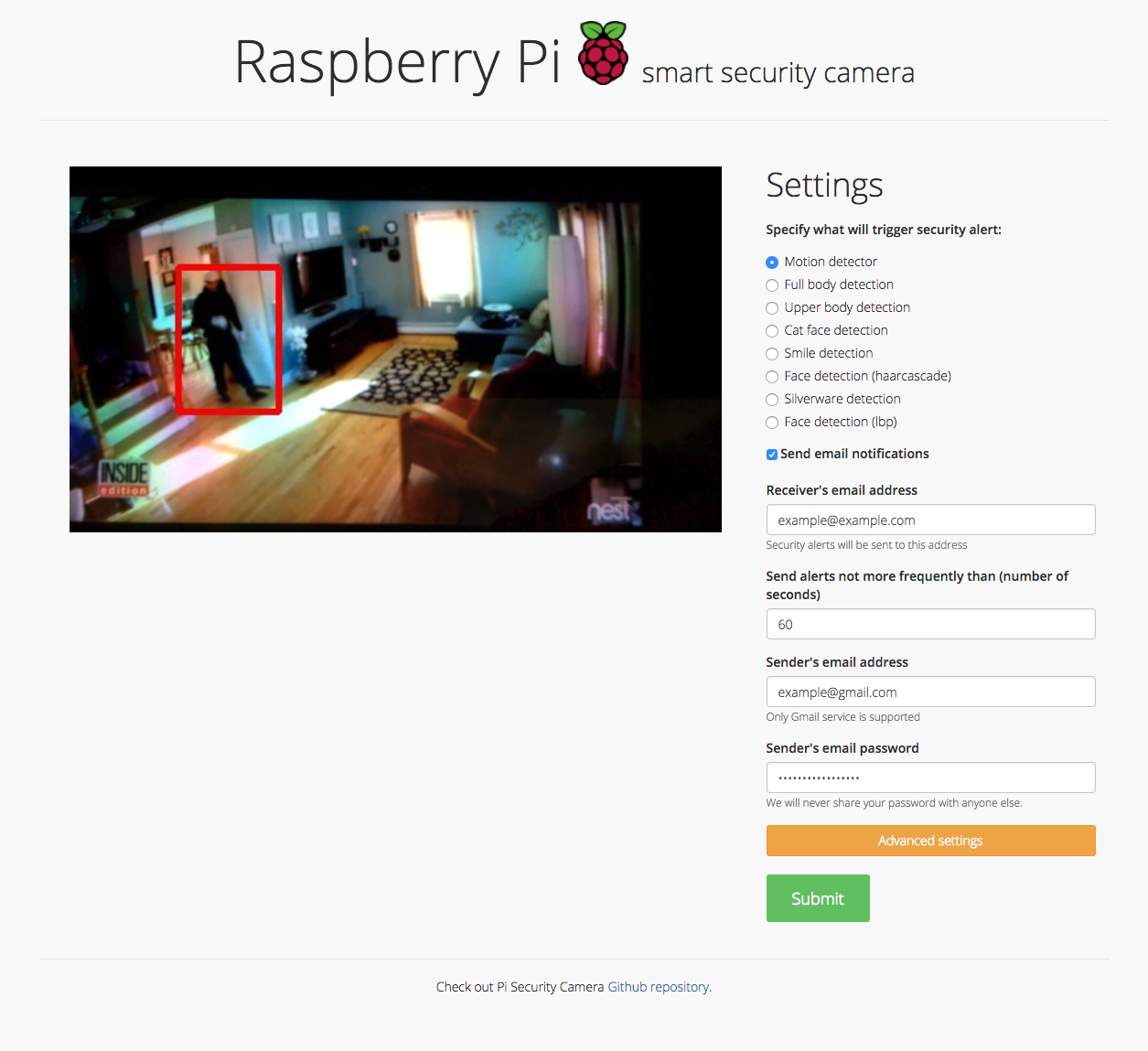
Motion detector, Full body detection, Upper body detection, Cat face detection, Smile detection, Face detection (haar cascade), Silverware detection, Face detection (lbp), and Sending email notifications

Security camera running OpenCV for object and motion detection. The camera will send email with image of any objects it detects. It also runs a server that provides web interface with live stream video.

Comments
  • Add more options for detect_text method

    Add more options for detect_text method

    Hi, sometime I don't want detect_text from file, I want detect_text directly from image in ndarray format, that will save more cost of I/O time. So I contribute this. Thanks for your work

    opened by ducviet00 2
  • Enable package to load model from local path

    Enable package to load model from local path

    When using the pypi package it should be allowed to use a model from a local path, because loading it from a remote location removes the control over what model is currently used. And might also result in pull limits being reached.

    enhancement 
    opened by TanjaBayer 1
  • Fix #8 - Fixing cuda issues in basic usage text detection

    Fix #8 - Fixing cuda issues in basic usage text detection

    Fixing issue #8

    In this quick-fix I referenced craft_net as a global variable. If this is not an acceptable workaround, then consider reorganizing the structure of the code.

    Have a nice day :)

    opened by gaborpelesz 1
  • accept customized weights path when loading models

    accept customized weights path when loading models

    path for the weight file can be specified by:

    load_craftnet_model(weight_path="path/to/weight")
    
    load_refinenet_model(weight_path="path/to/weight")
    
    opened by fcakyon 0
Releases(0.4.3)
  • 0.4.3(May 9, 2022)

    What's Changed

    • Enable package to load model from local path by @TanjaBayer in https://github.com/fcakyon/craft-text-detector/pull/53

    New Contributors

    • @TanjaBayer made their first contribution in https://github.com/fcakyon/craft-text-detector/pull/53

    Full Changelog: https://github.com/fcakyon/craft-text-detector/compare/0.4.2...0.4.3

    Source code(tar.gz)
    Source code(zip)
  • 0.4.2(Jan 6, 2022)

    What's Changed

    • fix opencv version by @fcakyon in https://github.com/fcakyon/craft-text-detector/pull/48

    Full Changelog: https://github.com/fcakyon/craft-text-detector/compare/0.4.1...0.4.2

    Source code(tar.gz)
    Source code(zip)
  • 0.4.1(Dec 20, 2021)

    What's Changed

    • fix crop export by @fcakyon in https://github.com/fcakyon/craft-text-detector/pull/45

    Full Changelog: https://github.com/fcakyon/craft-text-detector/compare/0.4.0...0.4.1

    Source code(tar.gz)
    Source code(zip)
  • 0.4.0(Jul 30, 2021)

  • 0.3.5(May 12, 2021)

  • 0.3.4(Apr 7, 2021)

    • add support for PIL and numpy images in addition to filepath. https://github.com/fcakyon/craft-text-detector/pull/28
    from PIL import Image
    import numpy
    
    # can be filepath, PIL image or numpy array
    image = 'figures/idcard.png' 
    image = Image.open("figures/idcard.png")
    image = numpy.array(Image.open("figures/idcard.png"))
    
    # apply craft text detection
    prediction_result = craft.detect_text(image)
    Source code(tar.gz)
    Source code(zip)
  • 0.3.3(Mar 2, 2021)

  • 0.3.2(Mar 2, 2021)

    path for the weight file can be specified by:

    load_craftnet_model(weight_path="path/to/weight")
    
    load_refinenet_model(weight_path="path/to/weight")
    
    Source code(tar.gz)
    Source code(zip)
  • v0.3.0(May 14, 2020)

    • updated basic usage for better device handling, now Craft instance should be created before calling detect_text:
    # import Craft class
    from craft_text_detector import Craft
    
    # set image path and export folder directory
    image_path = 'figures/idcard.png'
    output_dir = 'outputs/'
    
    # create a craft instance
    craft = Craft(output_dir=output_dir, crop_type="poly", cuda=False)
    
    # apply craft text detection and export detected regions to output directory
    prediction_result = craft.detect_text(image_path)
    
    # unload models from ram/gpu
    craft.unload_craftnet_model()
    craft.unload_refinenet_model()
    
    • some internal naming and styling changes
    Source code(tar.gz)
    Source code(zip)
  • v0.2.1(May 10, 2020)

  • v0.2.0a(Apr 22, 2020)

  • v0.2.0(Apr 22, 2020)

Owner
Senior Machine Learning Engineer, METU & Bilkent alum.
Self-supervised Equivariant Attention Mechanism for Weakly Supervised Semantic Segmentation, CVPR 2020 (Oral)

SEAM The implementation of Self-supervised Equivariant Attention Mechanism for Weakly Supervised Semantic Segmentaion. You can also download the repos

Hibercraft 459 Dec 26, 2022
pulse2percept: A Python-based simulation framework for bionic vision

pulse2percept: A Python-based simulation framework for bionic vision Retinal degenerative diseases such as retinitis pigmentosa and macular degenerati

67 Dec 29, 2022
✌️Using this you can control your PC/Laptop volume by Hand Gestures created with Python.

Hand Gesture Volume Controller ✋ Hand recognition 👆 Finger recognition 🔊 you can decrease and increase volume Demo Code Firstly I have created a Mod

Abbas Ataei 19 Nov 17, 2022
Virtualdragdrop - Virtual Drag and Drop Using OpenCV and Arduino

Virtualdragdrop - Virtual Drag and Drop Using OpenCV and Arduino

Rizky Dermawan 4 Mar 10, 2022
An Agnostic Computer Vision Framework - Pluggable to any Training Library: Fastai, Pytorch-Lightning with more to come

An Agnostic Object Detection Framework IceVision is the first agnostic computer vision framework to offer a curated collection with hundreds of high-q

airctic 790 Jan 05, 2023
Script para controlar o movimento do mouse usando Python e openCV com câmera em tempo real que detecta pontos de referência da mão, rastreia padrões de gestos em vez de um mouse físico.

mouserController Script para controlar o movimento do mouse usando Python e openCV com câmera em tempo real que detecta pontos de referência da mão, r

Vinícius Azevedo 6 Jun 28, 2022
Open Source Computer Vision Library

OpenCV: Open Source Computer Vision Library Resources Homepage: https://opencv.org Courses: https://opencv.org/courses Docs: https://docs.opencv.org/m

OpenCV 65.7k Jan 03, 2023
This is a passport scanning web service to help you scan, identify and validate your passport created with a simple and flexible design and ready to be integrated right into your system!

Passport-Recogniton-System This is a passport scanning web service to help you scan, identify and validate your passport created with a simple and fle

Mo'men Ashraf Muhamed 7 Jan 04, 2023
Code for AAAI 2021 paper: Sequential End-to-end Network for Efficient Person Search

This repository hosts the source code of our paper: [AAAI 2021]Sequential End-to-end Network for Efficient Person Search. SeqNet achieves the state-of

Zj Li 218 Dec 31, 2022
Image processing is one of the most common term in computer vision

Image processing is one of the most common term in computer vision. Computer vision is the process by which computers can understand images and videos, and how they are stored, manipulated, and retri

Happy N. Monday 3 Feb 15, 2022
Code related to "Have Your Text and Use It Too! End-to-End Neural Data-to-Text Generation with Semantic Fidelity" paper

DataTuner You have just found the DataTuner. This repository provides tools for fine-tuning language models for a task. See LICENSE.txt for license de

81 Jan 01, 2023
This is a pytorch re-implementation of EAST: An Efficient and Accurate Scene Text Detector.

EAST: An Efficient and Accurate Scene Text Detector Description: This version will be updated soon, please pay attention to this work. The motivation

Dejia Song 544 Dec 20, 2022
Fine tuning keras-ocr python package with custom synthetic dataset from scratch

OCR-Pipeline-with-Keras The keras-ocr package generally consists of two parts: a Detector and a Recognizer: Detector is responsible for creating bound

Eugene 1 Jan 05, 2022
An application of high resolution GANs to dewarp images of perturbed documents

Docuwarp This project is focused on dewarping document images through the usage of pix2pixHD, a GAN that is useful for general image to image translat

Thomas Huang 97 Dec 25, 2022
The world's simplest facial recognition api for Python and the command line

Face Recognition You can also read a translated version of this file in Chinese 简体中文版 or in Korean 한국어 or in Japanese 日本語. Recognize and manipulate fa

Adam Geitgey 47k Jan 07, 2023
Deep Learning Chinese Word Segment

引用 本项目模型BiLSTM+CRF参考论文:http://www.aclweb.org/anthology/N16-1030 ,IDCNN+CRF参考论文:https://arxiv.org/abs/1702.02098 构建 安装好bazel代码构建工具,安装好tensorflow(目前本项目需

2.1k Dec 23, 2022
A facial recognition device is a device that takes an image or a video of a human face and compares it to another image faces in a database.

A facial recognition device is a device that takes an image or a video of a human face and compares it to another image faces in a database. The structure, shape and proportions of the faces are comp

Pavankumar Khot 4 Mar 19, 2022
a Deep Learning Framework for Text

DeLFT DeLFT (Deep Learning Framework for Text) is a Keras and TensorFlow framework for text processing, focusing on sequence labelling (e.g. named ent

Patrice Lopez 350 Dec 19, 2022
Maze generator and solver with python

Procedural-Maze-Generator-Algorithms Check out my youtube channel : Auctux Ressources Thanks to Jamis Buck Book : Mazes for programmers Requirements P

Joseph 19 Dec 07, 2022