Code for the paper "Planning with Diffusion for Flexible Behavior Synthesis"

Related tags

Hardwarediffuser
Overview

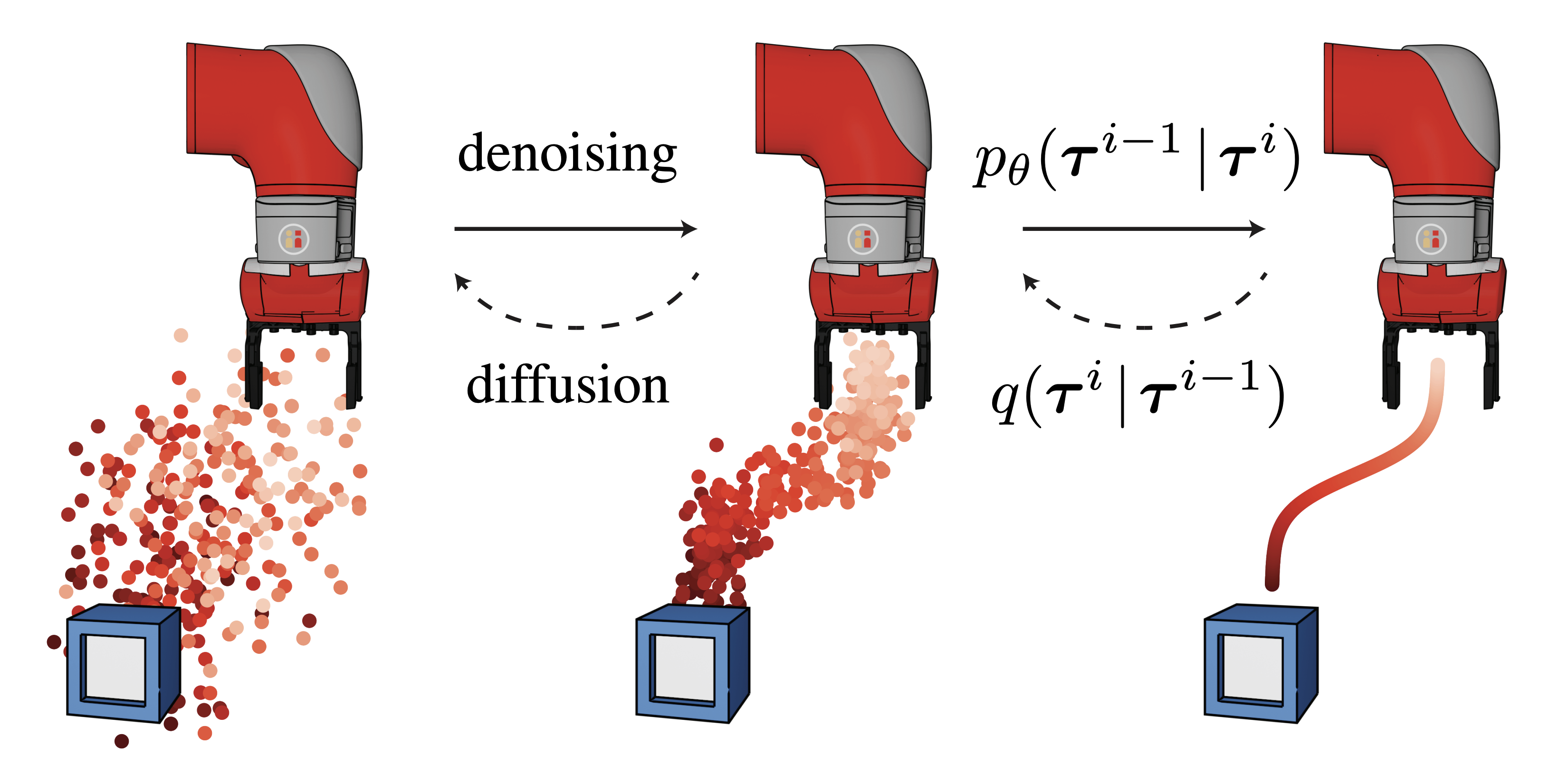
Planning with Diffusion    Open In Colab

Training and visualizing of diffusion models from Planning with Diffusion for Flexible Behavior Synthesis. Guided sampling code to come soon!
Quickstart

Load a pretrained diffusion model and sample from it in your browser with scripts/diffuser-sample.ipynb.

Installation

conda env create -f environment.yml
conda activate diffusion
pip install -e .

Usage

Train a diffusion model with:

python scripts/train.py --dataset hopper-medium-replay-v2 \
    --horizon 512 --n_diffusion_steps 200

The default hyperparameters are listed in config/locomotion.py. You can override any of them with runtime flags, eg --batch_size 64.

Docker

  1. Build the container:
docker build -f azure/Dockerfile . -t diffuser
  1. Test the container:
docker run -it --rm --gpus all \
    --mount type=bind,source=$PWD,target=/home/code \
    --mount type=bind,source=$HOME/.d4rl,target=/root/.d4rl \
    diffuser \
    bash -c \
    "export PYTHONPATH=$PYTHONPATH:/home/code && \
    python /home/code/scripts/train.py --dataset hopper-medium-expert-v2 --logbase logs/docker"

Running on Azure

Setup

  1. Launching jobs on Azure requires one more python dependency:
pip install git+https://github.com/JannerM/[email protected]
  1. Tag the image built in the previous section and push it to Docker Hub:
export DOCKER_USERNAME=$(docker info | sed '/Username:/!d;s/.* //')
docker tag diffuser ${DOCKER_USERNAME}/diffuser:latest
docker image push ${DOCKER_USERNAME}/diffuser
  1. Update azure/config.py, either by modifying the file directly or setting the relevant environment variables. To set the AZURE_STORAGE_CONNECTION variable, navigate to the Access keys section of your storage account. Click Show keys and copy the Connection string.

  2. Download azcopy: ./azure/download.sh

Usage

Launch training jobs with python azure/launch.py. The launch script takes no command-line arguments; instead, it launches a job for every combination of hyperparameters in params_to_sweep.

Viewing results

To rsync the results from the Azure storage container, run ./azure/sync.sh.

To mount the storage container:

  1. Create a blobfuse config with ./azure/make_fuse_config.sh
  2. Run ./azure/mount.sh to mount the storage container to ~/azure_mount

To unmount the container, run sudo umount -f ~/azure_mount; rm -r ~/azure_mount

Reference

@inproceedings{janner2022diffuser,
  title = {Planning with Diffusion for Flexible Behavior Synthesis},
  author = {Michael Janner and Yilun Du and Joshua B. Tenenbaum and Sergey Levine},
  booktitle = {International Conference on Machine Learning},
  year = {2022},
}

Acknowledgements

The diffusion model implementation is based on Phil Wang's denoising-diffusion-pytorch repo. The organization of this repo and remote launcher is based on the trajectory-transformer repo.

Ingeniamotion is a library that works over ingenialink and aims to simplify the interaction with Ingenia's drives.

Ingeniamotion Ingeniamotion is a library that works over ingenialink and aims to simplify the interaction with Ingenia's drives. Requirements Python 3

Ingenia Motion Control 7 Dec 15, 2022
HA-Edge-Connector - HA Edge Connector For Python

HA-Edge-Connector 1. Required a. Smartthings Hub & Homeassistant must be in same

chals 21 Dec 29, 2022
A Python program that makes it easy to manage modules on a CircuitPython device!

CircuitPython-Bundle-Manager-v2 A Python program that makes it easy to manage modules on a CircuitPython device! The CircuitPython Bundle Manager v2 i

Ckyiu 1 Dec 18, 2021
MPY tool - manage files on devices running MicroPython

mpytool MPY tool - manage files on devices running MicroPython It is an alternative to ampy Target of this project is to make more clean code, faster,

Pavel Revak 5 Aug 17, 2022
Python application, displaying currently played track from Spotify on OLED display connected via I2C

RaspberryPi Spotify OLED Display This application will display currently played track on SSD1306 OLED display connected to RaspberryPi. Displayed stuf

Wojciech Olech 2 Dec 30, 2021
ROS2 nodes for Waveshare Alphabot2-Pi mobile robot.

ROS2 for Waveshare Alphabot2-Pi This repo contains ROS2 packages for the Waveshare Alphabot2-Pi mobile robot: alphabot2: it contains the nodes used to

Michele Rizzo 2 Oct 11, 2022
The PicoEMP is a low-cost Electromagnetic Fault Injection (EMFI) tool,

ChipSHOUTER-PicoEMP The PicoEMP is a low-cost Electromagnetic Fault Injection (EMFI) tool, designed specifically for self-study and hobbiest research.

NewAE Technology Inc. 312 Jan 07, 2023
Andreas Frisch 1 Jan 10, 2022
Sticklog2heatmap - Draw a heatmap of RC sticks from OpenTX logs or USB HID device

sticklog2heatmap Draw a heatmap of RC sticks from OpenTX logs or USB HID device

2 Feb 02, 2022
Pure micropython ESP32 SPI driver for sdcard and screen at the same SPI bus

micropython-esp32-spi-sdcard-and-screen-driver Proof of concept of Pure micropython espidf SPI driver for sdcard with screen at the same SPI bus (exam

Thomas Favennec 7 Mar 14, 2022
It is a program that displays the current temperature of the GPU and CPU in real time and stores the temperature history.

HWLogger It is a program that displays the current temperature of the GPU and CPU in real time and stores the temperature history. Sample Usage Run HW

Xeros 0 Apr 05, 2022
Code for the onshape macropad.

Onshape_Macropad Code for the onshape macropad. This is a macropad built using the Pimoroni Keybow and the KPrepublic Enclosure. pimoroni_keybow kprep

Justin Cole 1 Nov 23, 2021
PyLog - Simple keylogger that uses pynput to listen to keyboard input.

Simple keylogger that uses pynput to listen to keyboard input. Outputs to a text file and the terminal. Press the escape key to stop.

1 Dec 29, 2021
Run this code to blink your ThinkPad LED with a hidden mysterious Morse code! ;)

TMorse Run this code to blink your ThinkPad LED with a hidden mysterious Morse code! ;) Compatible with python3.9+. No third-party library is required

Mahyar 2 Jul 11, 2022
A Macropad using the Raspberry Pi Pico, programmed with CircuitPython.

A Macropad using the Raspberry Pi Pico, programmed with CircuitPython.

15 Oct 14, 2022
Huawei Solar sensors for Home Assistant

Huawei Solar Sensors This integration splits out the various values that are fetched from your Huawei Solar inverter into separate HomeAssistant senso

Thijs Walcarius 151 Dec 31, 2022
ESP32 micropython implementation of Art-Net client

E_uArtnet ESP32 micropython implementation of Art-Net client Instalation Use thonny Open the root folder in thonny and upload the Empire folder like i

2 Dec 07, 2021
Universal Xiaomi MIoT integration for Home Assistant

Xiaomi MIoT Raw 简体中文 | English MIoT 协议是小米智能家居从 2018 年起推行的智能设备通信协议规范,此后凡是可接入米家的设备均通过此协议进行通信。此插件按照 MIoT 协议规范与设备通信,实现对设备的状态读取及控制。

1.9k Jan 02, 2023
Authentication provider using Synology DSM users for Home Assistant

Authentication provider using Synology DSM users for Home Assistant The Synology authentication provider lets you authenticate using the users in your

Sam Debruyn 5 Oct 06, 2022
A 3rd party Moonraker component to create timelapse of 3D prints.

A 3rd party Moonraker component to create timelapse of 3D prints.

Mainsail-Crew 166 Dec 26, 2022