Bringing vtk.js into Dash and Python

Overview

Dash VTK

Dash VTK lets you integrate the vtk.js visualization pipeline directly into your Dash app. It is powered by react-vtk-js.
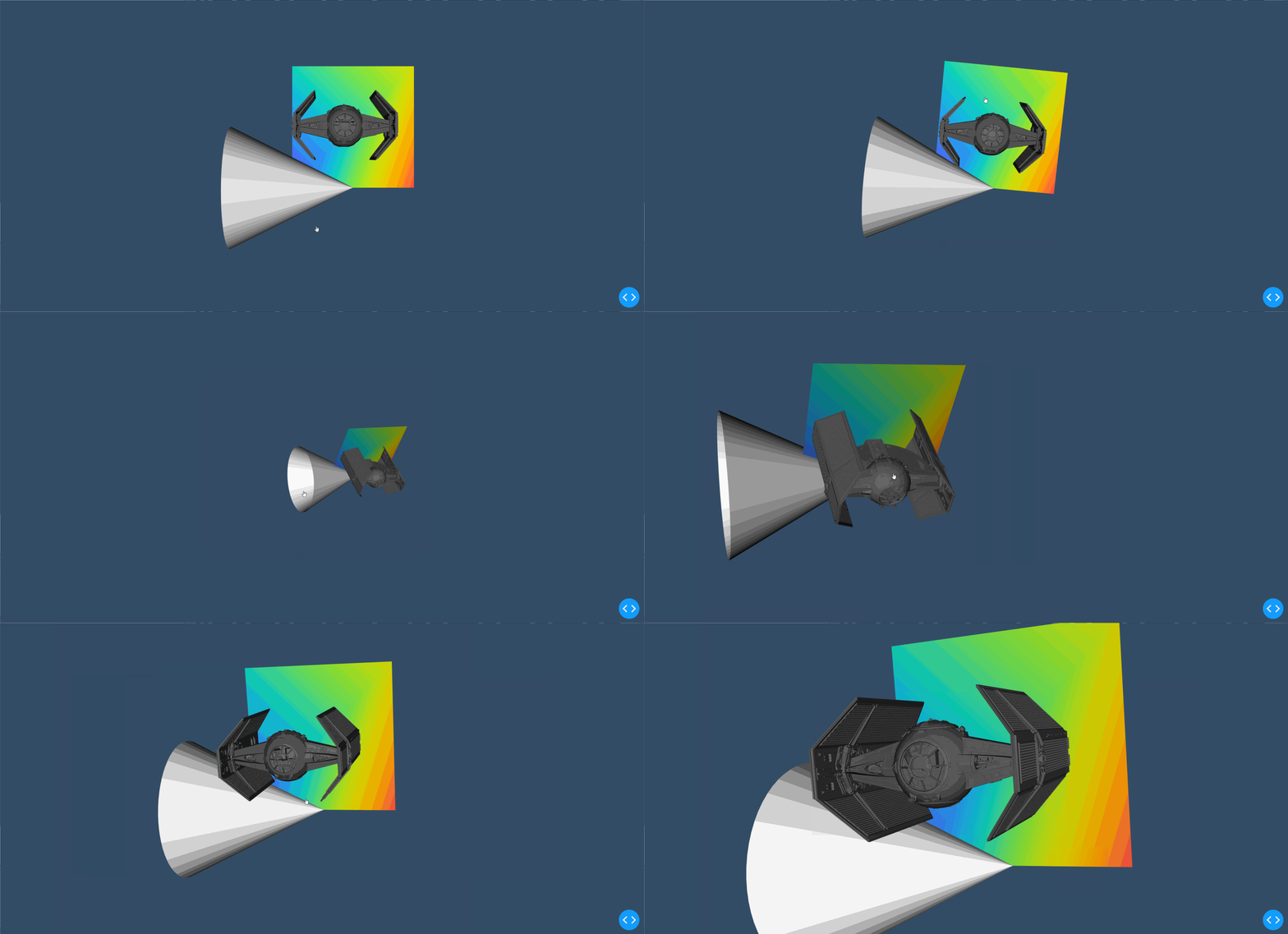
A demo of dash-vtk in action

Getting started

Quickstart (Python)

First, install the library through pip:

pip install dash-vtk

Then, create a file called app.py and add the following example:

import dash
import dash_vtk
import dash_html_components as html

app = dash.Dash(__name__)

app.layout = html.Div(
    style={"width": "100%", "height": "calc(100vh - 16px)"},
    children=dash_vtk.View([
        dash_vtk.GeometryRepresentation([
            dash_vtk.Algorithm(
                vtkClass="vtkConeSource",
                state={"resolution": 64, "capping": False},
            )
        ]),
    ]),
)

if __name__ == "__main__":
    app.run_server(debug=True)

Now, simply run the app:

python app.py

For a more detailed example, see usage.py.

Quickstart (R)

First, install the package from GitHub (the package is not yet available via CRAN):

remotes::install_github("plotly/dash-vtk")

then, create your component and add it to your layout:

library(dash)
library(dashVtk)
library(dashHtmlComponents)

app <- Dash$new()

app$layout(htmlDiv(
    style = list("width" = "100%", "height" = "calc(100vh - 16px)"),
    children = vtkView(list(
        vtkGeometryRepresentation(
            vtkAlgorithm(
                vtkClass = "vtkConeSource",
                state = list("resolution" = 64, "capping" = FALSE),
            )
        )
    )
)

app$run_server()

Contributing

See docs/CONTRIBUTING.md to learn about:

  • Setting up the environment
  • Coding Style
  • Code quality & design
  • Tests
  • Publishing

Running the demos

First clone the project (replace with the desired demo):

git clone https://github.com/plotly/dash-vtk.git
cd dash-vtk/demos/<name>/

Create a venv and install the requirements:

python -m venv venv
source venv/bin/activate  # for Windows, use venv\Scripts\activate.bat
pip install -e ../../  # IMPORTANT! If you skip you will get the pip version of dash-vtk
pip install -r requirements.txt

Run the demo:

python app.py

Python environments

Depending on your Python environment, you may run into deployment issue related to the vtk version that get pulled in.

Ideally we want a version of vtk equal or newer than 9. When using such version of VTK, dash-vtk won't even try to load the rendering module of VTK and if OpenGL is not available on your system everything will still be fine.

On the other hand, if you are running python-3.6 and/or pip-18 or less and you don't upgrade your pip version, you will only be able to use vtk<=8.1.2. With vtk 8, there is no way to prevent the loading of the GL library which means that you will have to install libGL on your system, or you will run into errors like this:

  File ".../python/lib/python3.6/site-packages/vtkmodules/all.py", line 29, in 
    from .vtkRenderingOpenGL2 import *
ImportError: libGL.so.1: cannot open shared object file: No such file or directory
[2021-02-08 18:36:15 +0000] [10] [INFO] Worker exiting (pid: 10)

or this:

  File ".../python3.7/site-packages/vtk/__init__.py", line 12, in 
    from .vtkOpenGLKit import *
  File ".../python3.7/site-packages/vtk/vtkOpenGLKit.py", line 9, in 
    from vtkOpenGLKitPython import *
ModuleNotFoundError: No module named 'vtkOpenGLKitPython'

Heroku and Dash Enterprise handle it is slightly different because you will have to install libgl1-mesa-glx via some apt files. In the case of Heroku, you will have to use a buildpack and add libgl1-mesa-glx to a Aptfile located in the root of your project. In the case of Dash Enterprise, you do not need to change the buildpack (it is handled automatically) but you will need to add libgl1-mesa-glx to a apt-packages file instead of Aptfile; see this app as an example.

References

You can find the complete API reference in docs/REFERENCES.md for each of the following components:

Demos

Usage for dash_vtk.Algorithm

A demo of the usage-algorithm app

Point Cloud with PyVista

A demo of the pyvista-point-cloud app

Terrain deformation using PyVista and dash-vtk
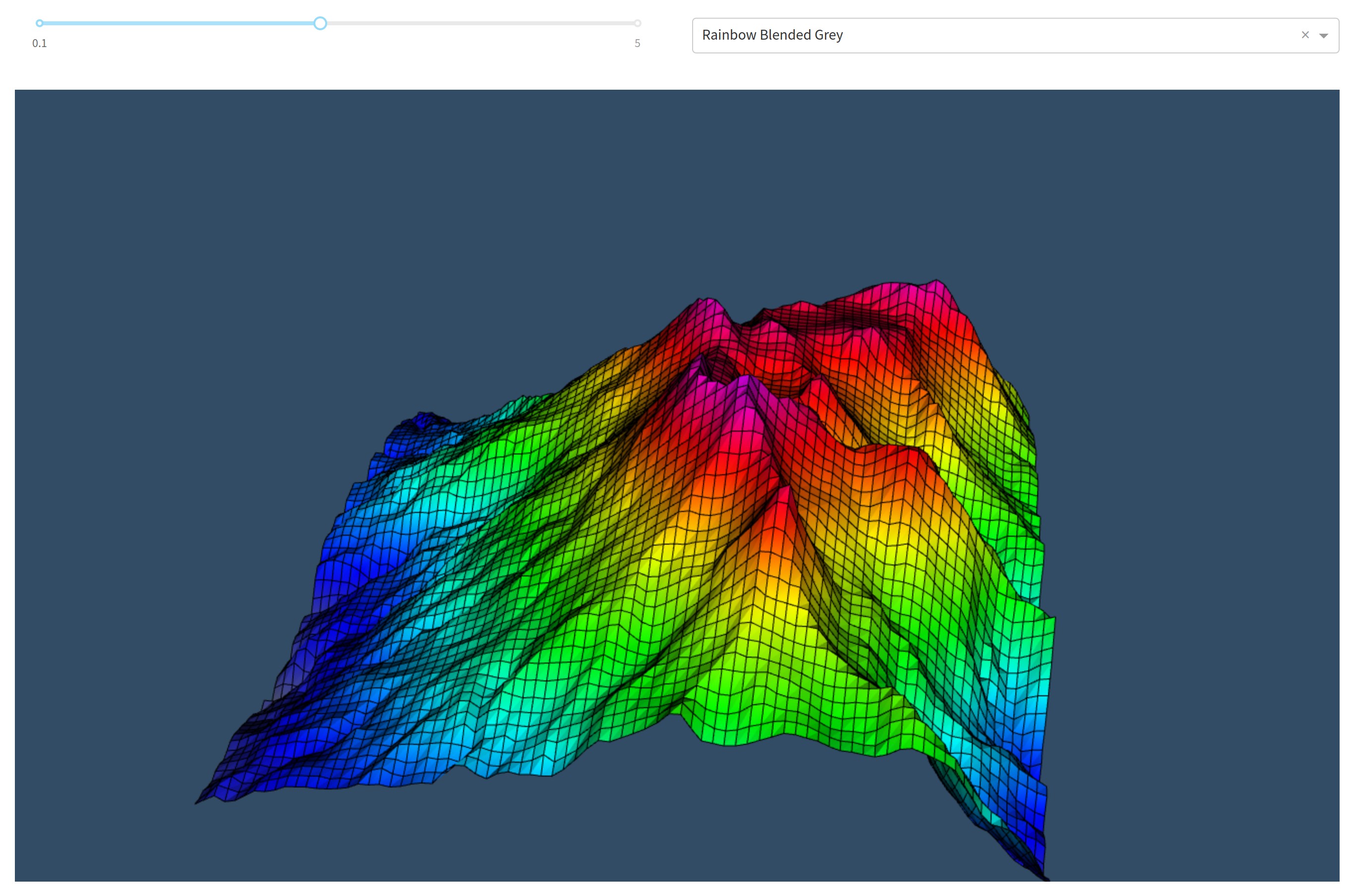
A demo of the pyvista-terrain-following-mesh app

Volume Rendering

A demo of the volume-rendering app

VTK for data processing and dash-vtk for rendering
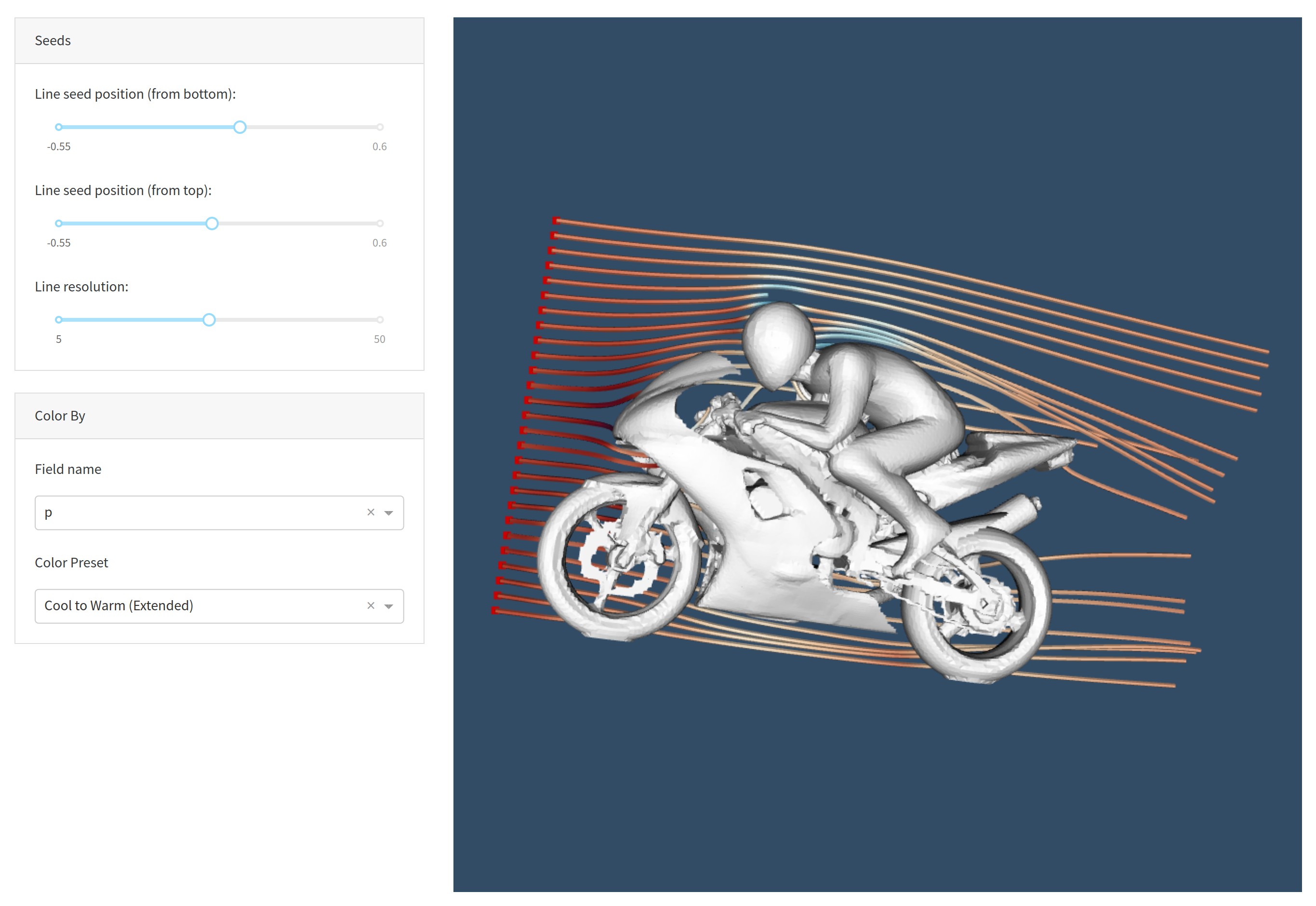
A demo of the usage-vtk-cfd app

Synthetic Volume Rendering

A demo of the synthetic-volume-rendering app

Comments
  • Further improvements to the demos

    Further improvements to the demos

    Here are some improvements i'd like to make to the demos; @jourdain feel free to share your thoughts on them:

    • [ ] CFD: better seed line labels; it's not clear what the first and second sliders mean. I'll think of better labels
    • [ ] Slice Rendering: Remove the 3D volume viewer on the right-side to improve speed and make the app simpler/easier to understand.

    @jourdain You mentioned about updating the sliders on change (instead of on release) for certain cases: image

    Could you remind me which ones you mentioned?

    opened by xhluca 21
  • Refactor dash_vtk.util to import vtkmodules instead of vtk

    Refactor dash_vtk.util to import vtkmodules instead of vtk

    See: https://github.com/plotly/dash-docs/pull/1091

    import vtkmodules avoid importing the libGL library in vtk v9.0.1, as opposed to import vtk which always loads (thus requires) libgl

    About

    Description of changes

    Pre-Merge checklist

    • [ ] The project was correctly built with npm run build.
    • [ ] If there was any conflict, it was solved correctly.
    • [ ] All changes were documented in CHANGELOG.md.
    • [ ] All tests on CircleCI have passed.
    • [ ] All Percy visual changes have been approved.
    • [ ] Two people have :dancer:'d the pull request. You can be one of these people if you are a Dash core contributor.

    Reference Issues

    Closes #[issue number]

    Other comments

    opened by xhluca 20
  • Re-rendering is broken when ImageData remains the same but child changes

    Re-rendering is broken when ImageData remains the same but child changes

    Bug

    I built a set of radio buttons to alternate between different representations (volumes and algorithms). This is done through a callback. When the data (i.e. ImageData) remains the same, but the child PointData changes, dash-vtk will not correctly re-render the new view.

    Here's a demo:

    vtk-bug

    Notice how going random -> progressive doesn't work, but random -> cone or cone -> progressive works. This is because cone uses a Algorithm instead of ImageData, so it would trigger a rerender.

    Code

    Show full code

    import dash_vtk
    import dash
    from dash.dependencies import Input, Output
    import dash_core_components as dcc
    import dash_html_components as html
    import numpy as np
    
    
    def build_vtk_representation(field):
        return dash_vtk.VolumeRepresentation(
            [
                dash_vtk.VolumeController(),
                dash_vtk.ImageData(
                    id="image-data",
                    dimensions=[10, 10, 10],
                    spacing=[1, 1, 1],
                    origin=[0, 0, 0],
                    children=dash_vtk.PointData(
                        dash_vtk.DataArray(registration="setScalars", values=field)
                    ),
                ),
            ]
        )
    
    
    views = [
        build_vtk_representation([np.random.random() for i in range(10 * 10 * 10)]),
        build_vtk_representation(np.linspace(0, 1, num=10 * 10 * 10)),
        dash_vtk.GeometryRepresentation(
            [
                dash_vtk.Algorithm(
                    vtkClass="vtkConeSource", state={"resolution": 64, "capping": False,},
                )
            ]
        ),
    ]
    
    
    app = dash.Dash(__name__)
    server = app.server
    
    
    app.layout = html.Div(
        style={"width": "100%", "height": "calc(90vh - 16px)"},
        children=[
            dcc.RadioItems(
                id="radio-items",
                options=[
                    {"value": i, "label": x}
                    for i, x in enumerate(["random", "progressive", "cone"])
                ],
                value=0,
            ),
            html.Br(),
            dash_vtk.View(id="vtk-view"),
            html.Div(id="output"),
        ],
    )
    
    
    @app.callback(
        Output("vtk-view", "children"),
        Output("vtk-view", "triggerRender"),
        Input("radio-items", "value"),
    )
    def update_vtk_view(value):
        if value is None:
            return dash.no_update
        return views[value], np.random.random()
    
    
    if __name__ == "__main__":
        app.run_server(debug=True)
    

    Here's a snippet:

    def build_vtk_representation(field):
        return dash_vtk.VolumeRepresentation(
            children=[
                dash_vtk.VolumeController(),
                dash_vtk.ImageData(
                    ...,
                    children=dash_vtk.PointData(
                        dash_vtk.DataArray(registration="setScalars", values=field)
                    ),
                ),
            ]
        )
    
    
    views = [
        build_vtk_representation([np.random.random() for i in range(10 * 10 * 10)]),
        build_vtk_representation(np.linspace(0, 1, num=10 * 10 * 10)),
        dash_vtk.GeometryRepresentation(
            [
                dash_vtk.Algorithm(
                    vtkClass="vtkConeSource", state={"resolution": 64, "capping": False,},
                )
            ]
        ),
    ]
    
    app = dash.Dash(__name__)
    server = app.server
    app.layout = ...
    
    @app.callback(
        Output("vtk-view", "children"),
        Output("vtk-view", "triggerRender"),
        Input("radio-items", "value"),
    )
    def update_vtk_view(value):
        if value is None:
            return dash.no_update
        return views[value], np.random.random()
    
    
    opened by xhluca 18
  • Loading mesh in

    Loading mesh in

    I am trying to load a mesh/multiple meshes I created with vedo which is based off vtk. Upon loading into the dash I get a type error for Mesh is not JSON serializable. Any suggestions on how to fix?

    Thanks

    opened by dodointhesnow 17
  • Add rendering tests for the demos and add images to README

    Add rendering tests for the demos and add images to README

    About

    Description of changes

    Pre-Merge checklist

    • [ ] The project was correctly built with npm run build.
    • [ ] If there was any conflict, it was solved correctly.
    • [ ] All changes were documented in CHANGELOG.md.
    • [ ] All tests on CircleCI have passed.
    • [ ] All Percy visual changes have been approved.
    • [ ] Two people have :dancer:'d the pull request. You can be one of these people if you are a Dash core contributor.

    Reference Issues

    Closes #[issue number]

    Other comments

    opened by xhluca 17
  • Docs Review

    Docs Review

    Wow the user guide is really great! Just minor details:

    • Some parts include react code (see example). Should we modify them to be Dash code?
    • I'm not sure whether it's possible to import those modules since they start with numbers. Will think about it but might need to rename them if I can't use importlib; would that be ok?
    opened by xhluca 12
  • Would it be possible to set camera parameters?

    Would it be possible to set camera parameters?

    I'd like to set the camera location, depth of view, etc. via code, but I cannot find any way to do this. Is it possible to add this as a feature? Is there a workaround I could use in the meantime?

    Thanks, and thanks for all the great work!

    opened by pythoro 11
  • Color legend

    Color legend

    Hello everyone!

    I'm building a web app using dash_vtk in python to visualize CFD data, so for now 3D surfaces coloured based on some parameter value like pressure. So far everything's good, but can't activate the colour legend and I saw no example with it, so I'm starting to question if it is possible at this point. To be clear, I'd like to be able to associate a value to the colours I'm seeing. I saw the example with the F1 car where values are displayed when hovering, but I'd prefer a simple scale. Is it possible?

    Thank you, Franco

    opened by francolovato 8
  • Implicit triggerRender

    Implicit triggerRender

    I feel the triggerRender is a bit clunky and makes it impossible to have more than one callback that updates a given view. how much effort would it be to make that implicit?

    EDIT: Ok so it already works with the trigger render, so let's remove it from the demos:

    • [ ] usage-vtk-cfd
    • [ ] slice-rendering
    • [ ]
    opened by xhluca 8
  • Try to use suspense/lazy

    Try to use suspense/lazy

    What was tried

    Over the weekend I was able to incorporate React.lazy and React.Suspense for each of the components. To do that, I created some modules:

    • src/lib/ReactVTK.js: This module simply imports and export the react-vtk-js library, which is needed in order to use the webpackChunkName functionality added in webpack and create a async-ReactVTK.js file.
    • src/lib/AsyncReactVTK.js: This module contains a AsyncComponentBuilder function. It creates an async function that returns a module-like object, which we can then pass to React.lazy without causing errors. Later on (inside the components definition), it gets rendered correctly by React.Suspense (in theory only). This is the component builder function I used: https://github.com/plotly/dash-vtk/blob/4cd17de0abdd967b4980ba74bde0259ca949a59f/src/lib/AsyncReactVTK.js#L5-L15 (I'm happy to hop on a call to explain how I got to this).

    I also brought some modifications to the files:

    • webpack.config.js: Some changes in lazy-loading (see https://github.com/plotly/dash-vtk/pull/29), no change here. Mostly code for chunk splitting in order to allow async.
    • package.json: Some changes in lazy-loading (see https://github.com/plotly/dash-vtk/pull/29), no change here. Added a few packages that were necessary to use the new webpack optimization.
    • src/lib/components: Each component here was updated such that the import came from AsyncReactVTK.js instead of react-vtk-js, and also the component outputted is wrapped with a React.Suspense.
    • dash_vtk/__init__.py: The following elements were added to _js_dist in order to load the async fragment:
    {
        'relative_package_path': 'async-ReactVTK.js',
        'external_url': 'https://unpkg.com/{0}@{2}/{1}/async-ReactVTK.js'.format(package_name, __name__, __version__),
        'namespace': package_name,
        'async': True
    },
    {
        'relative_package_path': 'async-ReactVTK.js.map',
        'external_url': 'https://unpkg.com/{0}@{2}/{1}/async-ReactVTK.js.map'.format(package_name, __name__, __version__),
        'namespace': package_name,
        'dynamic': True
    }
    

    What worked

    Rendering the simplest possible app, i.e. an empty dash_vtk.View worked with this new approach; no error was found in the console. Moreover, I tried with usage.py, which yielded this result: image

    So it partially worked in the sense that the cone and the starwars obj were rendered correctly, but not the colored pane in the back. Moreover, very simple demos like the synthetic-volume-rendering and t05_reader seemed to work as well. Additionally, some apps seem to load after a few seconds, but the intiial view is completely broken (you have to zoom out and drag it around to have the correct view; this didn't happen before): vtk-bug

    What didn't work

    Most of the apps (except maybe two) have problems in some way or another. In many cases, the app is completely broken and can't be used at all. Here are two examples of issues with the apps:

    • [ ] slice-rendering: Getting this error in the console:
      Uncaught TypeError: Failed to execute 'bindTexture' on 'WebGL2RenderingContext': parameter 2 is not of type 'WebGLTexture'.
      
    • [ ] volume-rendering: Getting this error in the console:
      dash_renderer.v1_9_1m1618031064.dev.js:100499 TypeError: Failed to execute 'bindTexture' on 'WebGL2RenderingContext': parameter 2 is not of type 'WebGLTexture'.
       at Object.Ln.e.bind (async-ReactVTK.v0_0_7m1618261439.js:2)
       at Object.Ln.e.activate (async-ReactVTK.v0_0_7m1618261439.js:2)
       at Object.Io.e.renderPieceDraw (async-ReactVTK.v0_0_7m1618261439.js:2)
       at Object.Io.e.renderPiece (async-ReactVTK.v0_0_7m1618261439.js:2)
       at Io.e.volumePass (async-ReactVTK.v0_0_7m1618261439.js:2)
       at Object.e.apply (async-ReactVTK.v0_0_7m1618261439.js:2)
       at Object.e.traverse (async-ReactVTK.v0_0_7m1618261439.js:2)
       at e.traverseVolumePass (async-ReactVTK.v0_0_7m1618261439.js:2)
       at Object.e.traverse (async-ReactVTK.v0_0_7m1618261439.js:2)
       at Object.e.traverse (async-ReactVTK.v0_0_7m1618261439.js:2)
      

    Not actual async loading

    ~~Moreover, I also noticed that when I import dash_vtk inside an app that doesn't use dash_vtk at all, it will still load async-ReactVTK.js, which is the new file with 500kb:~~ image

    ~~So although we have correctly implemented async, something inside the react-vtk-js initialization code forces this file to still be loaded; unfortunately i do not have insight on that.~~

    UPDATE: In f6b8c8a2fb26063d3b5e707c4ce787d507bb4fa4, I moved the the import('./ReactVTK') call inside the builder function and that seemed to have resolved that issue. Furthermore, it seems like the colored pane in usage.py works correctly now.

    Next step

    So far, @jdamiba and I successfully achieved the suggested approach from a React perspective by using React.lazy and React.Suspense; we also used the same approach as dash-core-components for loading the components (install extra packages in package.json, add custom webpack commands, use webpackChunkName in the import calls, etc), albeit with minor modifications through the AsyncComponentBuilder function, which I highlight doubt is the cause of the problems here.

    As a next step, it would be amazing if @jourdain takes a look at this branch (specifically, the new and modified files in src/lib) and decide whether more development will be needed (in react-vtk-js or in dash-vtk's JS code) in order to achieve the async functionality that we added in this branch.

    Furthermore, I think it'd be beneficial if @alexcjohnson @Marc-Andre-Rivet reviews our tentative approach to determine if there's a simple fix that @jdamiba and I missed, or if we are doing something wrong.

    opened by xhluca 8
  • Component only updated by dash callbacks when we click them

    Component only updated by dash callbacks when we click them

    In demo page's SourceViewer demo, we can see that the component is updated every time the slider is dragged:

    react-vtk

    However, the same demo in Dash doesn't automatically update the component when the callback is fired by the slider; instead, you have to click on the canvas:

    dash-vtk

    Any idea why this might happen?

    opened by xhluca 8
  • Mesh not correctly plotted

    Mesh not correctly plotted

    Description

    Attached mesh is not correctly plotted with Dash VTK. No issue with ParaView or PyVista. No problem with simpler meshes with Dash VTK.

    mesh.zip

    Steps/Code to Reproduce

    import dash
    import dash_vtk
    from dash_vtk.utils import to_mesh_state
    import pyvista
    
    mesh = pyvista.read("mesh.dat")
    mesh_state = to_mesh_state(mesh)
    
    app = dash.Dash(__name__)
    app.layout = dash.html.Div(
        dash_vtk.View(
            dash_vtk.GeometryRepresentation(
                dash_vtk.Mesh(state=mesh_state),
                property={"edgeVisibility": True},
            ),
            cameraPosition=[1005.0, -5000.0, -1500.0],
            cameraViewUp=[0.0, 0.0, 1.0],
        ),
        style={"width": "600px", "height": "600px"},
    )
    
    if __name__ == "__main__":
        app.run_server(debug=True)
    

    Expected Results

    expected

    Actual Results

    output

    Versions

    dash == 2.0.0 dash_vtk == 0.0.9

    opened by keurfonluu 4
  • JS `formula` prop available in Python

    JS `formula` prop available in Python

    Description

    formula prop available in Python, though JS formulae are unusable from Python.

    Steps/Code to Reproduce

    In the python REPL run:

    help (dash_vtk.Calculator)
    

    We see there is a prop formula available, but JS formulae are unusable from Python

    Expected Results

    Only have props that can be used in Python

    Actual Results

    formula is available.

    Versions

    Dash 2.0.0 :3: UserWarning: The dash_html_components package is deprecated. Please replace import dash_html_components as html with from dash import html import dash_html_components; print("Dash Core Components", dash_html_components.version) Dash Core Components 2.0.0 :4: UserWarning: The dash_core_components package is deprecated. Please replace import dash_core_components as dcc with from dash import dcc import dash_core_components; print("Dash HTML Components", dash_core_components.version) Dash HTML Components 2.0.0 Dash VTK 0.0.9

    @alexcjohnson

    opened by LiamConnors 1
  • Unable to reproduce R example

    Unable to reproduce R example

    Description

    I am unable to reproduce the README example of R.

    Code to Reproduce

    The original R code provided in README have some ending ")" missing. I added them and the id property in vtkView as well but the rest remains the same.

    library(dash)
    library(dashVtk)
    library(dashHtmlComponents)
    
    app <- Dash$new()
    
    app$layout(
        htmlDiv(id = "outerDiv",
            style = list("width" = "100%", "height" = "calc(100vh - 16px)"),
            children = vtkView(
                id = "vtkview",
                list(
                    vtkGeometryRepresentation(
                        vtkAlgorithm(
                            vtkClass = "vtkConeSource",
                            state = list("resolution" = 64, "capping" = FALSE),
                        )
                    )
                )
            )
        )
    )
    
    app$run_server()
    

    Results

    The browser (either chrome or safari) opens the app exposed on localhost but the page is entirely blank, not showing anything. In fact, the R console shows the following warning: warning: The dependency 'async-reactvtk.js' could not be loaded; the file was not found. from NULL

    I'm wondering if the above dependency was not added to the package.

    Versions

    > sapply(c("dashVtk", "dash", "dashHtmlComponents"), packageVersion, USE.NAMES = T)
    $dashVtk
    [1] '0.0.9'
    $dash
    [1] '0.5.0'
    $dashHtmlComponents
    [1] '1.0.3'
    
    > R.Version()$platform
    [1] "x86_64-apple-darwin15.6.0"
    > R.Version()$version.string
    [1] "R version 3.6.0 (2019-04-26)"
    

    Thanks for your attention and for providing this integration between Dash and VTK.

    opened by viniciuszendron 0
  • Pyvista issue with volume data representation

    Pyvista issue with volume data representation

    See readme https://github.com/lizzjs/dash-vtk

    @jourdain this seems out of my domain, do you think this is an easy fix or something that can be added to docs?

    opened by xhluca 10
  • colorMapPreset and colorDataRange do not worked in SliceRepresentation

    colorMapPreset and colorDataRange do not worked in SliceRepresentation

    For VolumeRepresentation, I use some codes like: dash_vtk.VolumeRepresentation( id='vol', colorMapPreset='jet', colorDataRange=[0,255], children=..... ),

    it works fine~

    but in SliceRepresentation, I use: dash_vtk.SliceRepresentation( id="slice-x", xSlice=128, colorMapPreset='jet', colorDataRange=[120,255], children=dash_vtk.ShareDataSet(), ),

    nothing happened....it is still in grayscale on the slicer why?

    opened by lascqy 2
  • Allow user-defined colormaps?

    Allow user-defined colormaps?

    Hi,

    First of all thank you for the awesome work on interfacing dash and VTK! Coming from the Python world, I was really impressed how smoothly I could move from my usual Python vtk tools to dash_vtk (thanks for that utils module ;) )

    I was wondering if there could be an easy way for users to introduce their own custom colormap presets in a Representation, something I can imagine a lot of people would want to do at some point... (No matter how many options are available, I guess there will always be THAT crucial one missing...)

    Would it be possible to go beyond the provided list, or is it a limitation that comes already from vtk.js? I'm thinking of a simple syntax reflecting the presets definition like this one:

    view = dash_vtk.View(
        dash_vtk.GeometryRepresentation(
            children=[...],
            colorMapPreset= {
                'ColorSpace' : 'RGB',
                'Name' : 'gray',
                'RGBPoints' : [0, 0, 0, 0,
                               1, 1, 1, 1]
            }
        )
    )
    

    But there might be other options... I was expecting to have such an option through the mapper argument of the Representation, being used to do a mapper.setLookupTable, but I failed to find out how exactly the colormap information is passed to the mapper...

    Thank you!

    opened by gcerutti 2
Releases(v0.0.9)
  • v0.0.9(Apr 16, 2021)

  • v0.0.8(Apr 15, 2021)

    Changed

    • react-vtk-js was updated from 1.2.1 to 1.5.0. See diffs
    • dash-vtk is now loaded asynchronously (see https://github.com/plotly/dash-vtk/pull/29). It will only be loaded when one or more components is called/displayed; this helps optimize for multi-page apps and use cases where dash-vtk is dynamically loaded.
    Source code(tar.gz)
    Source code(zip)
  • v0.0.7(Apr 7, 2021)

  • v0.0.6(Feb 22, 2021)

    Fixed

    • fix(react-vtk-js): fix dynamic handling of DataArray update

    Changed

    • update to react-vtk-js 1.1.4
    • doc(View): Update props to include style/className
    Source code(tar.gz)
    Source code(zip)
  • v0.0.5(Feb 15, 2021)

    Added

    • 3 new demos using dicom (#24)
    • GlyphRepresentation

    Changed

    • Added vtk to setup.py's install requires.

    Fixed

    • VolumeDataRepresentation typo
    • GIF URL in README.md
    Source code(tar.gz)
    Source code(zip)
  • v0.0.4(Feb 9, 2021)

    Changed

    • Added section about deployment in README.md
    • dash_vtk.utils: Will try to import vtkmodules (>=9.0.1) before falling back to vtk (<=8.1.2) to avoid requiring libGL.
    Source code(tar.gz)
    Source code(zip)
  • v0.0.3(Feb 4, 2021)

    Changed

    • Demos: removed headers, updated layout sizes, remove unused files
    • demos/usage-vtk-cfd: update viz on drag
    • demos/pyvista-point-cloud: faster loading by lowering sampling
    • demos/slice-rendering: faster loading by removing volume rendering
    • README.md: Change relative links to URLs
    • docs/CONTRIBUTING.md (commit): Various clarification and improvements

    Fixed

    • Simplified imports in dash_vtk.utils.vtk to only load necessary modules from vtk. This avoids libGL.so.1 since server side rendering is not needed.
    Source code(tar.gz)
    Source code(zip)
  • v0.0.2(Jan 29, 2021)

    Added

    • PyPi description auto-generated from README.md

    Changed

    • Use package.json's files instead of npmignore
    • Change order of instructions in docs/CONTRIBUTING.md

    Fixed

    • Update setup.py to include utils directory when upload to PyPi.
    Source code(tar.gz)
    Source code(zip)
  • v0.0.1(Jan 29, 2021)

    This is the initial release of the dash-vtk library. This version might not be stable yet and there might be breaking changes in subsequent releases. See docs/REFERENCES.md for the API documentation, and README.md for more details about this library.

    Source code(tar.gz)
    Source code(zip)
Owner
Plotly
Plotly
🎨 Generate and change color-schemes on the fly.

Generate and change color-schemes on the fly. Pywal is a tool that generates a color palette from the dominant colors in an image. It then applies the

dylan 6.9k Jan 03, 2023
Extract the temperature data of each wire from the thermal imager raw data.

Wire-Tempurature-Detection Extract the temperature data of each wire from the thermal imager raw data. The motivation of this computer vision project

JohanAckerman 1 Nov 03, 2021
GPU-accelerated image processing using cupy and CUDA

napari-cupy-image-processing GPU-accelerated image processing using cupy and CUDA This napari plugin was generated with Cookiecutter using with @napar

Robert Haase 16 Oct 26, 2022
Python Interface of P3D

pyp3d 介绍: pyp3d是一个可在python上使用的工具包,它提供了一种可使用python脚本驱动创建模型的方法,为三维建模提供了全新的思路。 pyp3d中定义了一系列建模相关的必要的数据类型,例如球体、圆锥台、四棱锥台、 拉伸体、圆角管等几何体,pyp3d还提供了许多函数来实现放置集合体、

20 Sep 07, 2022
Pure Python bindings for the pure C++11/OpenCL Qrack quantum computer simulator library

pyqrack Pure Python bindings for the pure C++11/OpenCL Qrack quantum computer simulator library (PyQrack is just pure Qrack.) IMPORTANT: You must buil

vm6502q 6 Jul 21, 2022
Converting Images Into Minecraft Houses

Converting Images Into Minecraft Houses In this particular project, we turned a 2D Image into Minecraft pixel art and then scaled it in 3D such that i

Mathias Oliver Valdbjørn Jørgensen 1 Feb 02, 2022
Parking management project which generates barcode parking ticket with user-friendly Tkinter program GUI

Parking-management-system Parking management project which generates barcode parking ticket with user-friendly Tkinter program GUI How to run Download

1 Jul 03, 2022
clesperanto is a graphical user interface for GPU-accelerated image processing.

clesperanto is a graphical user interface for a multi-platform multi-language framework for GPU-accelerated image processing. It is based on napari and the pyclesperanto-prototype.

1 Jan 02, 2022
Extracts random colours from an image

EXTRACT COLOURS This repo contains all the project files. Project Description A Program that extracts 10 random colours from an image and saves the rg

David .K. Danso 3 Dec 13, 2021
Image histogram remapping

Hmap An image histogram remapping script written in Python 2.7 by Anthony Kesich and Ross Goodwin. Changes source image so that source image's histogr

Ross Goodwin 199 Nov 19, 2022
SALaD (Semi-Automatic Landslide Detection) is a landslide mapping system

SALaD (Semi-Automatic Landslide Detection) is a landslide mapping system. SALaD utilizes Object-based Image Analysis and Random Forest to map landslides.

NASA 14 Jan 04, 2023
Image Processing - Make noise images clean

影像處理-影像降躁化(去躁化) (Image Processing - Make Noise Images Clean) 得力於電腦效能的大幅提升以及GPU的平行運算架構,讓我們能夠更快速且有效地訓練AI,並將AI技術應用於不同領域。本篇將帶給大家的是 「將深度學習應用於影像處理中的影像降躁化 」,

2 Aug 04, 2022
Script that organizes the Google Takeout archive into one big chronological folder

Script that organizes the Google Takeout archive into one big chronological folder

Mateusz Soszyński 1.6k Jan 09, 2023
Dynamic image server for web and print

Quru Image Server - dynamic imaging for web and print QIS is a high performance web server for creating and delivering dynamic images. It is ideal for

Quru 84 Jan 03, 2023
Python QR Code image generator

Pure python QR Code generator Generate QR codes. For a standard install (which will include pillow for generating images), run: pip install qrcode[pil

Lincoln Loop 3.5k Dec 31, 2022
Digital image process Basic algorithm

These are some basic algorithms that I have implemented by my hands in the process of learning digital image processing, such as mean and median filtering, sharpening algorithms, interpolation scalin

JingYu 2 Nov 03, 2022
SimpleITK is an image analysis toolkit with a large number of components supporting general filtering operations, image segmentation and registration

SimpleITK is an image analysis toolkit with a large number of components supporting general filtering operations, image segmentation and registration

672 Jan 05, 2023
AutoGiphyMovie lets you search giphy for gifs, converts them to videos, attach a soundtrack and stitches it all together into a movie!

AutoGiphyMovie lets you search giphy for gifs, converts them to videos, attach a soundtrack and stitches it all together into a movie!

Satya Mohapatra 18 Nov 13, 2022
⚡ZenGL is a minimalist Python module providing exactly one way to render scenes with OpenGL.

ZenGL is a minimalist Python module providing exactly one way to render scenes with OpenGL.

Szabolcs Dombi 133 Dec 17, 2022
QR Generator using GUI with Tinker

BinCat Token System Very simple python script with GUI that generates QR codes. It don't include a QR "decription" tool. It only generate-it and thats

Hipotesi 1 Nov 06, 2021