BoxToolBox is a simple python application built around the openCV library

Overview

BoxToolBox

BoxToolBox is a simple python application built around the openCV library. It is not a full featured application to guide you through the whole process. It is a missing piece in your toolchain between Lightroom and Photoshop. You still need to take you box pictures as straight as possible with the same camera settings and pre-process them to match the lighting.

It will help you to

  • correct perspective of the source photos
  • quickly test the layout and arrangement
  • place photos to correct location
  • generate grid to recolor or use as mask to hide the seams

It will not

  • unify brightness and colors of source photos
  • magically correct photos taken from bad perspective
  • assemble final picture

How to install (Linux)

Just clone or download this repository and run the main script. You will also need opencv installed.

pip install opencv-python
git clone https://github.com/fhorinek/BoxToolBox.git
cd BoxToolBox
python BoxToolBox.py

How to install (Windows)

Just download and execute pre-built exe file

It will trigger Windows protection, you need to click on more info and run anyway

How to use it

Here is a quick start video on youtube
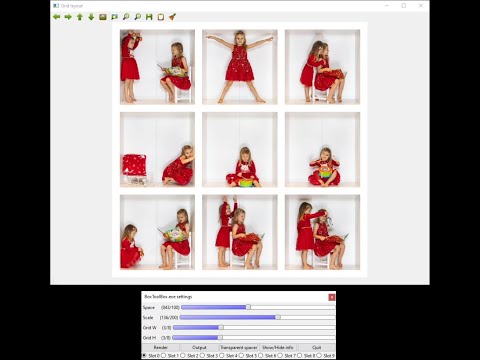
BoxToolBox quick tutorial

Perspective editor

One window acts as input for defining box corners and the second window shows transformation previu. Controls on the second window sets transformed image width and height. The resolution for the final picture will be Width * Grid W x Height * Grid H. Margin define how much of the image will be preserved around the defined box. Preview scale will define size of the temporary pictures used in layout editor. Smaller scale will make the editor go faster, larger scale will provide better quality.

norm

Controls:

  • Mouse wheel - zoom
  • Left button - Pan
  • Middle button - Select point
  • N key and M key - Open previous and next image
  • Q - Close editor

Normally you only need to define a transformation box for the first photo. The transformation will be applied to all following pictures. If you bump the camera during the session you can find the first image that is affected and redefine the transformation box. All following images will use that correction.

Layout editor

You can use this window to compose the final image. Here you can change geometry for the final image. Set scaling and spacing for the images. You can use Transparent spacer to define a very precise scale.

layout

If the settings window is not visible press Ctrl-P.

Controls:

  • Mouse wheel - zoom
  • Left button - Pan
  • Drag picture - Swap images
  • N key and M key - set previous and next image
  • E key - Open perspective editor for image
  • C key - Toggle Crop or Full flag for image
  • S key - Show full image with marker lines
  • Q key - Close editor
  • Render - Show final image in full resolution
  • Output - Render final image in layers

Use different slots to experiment with multiple layouts and geometries.

Output

Output for the image will consist of multiple images placed inside the directory slot_n. Photos in images will be placed to correct location on transparent background. You will also find the generated grid image. Import these images as layers to any photo editor to compose the final image.

gimp

Disclaimer

This tool is my hobby project, done in my free time for my personal use. However I think that other people might find it useful so I made extra steps to make it more friendly and easier to install. If you found a bug or want something to add, feel free to open an issue. Pull requests are also welcomed!

If you found it useful and want to thank me, you can buy me a bear :-)

Owner
František Horínek
František Horínek
The world's simplest facial recognition api for Python and the command line

Face Recognition You can also read a translated version of this file in Chinese 简体中文版 or in Korean 한국어 or in Japanese 日本語. Recognize and manipulate fa

Adam Geitgey 47k Jan 07, 2023
This is the official PyTorch implementation of the paper "TransFG: A Transformer Architecture for Fine-grained Recognition" (Ju He, Jie-Neng Chen, Shuai Liu, Adam Kortylewski, Cheng Yang, Yutong Bai, Changhu Wang, Alan Yuille).

TransFG: A Transformer Architecture for Fine-grained Recognition Official PyTorch code for the paper: TransFG: A Transformer Architecture for Fine-gra

Ju He 307 Jan 03, 2023
A tool for extracting text from scanned documents (via OCR), with user-defined post-processing.

The project is based on older versions of tesseract and other tools, and is now superseded by another project which allows for more granular control o

Maxim 32 Jul 24, 2022
(CVPR 2021) Back-tracing Representative Points for Voting-based 3D Object Detection in Point Clouds

BRNet Introduction This is a release of the code of our paper Back-tracing Representative Points for Voting-based 3D Object Detection in Point Clouds,

86 Oct 05, 2022
An Implementation of the seglink alogrithm in paper Detecting Oriented Text in Natural Images by Linking Segments

Tips: A more recent scene text detection algorithm: PixelLink, has been implemented here: https://github.com/ZJULearning/pixel_link Contents: Introduc

dengdan 484 Dec 07, 2022
This repository summarized computer vision theories.

This repository summarized computer vision theories.

3 Feb 04, 2022
Using python libraries to track hands

Python-HandTracking Using python libraries to track hands on a camera Uses cv2 and mediapipe libraries custom hand tracking module PyCharm IDE Final E

Martin Matsudaira 1 Dec 17, 2021
A python screen recorder for low-end computers, provides high quality video output.

RecorderX - v1.0 A screen recorder made in Python with the help of OpenCv, it has ability to record your screen in high quality. No matter what your P

Priyanshu Jindal 4 Nov 10, 2021
Source Code for AAAI 2022 paper "Graph Convolutional Networks with Dual Message Passing for Subgraph Isomorphism Counting and Matching"

Graph Convolutional Networks with Dual Message Passing for Subgraph Isomorphism Counting and Matching This repository is an official implementation of

HKUST-KnowComp 13 Sep 08, 2022
Morphological edge detection or object's boundary detection using erosion and dialation in OpenCV python

Morphologycal-edge-detection-using-erosion-and-dialation the task is to detect object boundary using erosion or dialation . Here, use the kernel or st

Tamzid hasan 3 Nov 25, 2022
Tools for manipulating and evaluating the hOCR format for representing multi-lingual OCR results by embedding them into HTML.

hocr-tools About About the code Installation System-wide with pip System-wide from source virtualenv Available Programs hocr-check -- check the hOCR f

OCRopus 285 Dec 08, 2022
OpenMMLab Text Detection, Recognition and Understanding Toolbox

Introduction English | 简体中文 MMOCR is an open-source toolbox based on PyTorch and mmdetection for text detection, text recognition, and the correspondi

OpenMMLab 3k Jan 07, 2023
Omdena-abuja-anpd - Automatic Number Plate Detection for the security of lives and properties using Computer Vision.

Omdena-abuja-anpd - Automatic Number Plate Detection for the security of lives and properties using Computer Vision.

Abdulazeez Jimoh 1 Jan 01, 2022
Code for the paper STN-OCR: A single Neural Network for Text Detection and Text Recognition

STN-OCR: A single Neural Network for Text Detection and Text Recognition This repository contains the code for the paper: STN-OCR: A single Neural Net

Christian Bartz 496 Jan 05, 2023
APS 6º Semestre - UNIP (2021)

UNIP - Universidade Paulista Ciência da Computação (CC) DESENVOLVIMENTO DE UM SISTEMA COMPUTACIONAL PARA ANÁLISE E CLASSIFICAÇÃO DE FORMAS Link do git

Eduardo Talarico 5 Mar 09, 2022
Tools for manipulating and evaluating the hOCR format for representing multi-lingual OCR results by embedding them into HTML.

hocr-tools About About the code Installation System-wide with pip System-wide from source virtualenv Available Programs hocr-check -- check the hOCR f

OCRopus 285 Dec 08, 2022
Introduction to image processing, most used and popular functions of OpenCV

👀 OpenCV 101 Introduction to image processing, most used and popular functions of OpenCV go here.

Vusal Ismayilov 3 Jul 02, 2022
STEFANN: Scene Text Editor using Font Adaptive Neural Network

STEFANN: Scene Text Editor using Font Adaptive Neural Network @ The IEEE/CVF Conference on Computer Vision and Pattern Recognition (CVPR) 2020.

Prasun Roy 208 Dec 11, 2022
Steve Tu 71 Dec 30, 2022
天池2021"全球人工智能技术创新大赛"【赛道一】:医学影像报告异常检测 - 第三名解决方案

天池2021"全球人工智能技术创新大赛"【赛道一】:医学影像报告异常检测 比赛链接 个人博客记录 目录结构 ├── final------------------------------------决赛方案PPT ├── preliminary_contest--------------------

19 Aug 17, 2022