Flame Graphs visualize profiled code

Overview

Flame Graphs visualize profiled code

Main Website: http://www.brendangregg.com/flamegraphs.html

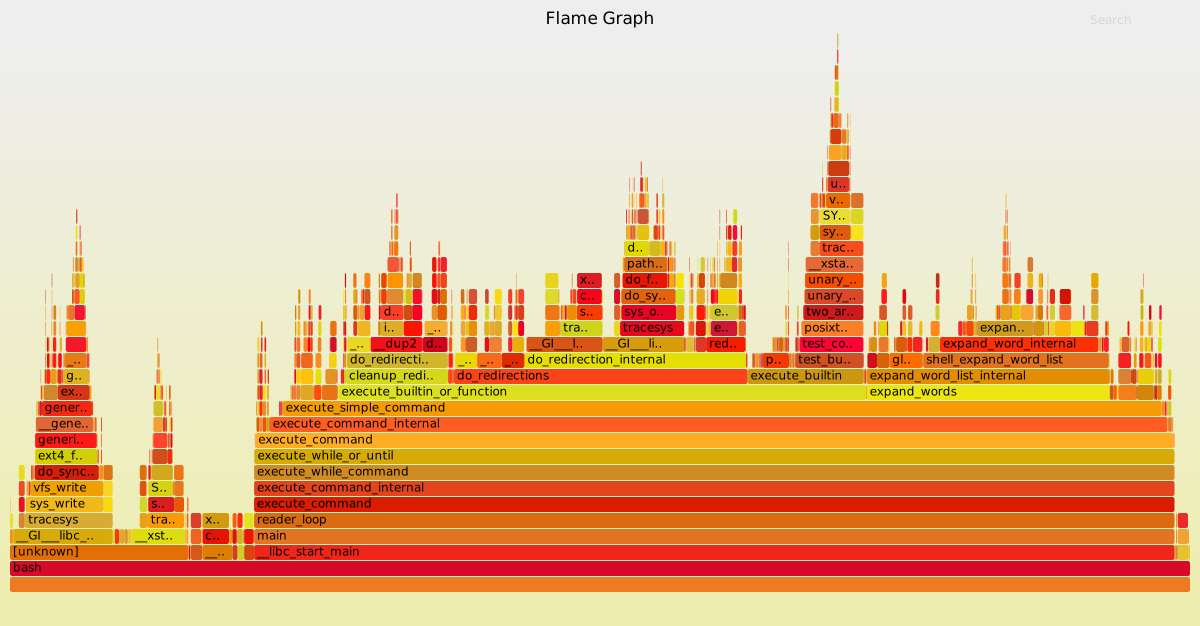
Example (click to zoom):
Example

Click a box to zoom the Flame Graph to this stack frame only. To search and highlight all stack frames matching a regular expression, click the search button in the upper right corner or press Ctrl-F. By default, search is case sensitive, but this can be toggled by pressing Ctrl-I or by clicking the ic button in the upper right corner.

Other sites:

Flame graphs can be created in three steps:

  1. Capture stacks
  2. Fold stacks
  3. flamegraph.pl

1. Capture stacks

Stack samples can be captured using Linux perf_events, FreeBSD pmcstat (hwpmc), DTrace, SystemTap, and many other profilers. See the stackcollapse-* converters.

Linux perf_events

Using Linux perf_events (aka "perf") to capture 60 seconds of 99 Hertz stack samples, both user- and kernel-level stacks, all processes:

# perf record -F 99 -a -g -- sleep 60
# perf script > out.perf

Now only capturing PID 181:

# perf record -F 99 -p 181 -g -- sleep 60
# perf script > out.perf

DTrace

Using DTrace to capture 60 seconds of kernel stacks at 997 Hertz:

# dtrace -x stackframes=100 -n 'profile-997 /arg0/ { @[stack()] = count(); } tick-60s { exit(0); }' -o out.kern_stacks

Using DTrace to capture 60 seconds of user-level stacks for PID 12345 at 97 Hertz:

# dtrace -x ustackframes=100 -n 'profile-97 /pid == 12345 && arg1/ { @[ustack()] = count(); } tick-60s { exit(0); }' -o out.user_stacks

60 seconds of user-level stacks, including time spent in-kernel, for PID 12345 at 97 Hertz:

# dtrace -x ustackframes=100 -n 'profile-97 /pid == 12345/ { @[ustack()] = count(); } tick-60s { exit(0); }' -o out.user_stacks

Switch ustack() for jstack() if the application has a ustack helper to include translated frames (eg, node.js frames; see: http://dtrace.org/blogs/dap/2012/01/05/where-does-your-node-program-spend-its-time/). The rate for user-level stack collection is deliberately slower than kernel, which is especially important when using jstack() as it performs additional work to translate frames.

2. Fold stacks

Use the stackcollapse programs to fold stack samples into single lines. The programs provided are:

  • stackcollapse.pl: for DTrace stacks
  • stackcollapse-perf.pl: for Linux perf_events "perf script" output
  • stackcollapse-pmc.pl: for FreeBSD pmcstat -G stacks
  • stackcollapse-stap.pl: for SystemTap stacks
  • stackcollapse-instruments.pl: for XCode Instruments
  • stackcollapse-vtune.pl: for Intel VTune profiles
  • stackcollapse-ljp.awk: for Lightweight Java Profiler
  • stackcollapse-jstack.pl: for Java jstack(1) output
  • stackcollapse-gdb.pl: for gdb(1) stacks
  • stackcollapse-go.pl: for Golang pprof stacks
  • stackcollapse-vsprof.pl: for Microsoft Visual Studio profiles
  • stackcollapse-wcp.pl: for wallClockProfiler output

Usage example:

For perf_events:
$ ./stackcollapse-perf.pl out.perf > out.folded

For DTrace:
$ ./stackcollapse.pl out.kern_stacks > out.kern_folded

The output looks like this:

unix`_sys_sysenter_post_swapgs 1401
unix`_sys_sysenter_post_swapgs;genunix`close 5
unix`_sys_sysenter_post_swapgs;genunix`close;genunix`closeandsetf 85
unix`_sys_sysenter_post_swapgs;genunix`close;genunix`closeandsetf;c2audit`audit_closef 26
unix`_sys_sysenter_post_swapgs;genunix`close;genunix`closeandsetf;c2audit`audit_setf 5
unix`_sys_sysenter_post_swapgs;genunix`close;genunix`closeandsetf;genunix`audit_getstate 6
unix`_sys_sysenter_post_swapgs;genunix`close;genunix`closeandsetf;genunix`audit_unfalloc 2
unix`_sys_sysenter_post_swapgs;genunix`close;genunix`closeandsetf;genunix`closef 48
[...]

3. flamegraph.pl

Use flamegraph.pl to render a SVG.

$ ./flamegraph.pl out.kern_folded > kernel.svg

An advantage of having the folded input file (and why this is separate to flamegraph.pl) is that you can use grep for functions of interest. Eg:

$ grep cpuid out.kern_folded | ./flamegraph.pl > cpuid.svg

Provided Examples

Linux perf_events

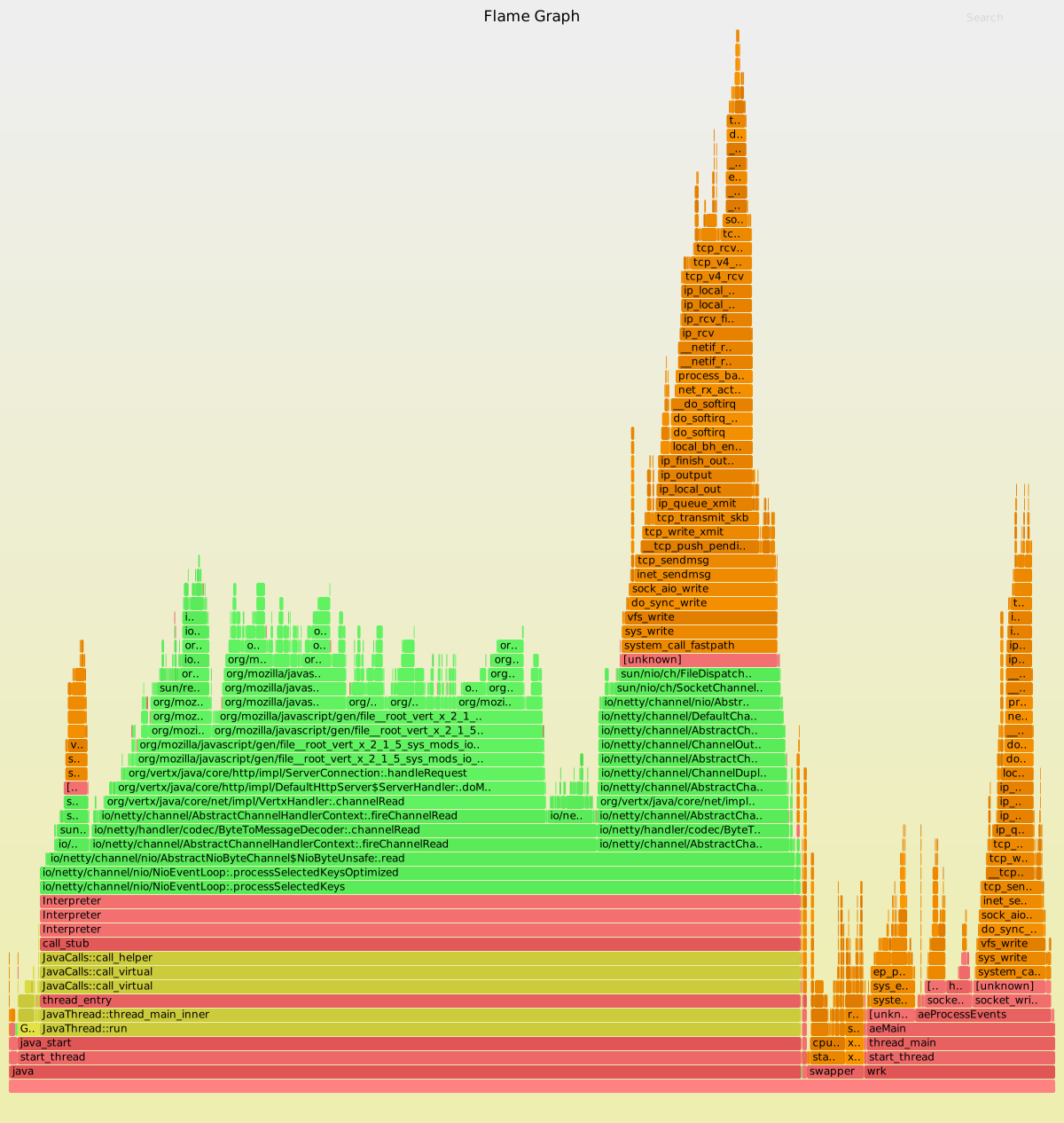
An example output from Linux "perf script" is included, gzip'd, as example-perf-stacks.txt.gz. The resulting flame graph is example-perf.svg:
Example

You can create this using:

$ gunzip -c example-perf-stacks.txt.gz | ./stackcollapse-perf.pl --all | ./flamegraph.pl --color=java --hash > example-perf.svg

This shows my typical workflow: I'll gzip profiles on the target, then copy them to my laptop for analysis. Since I have hundreds of profiles, I leave them gzip'd!

Since this profile included Java, I used the flamegraph.pl --color=java palette. I've also used stackcollapse-perf.pl --all, which includes all annotations that help flamegraph.pl use separate colors for kernel and user level code. The resulting flame graph uses: green == Java, yellow == C++, red == user-mode native, orange == kernel.

This profile was from an analysis of vert.x performance. The benchmark client, wrk, is also visible in the flame graph.

DTrace

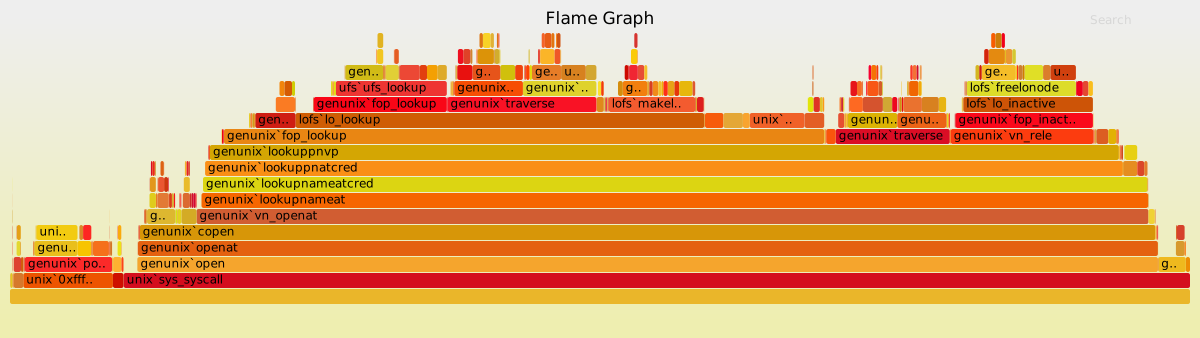
An example output from DTrace is also included, example-dtrace-stacks.txt, and the resulting flame graph, example-dtrace.svg:
Example

You can generate this using:

$ ./stackcollapse.pl example-stacks.txt | ./flamegraph.pl > example.svg

This was from a particular performance investigation: the Flame Graph identified that CPU time was spent in the lofs module, and quantified that time.

Options

See the USAGE message (--help) for options:

USAGE: ./flamegraph.pl [options] infile > outfile.svg

red) --notes TEXT # add notes comment in SVG (for debugging) --help # this message eg, ./flamegraph.pl --title="Flame Graph: malloc()" trace.txt > graph.svg">
--title TEXT     # change title text
--subtitle TEXT  # second level title (optional)
--width NUM      # width of image (default 1200)
--height NUM     # height of each frame (default 16)
--minwidth NUM   # omit smaller functions (default 0.1 pixels)
--fonttype FONT  # font type (default "Verdana")
--fontsize NUM   # font size (default 12)
--countname TEXT # count type label (default "samples")
--nametype TEXT  # name type label (default "Function:")
--colors PALETTE # set color palette. choices are: hot (default), mem,
                 # io, wakeup, chain, java, js, perl, red, green, blue,
                 # aqua, yellow, purple, orange
--bgcolors COLOR # set background colors. gradient choices are yellow
                 # (default), blue, green, grey; flat colors use "#rrggbb"
--hash           # colors are keyed by function name hash
--cp             # use consistent palette (palette.map)
--reverse        # generate stack-reversed flame graph
--inverted       # icicle graph
--flamechart     # produce a flame chart (sort by time, do not merge stacks)
--negate         # switch differential hues (blue<->red)
--notes TEXT     # add notes comment in SVG (for debugging)
--help           # this message

eg,
./flamegraph.pl --title="Flame Graph: malloc()" trace.txt > graph.svg

As suggested in the example, flame graphs can process traces of any event, such as malloc()s, provided stack traces are gathered.

Consistent Palette

If you use the --cp option, it will use the $colors selection and randomly generate the palette like normal. Any future flamegraphs created using the --cp option will use the same palette map. Any new symbols from future flamegraphs will have their colors randomly generated using the $colors selection.

If you don't like the palette, just delete the palette.map file.

This allows your to change your colorscheme between flamegraphs to make the differences REALLY stand out.

Example:

Say we have 2 captures, one with a problem, and one when it was working (whatever "it" is):

cat working.folded | ./flamegraph.pl --cp > working.svg
# this generates a palette.map, as per the normal random generated look.

cat broken.folded | ./flamegraph.pl --cp --colors mem > broken.svg
# this svg will use the same palette.map for the same events, but a very
# different colorscheme for any new events.

Take a look at the demo directory for an example:

palette-example-working.svg
palette-example-broken.svg

Comments
  • stackcollapse-perf.pl ignores period of samples

    stackcollapse-perf.pl ignores period of samples

    It seems like stackcollapse-perf.pl ignores the period associated with each sample record so all recorded samples are given the same weight. This ends up in the generated flamegraph not being consistent with what perf report outputs for the overhead of the different call stacks. I usually sample by specifying a frequency and the hardware CPU cycles event with something like perf record -e cpu-cycles -F 997 and I can get pretty different output. I was wondering if you run into the same thing.

    opened by hardc0der 18
  • Added Zoom inside SVG

    Added Zoom inside SVG

    This extends svg script to zoom/unzoom. This was only tested under chromium, but should not break from standard svg.

    You may consider moving the "Reset Zoom" button to a more "clean" position.

    opened by Saruspete 13
  • "java 19983 cycles:" not matched as the event header - perf v3.2.28

    Environment: hostname : xguan-ubuntu os release : 3.2.0-31-generic perf version : 3.2.28 arch : x86_64 cmdline : /usr/bin/perf_3.2.0-31 record -F 99 -p 19982 -g sleep 30

    ...

    The perf.out:

    java 19983 cycles: 7f7241fbe6d8 arrayOopDesc::base(BasicType) const (/home/xguan/opt/jdk1.8.0_112/jre/lib/amd64/server/libjvm.so) 7f7241239aec writeBytes (/home/xguan/opt/jdk1.8.0_112/jre/lib/amd64/libjava.so) 7f724123176f Java_java_io_FileOutputStream_writeBytes (/home/xguan/opt/jdk1.8.0_112/jre/lib/amd64/libjava.so) 7f722d119786 Ljava/io/FileOutputStream;::writeBytes (/tmp/perf-19982.map) 7f722d142778 Ljava/io/PrintStream;::print (/tmp/perf-19982.map) 7f722d12e1d4 LBusy;::main (/tmp/perf-19982.map) 7f722d0004e7 call_stub (/tmp/perf-19982.map) 7f72421d2d76 JavaCalls::call_helper(JavaValue_, methodHandle_, JavaCallArguments_, Thread_) (/home/xguan/opt/jdk1.8.0_112/jre/lib/amd64/server/libjvm.so) 7f72421ed566 jni_invoke_static(JNIEnv__, JavaValue_, jobject, JNICallType, jmethodID, JNI_ArgumentPusher_, Thread_) (/home/xguan/opt/jdk1.8.0_112/jre/lib/amd64/server/libjvm.so) 7f72421f987a jni_CallStaticVoidMethod (/home/xguan/opt/jdk1.8.0_112/jre/lib/amd64/server/libjvm.so) 7f724309ebdf JavaMain (/home/xguan/opt/jdk1.8.0_112/lib/amd64/jli/libjli.so) 7f72432b4e9a start_thread (/lib/x86_64-linux-gnu/libpthread-2.15.so)

    When I tried:

    ./stackcollapse-perf.pl perf.out

    Unrecognized line: java 19983 cycles: at ./stackcollapse-perf.pl line 264, <> line 3609. Use of uninitialized value $pname in string eq at ./stackcollapse-perf.pl line 246, <> line 3610.

    And the fix is to tweak the regular expression in line 177.

    opened by techtony2018 8
  • Better support for process name with spaces

    Better support for process name with spaces

    I was playing with perf today for the first time and stackcollapse-perf.pl shows some warnings processing lines with the name of process having more than one space in it, like this one:

    Plex DLNA Serve 26638 [001] 856620.530720: 2654110 cycles:

    I think it also would close issue #78

    I did not write perl code in the past, so please, test it... And thanks for FlameGraphs... ;)

    opened by skarcha 8
  • Unfoldall support

    Unfoldall support

    This adds support for https://github.com/jrudolph/perf-map-agent/pull/35

    You can see before/after here: https://gist.github.com/tjake/b762c51cc8a5ee89df290f2b4f361f81

    Note: this patch is on top of #88

    opened by tjake 7
  • [unknown] functions

    [unknown] functions

    Frequently I see in perf sript entries like this:

    httpd 18294 [008] 205996.782023:   10101010 cpu-clock:
                      2b20e5 [unknown] (/opt/remi/php56/root/usr/lib64/httpd/modules/libphp5.so)
                2b5e1de3f698 [unknown] ([unknown])
                2b5e00000013 [unknown] ([unknown])
            4c20ec834853fd89 [unknown] ([unknown])
    
    mysqld 18314 [003] 205996.822418:   10101010 cpu-clock:
                      39a7c4 prev_record_reads(st_position*, unsigned int, unsigned long long) (/usr/libexec/mysqld)
                      39c65c best_access_path(JOIN*, st_join_table*, unsigned long long, unsigned int, bool, double, st_position*, st_position*) (/usr/libexec/mysqld)
                      39e997 [unknown] (/usr/libexec/mysqld)
                      39ed0f [unknown] (/usr/libexec/mysqld)
                      39ed0f [unknown] (/usr/libexec/mysqld)
                      39ed0f [unknown] (/usr/libexec/mysqld)
    ...
    

    Then flame graph is occupied with a lot of [unknown] functions, even though some of unknowns have binary associated with them. Could you modify stackcollapse-perf.pl if it sees [unknown] but there's binary to show binary name, it could be like [/path/bin] for example. Or add option to do such replacements.

    opened by do11 6
  • collapse perf: Allow whitespace in thread names

    collapse perf: Allow whitespace in thread names

    This adds support to process perf script output for programs containing threads with whitespace in the name. For example:

    "java main 25607 4794564.109216: cycles:"

    opened by vgeorgiev 6
  • Implement state for zoom and search

    Implement state for zoom and search

    Hey @brendangregg,

    looking through old PRs I found #134 very interesting. I have implemented a history safe (meaning the browsers back and forward functions won't interfere) solution that "safes" the zoom and/or search state.

    It basically uses CSS attribute selectors[1] to match a frame ([x=100][y=200]) and uses GET parameters using the history API[2] to "store" the current zoom/search state.

    Cheers,

    Mike

    [1] https://developer.mozilla.org/en-US/docs/Web/CSS/Attribute_selectors [2] https://developer.mozilla.org/en-US/docs/Web/API/History_API

    opened by versable 5
  • Add pc to help identify unknown addresses.

    Add pc to help identify unknown addresses.

    Add the function's pc to the module name or the "unknown" string in order to identify where the unknown lies (useful for managed runtimes that are missing some reporting of JIT or other symbols) and to differentiate between unknowns.

    opened by gdbentley 5
  • [Linux 4.8.6] New perf script output format

    [Linux 4.8.6] New perf script output format

    I have installed kernel 4.8.6, and doing

    perf record -F 99 -a -g -- sleep 10
    

    followed by

    perf script
    

    gives

    swapper     0 [000]   147.374682:          1 cycles:ppp: 
            ffffffff810631d4 native_write_msr+0x4 ([kernel.kallsyms])
            ffffffff8100b720 intel_pmu_enable_all+0x10 ([kernel.kallsyms])
            ffffffff81007403 x86_pmu_enable+0x263 ([kernel.kallsyms])
            ffffffff8117dcc2 perf_pmu_enable+0x22 ([kernel.kallsyms])
            ffffffff8117eba1 ctx_resched+0x51 ([kernel.kallsyms])
            ffffffff8117ed90 __perf_event_enable+0x1e0 ([kernel.kallsyms])
            ffffffff81177726 event_function+0xa6 ([kernel.kallsyms])
            ffffffff81178c1f remote_function+0x3f ([kernel.kallsyms])
            ffffffff8110887b flush_smp_call_function_queue+0x7b ([kernel.kallsyms])
            ffffffff81109363 generic_smp_call_function_single_interrupt+0x13 ([kernel.kallsyms])
            ffffffff81050d87 smp_call_function_single_interrupt+0x27 ([kernel.kallsyms])
            ffffffff8173ceec call_function_single_interrupt+0x8c ([kernel.kallsyms])
            ffffffff815b3427 cpuidle_enter+0x17 ([kernel.kallsyms])
            ffffffff810c6f6b cpu_startup_entry+0x2cb ([kernel.kallsyms])
            ffffffff8172dd47 rest_init+0x77 ([kernel.kallsyms])
            ffffffff81da5191 start_kernel+0x4a7 ([kernel.kallsyms])
            ffffffff81da45d6 x86_64_start_reservations+0x2a ([kernel.kallsyms])
            ffffffff81da4724 x86_64_start_kernel+0x14c ([kernel.kallsyms])
    

    F.ex. x86_64_start_kernel+0x14c instead of x86_64_start_kernel.

    Should stackcollapse-perf.pl automatically remove this, or should there be a new option for it ?

    RHEL 7.2 w/ kernel-ml-4.8.6 from ELRepo.

    opened by jesperpedersen 5
  • optimize update_text

    optimize update_text

    Much faster implementation of text clipping, especially for Java stacks with long stack element texts. Makes zooming / unzooming less painful for big, complex FlameGraphs.

    opened by tsabirgaliev 5
  • Flamegraph handles multi-thread program abnormality

    Flamegraph handles multi-thread program abnormality

    The command pipeline is as follows: perf record -g ./app perf script > app.perf cat app.perf | ./stackcollapse-perf.pl --all | ./flamegraph.pl > app.svg

    My application is a multi-threaded application and the execution time is about 20 minutes. When I finished executing the above pipeline, I got an unexpected svg image, the flame graph does not truly reflect the actual situation。

    out

    ReadAlignChunk::mapChunk is a thread execution function, which should be a hotspot, and BarcodeMap::BarcodeMapping is a sub-function of a thread thread function, which should be a secondary hotspot. Another problem is that the call stack is too shallow, with less than 10 layers, far below expectations.

    opened by yuand2022 0
  • flamegraph.pl search() function erroneusly counts hidden frames

    flamegraph.pl search() function erroneusly counts hidden frames

    The loop in https://github.com/brendangregg/FlameGraph/blob/master/flamegraph.pl#L1077 which iterates over <g> elements, does not check if they have currently the .hide class. These elements still have their x and width values from before zoom, and seem to be collected in the matches hashmap, and counted towards count.

    What I expected: The "Matched: x%" text should mean that the frames that (match the CTRL+F query) AND (are currently visible) consititute x% of the visible region.

    What happens instead: The "Matched: x%" text seams to mean that the frames that (match the CTRL+F query) consititute x% of the visible region.

    Why does it matter: This results in the Matched: 69.5% instead of Matched: 55.8% text in my case, but in general the differece can be arbitrarily huge. This is a problem to me, because I have function outer() which calls inner() and I wanted to know relation of inner()/outer() for each callstack separately - so I've zoomed to each call of outer() one by one and noted down the ratio, and was puzzled that the ratio is always larger than the average ratio (which I computed by zooming out and searching for outer() and inner() separately).

    opened by qbolec 0
  • Display the text that was searched for when a match occurs

    Display the text that was searched for when a match occurs

    The text is displayed in the bottom left corner.

    This text will show whenever the "Matched: x%" text is shown.

    This can be useful when you're switching between multiple flamegraphs, and you come back to a graph with highlighted bars, but you don't remember what you searched for to highlight those bars.

    opened by ananduri 0
Releases(v1.0)
  • v1.0(Aug 19, 2017)

    I'm adding a tagged release to FlameGraph so that package maintainers can grab a static version. There's nothing really special about this v1.0 release, other than it reflecting a stable body of code that is in widespread use, and recently merged a number of fixes.

    Recent changes/fixes include:

    • fixing a small floating point issue with search's total percent which is now more accurate #140
    • stackcollapse-perf.pl now supports multiple event sources #136
    • fixing a title overlap issue with large --height #125
    • adding an optional subtitle (--subtitle) https://github.com/brendangregg/FlameGraph/commit/fad6bf74b6ab9b5ab3b89aec04e0d1b5effaf026
    • embedded notes (--notes) https://github.com/brendangregg/FlameGraph/commit/cef340b208c409c7c1fba5be1c42c4cbb442174d
    • improving code annotations for Linux perf (used by some palettes) https://github.com/brendangregg/FlameGraph/commit/99972c0ef5d70778a54d83c6641e95403479612c https://github.com/brendangregg/FlameGraph/commit/e83d1bcf33c313f4b6c754799646fe038b9fad0f
    • add --addrs option to include addresses on unknown frames #124
    • treat input as UTF-8, to avoid some unicode characters breaking zoom #133

    And some minor improvements to the test files.

    Source code(tar.gz)
    Source code(zip)
Owner
Brendan Gregg
Cloud computing performance architect and engineer.
Brendan Gregg
A declarative (epi)genomics visualization library for Python

gos is a declarative (epi)genomics visualization library for Python. It is built on top of the Gosling JSON specification, providing a simplified interface for authoring interactive genomic visualiza

Gosling 107 Dec 14, 2022
Exploratory analysis and data visualization of aircraft accidents and incidents in Brazil.

Exploring aircraft accidents in Brazil Occurrencies with aircraft in Brazil are investigated by the Center for Investigation and Prevention of Aircraf

Augusto Herrmann 5 Dec 14, 2021
Python implementation of the Density Line Chart by Moritz & Fisher.

PyDLC - Density Line Charts with Python Python implementation of the Density Line Chart (Moritz & Fisher, 2018) to visualize large collections of time

Charles L. Bérubé 10 Jan 06, 2023
Painlessly create beautiful matplotlib plots.

Announcement Thank you to everyone who has used prettyplotlib and made it what it is today! Unfortunately, I no longer have the bandwidth to maintain

Olga Botvinnik 1.6k Jan 06, 2023
Pebble is a stat's visualization tool, this will provide a skeleton to develop a monitoring tool.

Pebble is a stat's visualization tool, this will provide a skeleton to develop a monitoring tool.

Aravind Kumar G 2 Nov 17, 2021
Jupyter Notebook extension leveraging pandas DataFrames by integrating DataTables and ChartJS.

Jupyter DataTables Jupyter Notebook extension to leverage pandas DataFrames by integrating DataTables JS. About Data scientists and in fact many devel

Marek Čermák 142 Dec 28, 2022
WhatsApp Chat Analyzer is a WebApp and it can be used by anyone to analyze their chat. 😄

WhatsApp-Chat-Analyzer You can view the working project here. WhatsApp chat Analyzer is a WebApp where anyone either tech or non-tech person can analy

Prem Chandra Singh 26 Nov 02, 2022
Render tokei's output to interactive sunburst chart.

Render tokei's output to interactive sunburst chart.

134 Dec 15, 2022
Some problems of SSLC ( High School ) before outputs and after outputs

Some problems of SSLC ( High School ) before outputs and after outputs 1] A Python program and its output (output1) while running the program is given

Fayas Noushad 3 Dec 01, 2021
A research of IT labor market based especially on hh.ru. Salaries, rate of technologies and etc.

hh_ru_research Проект реализован в учебных целях анализа рынка труда, в особенности по hh.ru Input data В качестве входных данных используются сериали

3 Sep 07, 2022
Visualization Library

CamViz Overview // Installation // Demos // License Overview CamViz is a visualization library developed by the TRI-ML team with the goal of providing

Toyota Research Institute - Machine Learning 67 Nov 24, 2022
Automatic data visualization in atom with the nteract data-explorer

Data Explorer Interactively explore your data directly in atom with hydrogen! The nteract data-explorer provides automatic data visualization, so you

Ben Russert 65 Dec 01, 2022
Browse Dash docsets inside emacs

Helm Dash What's it This package uses Dash docsets inside emacs to browse documentation. Here's an article explaining the basic usage of it. It doesn'

504 Dec 15, 2022
This tool is designed to help administrators get an overview of their Active Directory structure.

This tool is designed to help administrators get an overview of their Active Directory structure. In the group view you can see all elements of an AD (OU, USER, GROUPS, COMPUTERS etc.). In the user v

deexno 2 Oct 30, 2022
Python module for drawing and rendering beautiful atoms and molecules using Blender.

Batoms is a Python package for editing and rendering atoms and molecules objects using blender. A Python interface that allows for automating workflows.

Xing Wang 1 Jul 06, 2022
Data Analysis: Data Visualization of Airlines

Data Analysis: Data Visualization of Airlines Anderson Cruz | London-UK | Linkedin | Nowa Capital Project: Traffic Airlines Airline Reporting Carrier

Anderson Cruz 1 Feb 10, 2022
📊📈 Serves up Pandas dataframes via the Django REST Framework for use in client-side (i.e. d3.js) visualizations and offline analysis (e.g. Excel)

📊📈 Serves up Pandas dataframes via the Django REST Framework for use in client-side (i.e. d3.js) visualizations and offline analysis (e.g. Excel)

wq framework 1.2k Jan 01, 2023
ICS-Visualizer is an interactive Industrial Control Systems (ICS) network graph that contains up-to-date ICS metadata

ICS-Visualizer is an interactive Industrial Control Systems (ICS) network graph that contains up-to-date ICS metadata (Name, company, port, user manua

QeeqBox 2 Dec 13, 2021
a python function to plot a geopandas dataframe

Pretty GeoDataFrame A minimum python function (~60 lines) to draw pretty geodataframe. Based on matplotlib, shapely, descartes. Installation just use

haoming 27 Dec 05, 2022
🌀❄️🌩️ This repository contains some examples for creating 2d and 3d weather plots using matplotlib and cartopy libraries in python3.

Weather-Plotting 🌀 ❄️ 🌩️ This repository contains some examples for creating 2d and 3d weather plots using matplotlib and cartopy libraries in pytho

Giannis Dravilas 21 Dec 10, 2022