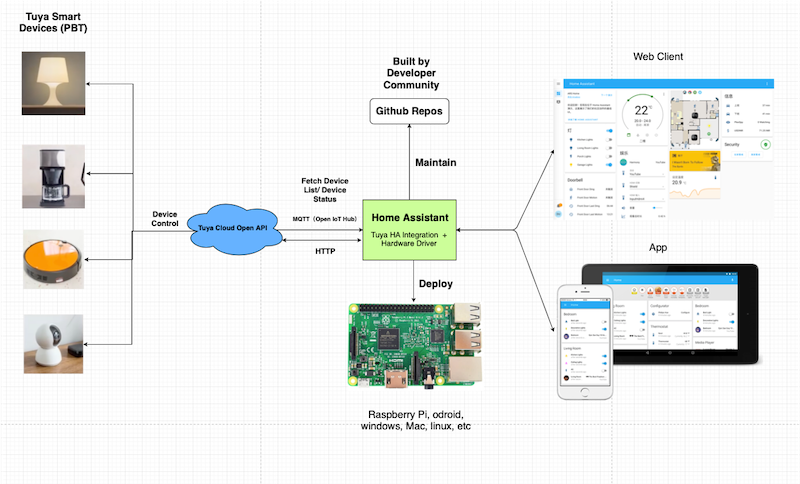
Home Assistant custom integration for controlling Powered by Tuya (PBT) devices using Tuya Open API, officially maintained by the Tuya Developer Team.

Overview

Tuya Home Assistant Integration

Home Assistant custom integration for controlling Powered by Tuya (PBT) devices using Tuya Open API, officially maintained by the Tuya Developer Team.

Supported Tuya Device Types

The following Tuya Device types are currently supported by this integration:

  • Light: Supports Tuya Wi-Fi light devices.
  • Switch & Socket: Supports Tuya Wi-Fi switch & socket devices.

Please check the Develop Tuya-Compatible Home Assistant Drivers and Home Assistant Entity tutorials to develop more drivers for the Tuya Home Assistant Integration and support more Tuya devices.

Workflow

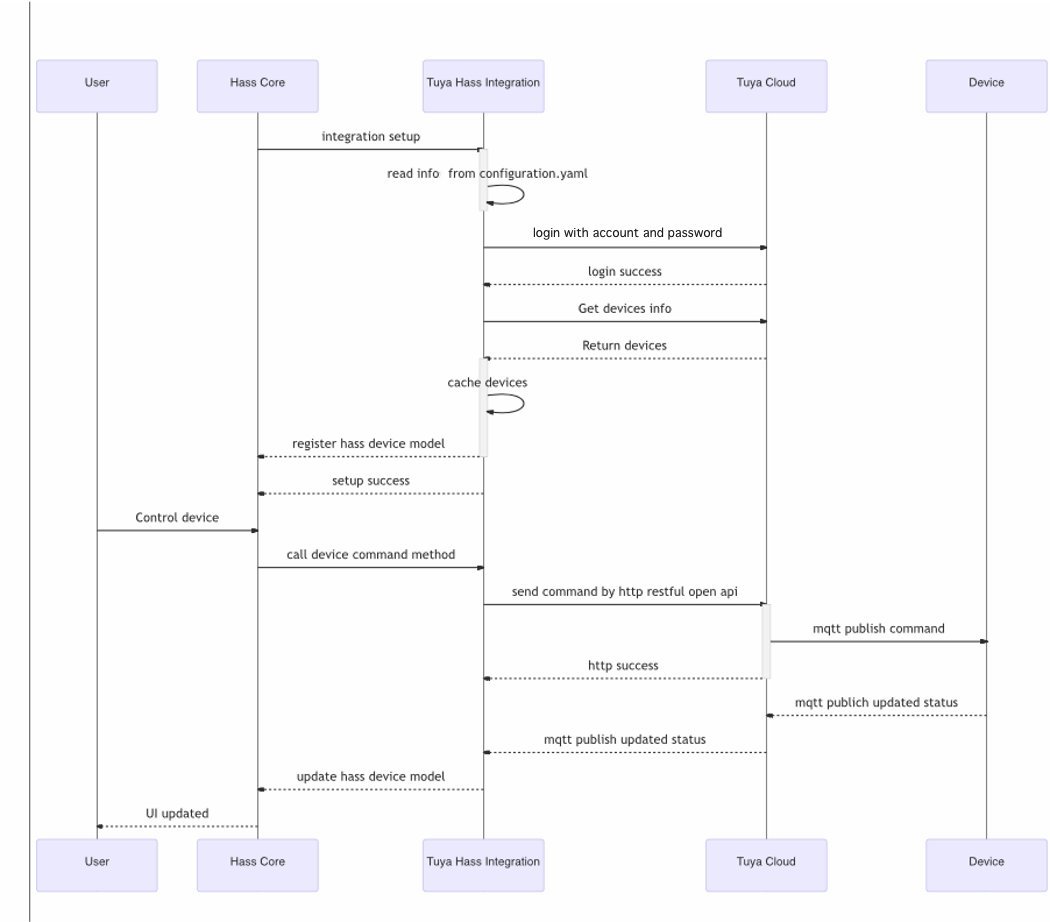
Sequence Diagram

Installation

1. Home Assistant Installation

Please refer to the Home Assistant Official Installation documentation to install Home Assistant Core.

You can also get help from Set up Home Assistant Development Environment on Raspberry Pi in Tuya Developer Demo Center.

2. Tuya Home Assistant Integration Installation

There are two methods to install the integration:

  1. Home Assistant Custom Components Installation
  2. Install by HACS

2.1 Home Assistant Custom Components Installation

Download this tuya-home-assistant repo, unzip it, and copy the custom_components/tuya/ folder to the HomeAssistant configuration directory, e.g. ~/.homeassistant

2.2 Install by HACS

1. HACS Install

2. HACS Initial Configuration

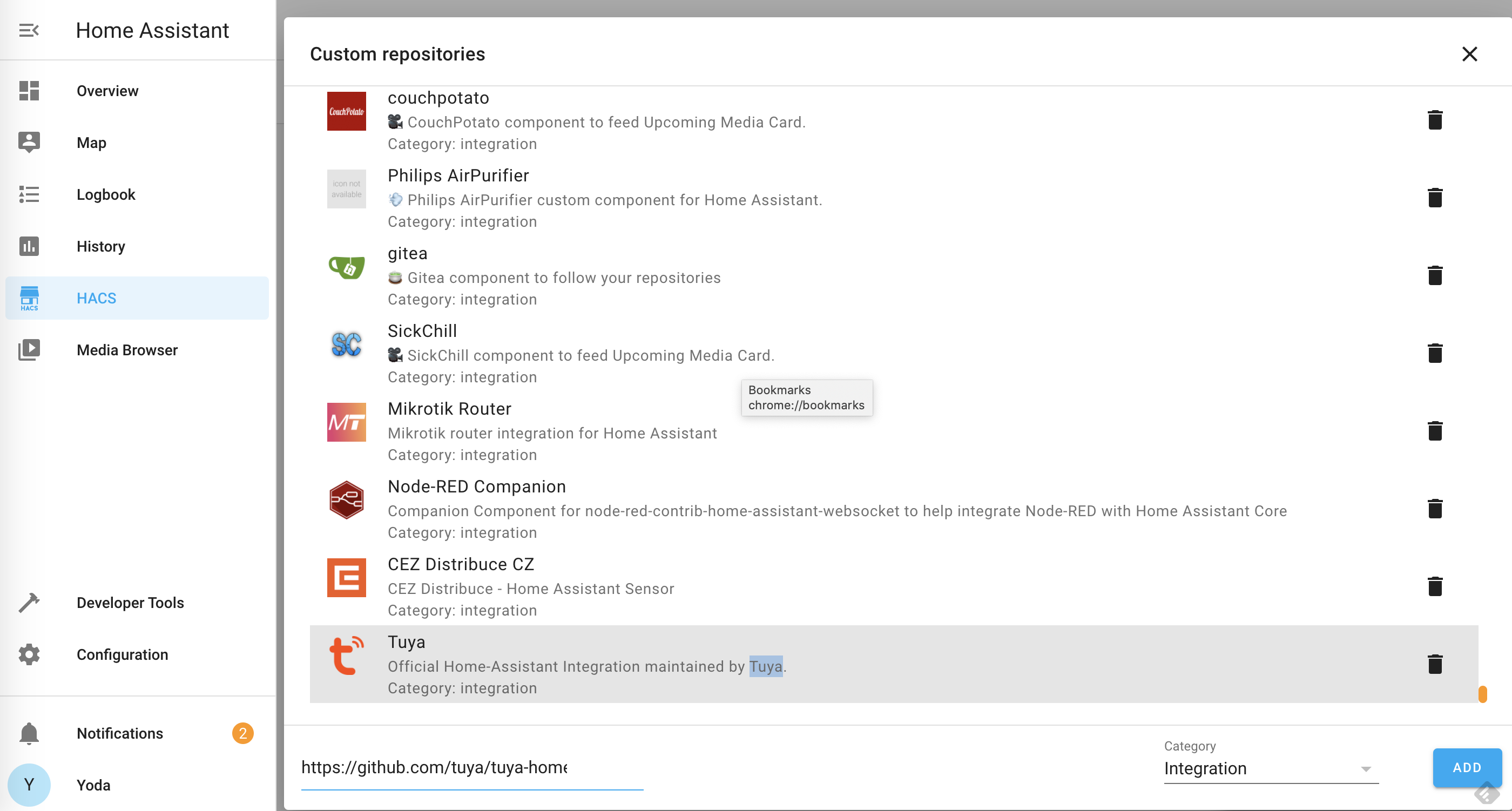
3. HACS -> Integrations -> ... -> Custom repositories

4. Input the tuya-home-assistant GitHub URL: https://github.com/tuya/tuya-home-assistant.git and select Integration as the Category type, then click ADD.

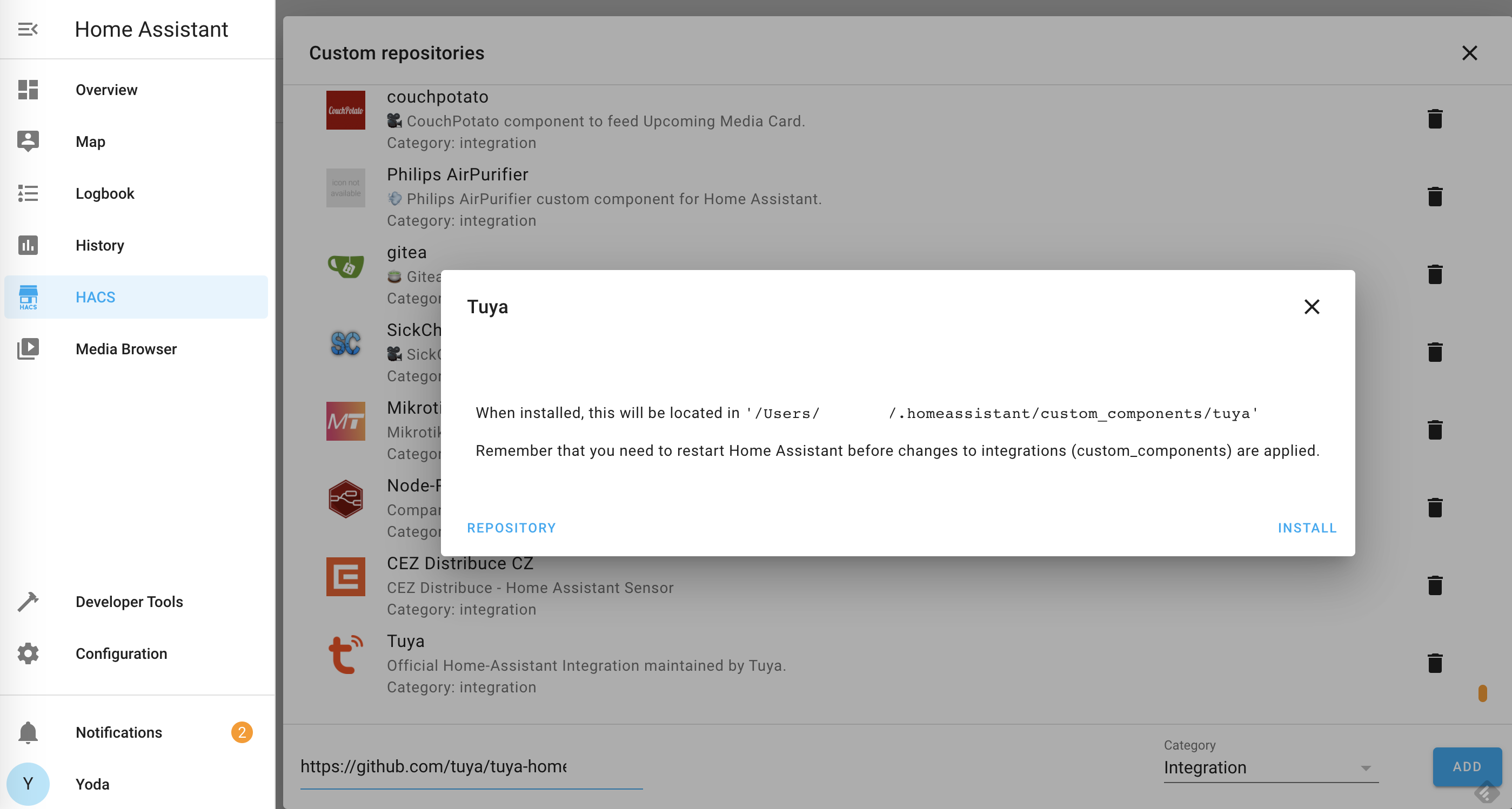
5. Click INSTALL

2.3 Restart Home Assistant

Configuration -> Server Controls -> RESTART

2.4 Activate tuya-home-assistant

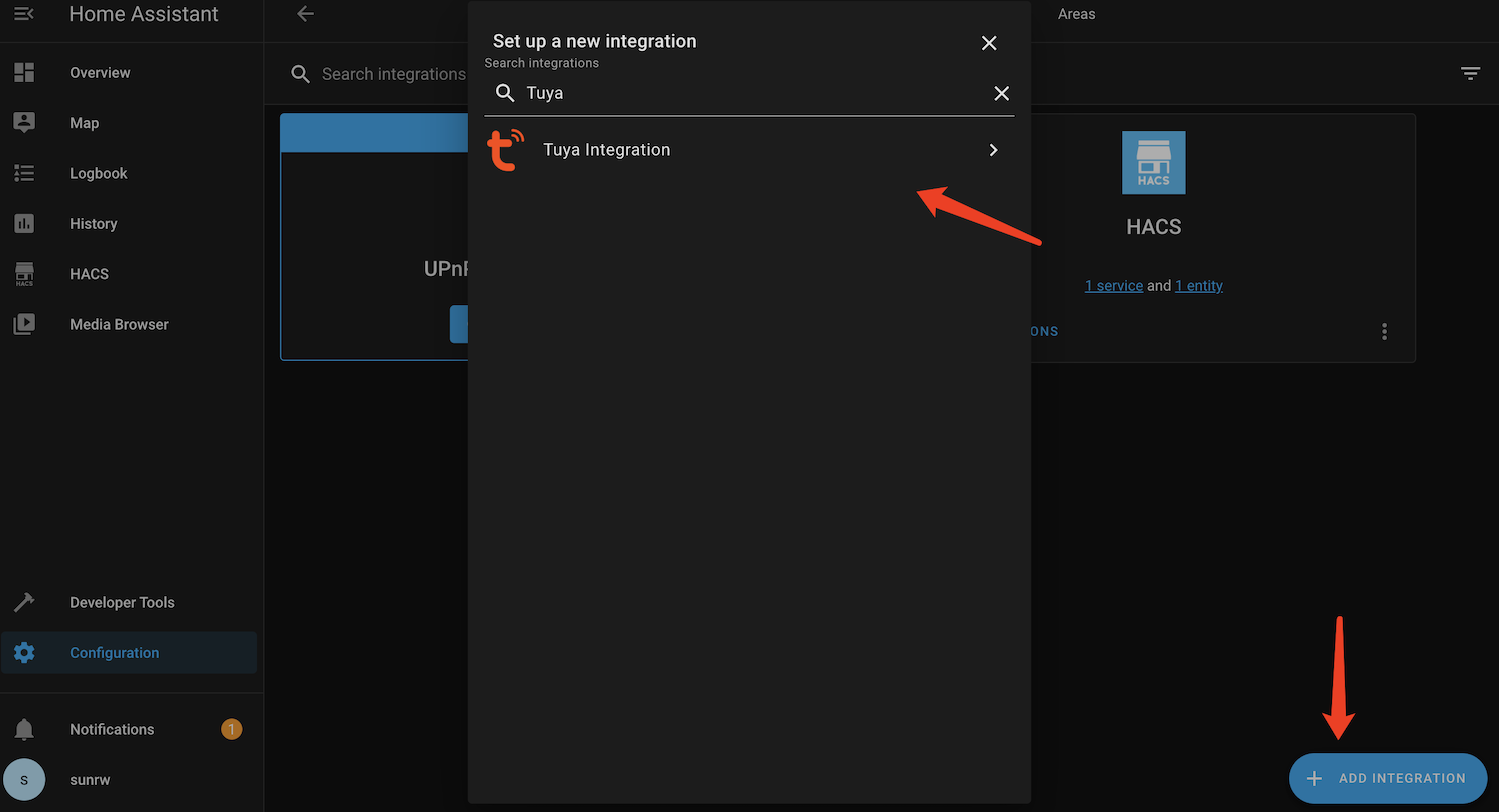
Configuration -> Integrations -> ADD INTEGRATION -> Tuya Integration

3. Enter your Tuya credential

Please get the Tuya credential info by following the Configure Cloud Development Project part in Tuya IoT Platform Configuration Guide.

Start Home Assistant

Go to the home assistant installation folder ~/hass and use the following command to activate it and run the hass service:

➜  hass source bin/activate
(hass) ➜  hass hass

For more information, please refer to the Home Assistant Core tutorial for the startup process and run hass.

Link Tuya Devices to Home Assistant

Please download and use the Tuya Device Manager App to pair Tuya devices to the Home Assistant for controlling.

You can check Tuya Device Manager App (Android) part of the Tuya IoT Platform Configuration Guide for more information.

Contributing

Please refer to the Contributing.md for contributing guide.

Issue feedback

You can give feedback on issues you encounter via GitHub Issue.

LICENSE

For more information, please refer to the LICENSE file

Comments
  • No devices detected when switched to the official integration

    No devices detected when switched to the official integration

    Describe the bug Removed the integration from HACS and unconfigured it and replaced it with the official one. No devices were detected there.

    Expected behavior I should be able to use the devices which were present in the HACS version of the integration.

    Screenshots image

    Home Assistant Version core-2021.10.0

    Device info (please complete the following information, which can be found in log): Two mcs door switches.

    Additional context Add any other context or logs about the problem here. In the official version there's no choice to pick which app was used to set the devices, I suspect it might be picking Smart life instead of Tuya.

    bug 
    opened by strasharo 61
  • New Driver - Kogan Smart Heater

    New Driver - Kogan Smart Heater

    while this shows up in HA now, i have no control over its state

    Device normal info

    • Kogan

    • Kogan Panel Heater - KAWFHTP15BA / KAHTP15WALA

      { "active_time": 1627895893, "biz_type": 0, "category": "qn", "create_time": 1627895893, "icon": "smart/icon/1470624702_0.jpeg", "id": “xxxx ", "ip": "***", "lat": "***", "local_key": "***", "lon": "***", "name": "Bedroom heater", "online": true, "owner_id": "23484236", "product_id": "ynjanlglr4qa6dxf", "product_name": "Panel heater", "status": [ { "code": "switch", "value": false }, { "code": "temp_set", "value": 25 }, { "code": "temp_current", "value": 19 } ], "sub": false, "time_zone": "+10:00", "uid": "***", "update_time": 1631720829, "uuid": "0014083010521c49f20a" },

      "sub": false,
      "time_zone": "+10:00",
      "uid": "***",
      "update_time": 1631720829,
      "uuid": "0014083010521c49f20a"
      

      },

    Device specifications 2021-09-18 08:26:33 DEBUG (SyncWorker_6) [tuya iot] Request: method = GET, url = https://openapi.tuyaeu.com/v1.0/devices/xxxxx/specifications, params = None, body = None, t = 1631917593164 2021-09-18 08:26:33 DEBUG (Thread-25) [tuya iot] _on_log: Received PUBLISH (d0, q0, r0, m0), 'cloud/token/in/ebc1d658bf210987387c9f4d12782ce2', ... (284 bytes) 2021-09-18 08:26:33 DEBUG (Thread-25) [tuya iot] payload-> b'{"data":"JFYot1AkACi8/Ur2AvTCi3qltBYwgPLSJE1YUp2CUYLVDfkFVEIu0HrN+DDEC/uA30I2NnsvKp0PqavUK5p6+2QiO6QlCEtkkzxqFzKYNWxMrTh7bOcdtlB60wzimmmtVhPwPLhtAwgQaCu5WeOT9m6lumAfCbOsThm8glBZvTgjlDYEccpKuYPzJEOBdMLP","protocol":4,"pv":"2.0","sign":"60e1f36e5c5c57e0246d96ace8e56e37","t":1631917592}' 2021-09-18 08:26:33 DEBUG (Thread-25) [tuya iot] on_message: {'data': {'dataId': 'c8013806-594e-4521-ba79-685fc9d3270a', 'devId': '7312002040f5201c02cc', 'productKey': 'GXoLAzy1gQUbckKe', 'status': [{'5': 53}]}, 'protocol': 4, 'pv': '2.0', 'sign': '60e1f36e5c5c57e0246d96ace8e56e37', 't': 1631917592} 2021-09-18 08:26:33 DEBUG (Thread-25) [tuya iot] mq receive-> {'data': {'dataId': 'c8013806-594e-4521-ba79-685fc9d3270a', 'devId': '7312002040f5201c02cc', 'productKey': 'GXoLAzy1gQUbckKe', 'status': [{'5': 53}]}, 'protocol': 4, 'pv': '2.0', 'sign': '60e1f36e5c5c57e0246d96ace8e56e37', 't': 1631917592} 2021-09-18 08:26:33 DEBUG (Thread-25) [tuya iot] mq _on_device_report-> [{'5': 53}] 2021-09-18 08:26:33 DEBUG (SyncWorker_6) [tuya iot] Response: { "result": { "category": "qn", "functions": [ { "code": "switch", "type": "Boolean", "values": "{}" }, { "code": "temp_set", "type": "Integer", "values": "{"unit":"℃","min":5,"max":40,"scale":0,"step":1}" } ], "status": [ { "code": "switch", "type": "Boolean", "values": "{}" }, { "code": "temp_set", "type": "Integer", "values": "{"unit":"℃","min":5,"max":40,"scale":0,"step":1}" }, { "code": "temp_current", "type": "Integer", "values": "{"unit":"℃","min":0,"max":100,"scale":0,"step":1}" } ] }, "success": true, "t": 163191759334

    enhancement help wanted 
    opened by rodgrech 38
  • 2406 skill id invalid

    2406 skill id invalid

    Hello! Following the instructions, I created a new account and a new project. When I try to log in, I get an error: Invalid authentication. In logs: 2021-10-21 10:33:31 ERROR (MainThread) [custom_components.tuya_v2.config_flow] Login failed: {'code': 2406, 'msg': 'skill id invalid', 'success': False, 't': 1634801611400}. The SmartLife account is linked, the devices on the Tuya website are visible. "Central Europe Data Center" is selected in the project settings, country code for authorization is 7.

    bug 
    opened by mifrith 34
  • TypeError: unsupported operand type(s) for +: 'int' and 'str'

    TypeError: unsupported operand type(s) for +: 'int' and 'str'

    After migrating to HA Core 2022.9.7 (on docker-debian) the Tuya integration cannot setup and i see this error in the log:

    Logger: homeassistant.config_entries Source: components/tuya/init.py:79 First occurred: 9:35:56 AM (1 occurrences) Last logged: 9:35:56 AM

    Error setting up entry [email protected] for tuya Traceback (most recent call last): File "/usr/src/homeassistant/homeassistant/config_entries.py", line 357, in async_setup result = await component.async_setup_entry(hass, self) File "/usr/src/homeassistant/homeassistant/components/tuya/init.py", line 79, in async_setup_entry response = await hass.async_add_executor_job( File "/usr/local/lib/python3.10/concurrent/futures/thread.py", line 58, in run result = self.fn(*self.args, **self.kwargs) File "/usr/local/lib/python3.10/site-packages/tuya_iot/openapi.py", line 222, in connect self.token_info = TuyaTokenInfo(response) File "/usr/local/lib/python3.10/site-packages/tuya_iot/openapi.py", line 41, in init token_response.get("t", 0) TypeError: unsupported operand type(s) for +: 'int' and 'str'

    Any help?

    bug 
    opened by galtamur 29
  • AC shows incorrect temperature

    AC shows incorrect temperature

    Hey, this is a great integration, however I have a small problem with my AC unit showing incorrect temps.

    kuva

    Inspecting the logs, I can see that the correct temps are visible there ("temp_set": 22, "temp_current": 21):

    kuva

    However in the UI, instead of the correct values, it shows "-17.8":

    kuva

    Also, trying to adjust the temp value in the UI is not working:

    kuva

    bug 
    opened by Zaiban 26
  • Thermostat wrong temperature

    Thermostat wrong temperature

    Hi, I try to set up this Thermostat model : https://www.aliexpress.com/item/1005001874317882.html?spm=a2g0s.9042311.0.0.40d74c4d5VSqTv

    Should be possible to see the actual temperature, to set a temperatore, switch on/stand-by the thermostat but unfortunately none of this options are possible with the Thermostat standar card into lovelace and the current temperature is completely wrong.

    Here the card image immagine

    Home Assistant Version core-2021.9.7 supervisor-2021.09.4

    Device info ** 2021-09-29 11:26:22 DEBUG (SyncWorker_0) [tuya iot] Response: { "result": [ { "active_time": 1628280192, "biz_type": 18, "category": "wk", "create_time": 1622049142, "icon": "smart/icon/15264583415nnlzwfs1qd2wqz6i937op3nmi_0.png", "id": "878608518caab5e502f5", "ip": "", "lat": "", "local_key": "", "lon": "", "model": "", "name": "Termostato01", "online": true, "owner_id": "35277597", "product_id": "IAYz2WK1th0cMLmL", "product_name": "thermostat", "status": [ { "code": "switch", "value": false }, { "code": "temp_set", "value": 30 }, { "code": "upper_temp", "value": 45 }, { "code": "eco", "value": false }, { "code": "child_lock", "value": false } ], "sub": false, "time_zone": "+01:00", "uid": "*", "update_time": 1632846559, "uuid": "878608518caab5e502f5" } ], "success": true, "t": 1632907582148 }

    Tks for your support

    bug 
    opened by flayy73 24
  • Climate device bug (DUUX threesixty )

    Climate device bug (DUUX threesixty )

    Describe the bug Can not control the device, operation button is no option in it

    Expected behavior It get detected, i can control the temp, but when its on it says it's off, and not able to select an operation.

    Screenshots image

    thermostat module image

    Home Assistant Version

    • 2021.9.6

    **Device info (please complete the following information, which can be found in [log](https://github.com/tuya/tuya-home-

     {
          "active_time": 1632234486,
          "biz_type": 0,
          "category": "qn",
          "create_time": 1632234486,
          "icon": "smart/icon/ay1546498252458MDNjl/9344e65d792a4d564c734381d7c3dce1.png",
          "id": "31300661483fda835c80",
          "ip": "***",
          "lat": "***",
          "local_key": "***",
          "lon": "***",
          "model": "",
          "name": "ThreeSixty",
          "online": true,
          "owner_id": "10107869",
          "product_id": "2vcy8zacjqw3olsq",
          "product_name": "",
          "status": [
            {
              "code": "switch",
              "value": false
            },
            {
              "code": "temp_set",
              "value": 30
            },
            {
              "code": "level",
              "value": "1"
            }
          ],
          "sub": false,
          "time_zone": "+01:00",
          "uid": "***",
          "update_time": 1632263147,
          "uuid": "31300661483fda835c80"
        },


    **Device specifications

    2021-09-22 13:54:16 INFO (MainThread) [custom_components.tuya_v2.climate] climate init
    2021-09-22 13:54:16 INFO (MainThread) [custom_components.tuya_v2.climate] climate add->['31300661483fda835c80']
    }
    2021-09-22 13:54:09 DEBUG (SyncWorker_1) [tuya iot] Request: method = GET, url = https://openapi.tuyaeu.com/v1.0/devices/31300661483fda835c80/specifications, params = None, body = None, t = 1632311649045 
    2021-09-22 13:54:09 DEBUG (SyncWorker_1) [tuya iot] Response: {
      "result": {
        "category": "qn",
        "functions": [
          {
            "code": "switch",
            "type": "Boolean",
            "values": "{}"
          },
          {
            "code": "temp_set",
            "type": "Integer",
            "values": "{\"unit\":\"℃\",\"min\":18,\"max\":30,\"scale\":0,\"step\":1}"
          },
          {
            "code": "level",
            "type": "Enum",
            "values": "{\"range\":[\"1\",\"2\",\"3\"]}"
          }
        ],
        "status": [
          {
            "code": "switch",
            "type": "Boolean",
            "values": "{}"
          },
          {
            "code": "temp_set",
            "type": "Integer",
            "values": "{\"unit\":\"℃\",\"min\":18,\"max\":30,\"scale\":0,\"step\":1}"
          },
          {
            "code": "level",
            "type": "Enum",
            "values": "{\"range\":[\"1\",\"2\",\"3\"]}"
          }
        ]
      },
      "success": true,
      "t": 1632311649167
    }
    

    Additional context

    bug 
    opened by malosaa 23
  • Bluetooth PIR Sensors

    Bluetooth PIR Sensors

    My Arlec Bluetooth gateway is being detected and it's sensors by the integration. I have a Arlec PIR sensor paired which physically detects the motion (red light) and logged in SmartLife app but not coming through to Home Assistant.

    bug 
    opened by iotinkognito 21
  • Cameras?

    Cameras?

    Are Cameras on the list for supported devices in the future?

    I have some Tuya based cameras that I want to be intergrated, even if it's just as a motion sensor, but ideally with the feed.

    Thanks, Sam

    new driver wanted 
    opened by sambarlick 21
  • Dehumidifier not supported

    Dehumidifier not supported

    Describe the bug Using the Tuya integration in Home Assistant. Adding the Tuya account and linking to the app works fine (in Home Assistant - integration). In the Integrations under Tuya when viewing the devices it says "Dehumidifier (unsupported)"

    Home Assistant Version Core_2021.12.10 Supervisor-2021.12.2

    Tuya Service API IOT Core Authorization Smart Home Scene Linkage Data Dashboard Service Device Status Notification Tuya1

    Device info (please complete the following information, which can be found in log): like this: I do not the the suggested output. I only get the errorlog (see futher down)

    Additional context 2022-01-26 15:50:34 ERROR (MainThread) [homeassistant.components.humidifier] Error while setting up tuya platform for humidifier Traceback (most recent call last): File "/usr/src/homeassistant/homeassistant/helpers/entity_platform.py", line 249, in _async_setup_platform await asyncio.shield(task) File "/usr/src/homeassistant/homeassistant/components/tuya/humidifier.py", line 72, in async_setup_entry async_discover_device([*hass_data.device_manager.device_map]) File "/usr/src/homeassistant/homeassistant/components/tuya/humidifier.py", line 68, in async_discover_device TuyaHumidifierEntity(device, hass_data.device_manager, description) File "/usr/src/homeassistant/homeassistant/components/tuya/humidifier.py", line 114, in init self._attr_min_humidity = int(type_data.min_scaled) File "/usr/src/homeassistant/homeassistant/components/tuya/base.py", line 39, in min_scaled return self.scale_value(self.min) File "/usr/src/homeassistant/homeassistant/components/tuya/base.py", line 48, in scale_value return value * 1.0 / (10 ** self.scale) TypeError: can't multiply sequence by non-int of type 'float'

    bug 
    opened by mortendok 20
  • Add Support for DS02 / DS02F Fan Controls

    Add Support for DS02 / DS02F Fan Controls

    This adds support for DS02F (Treatlife brand, and others) type dedicated fan controls. See issues #345 and #138.

    Product Name: Smart Ceiling Fan Switch-DS02F Product Category: fskg

    opened by schonfeld 18
  • Add support for smart water quality meter Yieryi YY-W9909

    Add support for smart water quality meter Yieryi YY-W9909

    Please add support for smart water quality meter Yieryi YY-W9909. It currently only shows water temperature and I wish it would also show pH, TDS, EC, Salinity, and Proportion (specific gravity).

    Data shows up in the Tuya IOT platform Device Debugging

    image

    The tuya integeration data diagnostics shows the following:

    "data": { "endpoint": "https://openapi.tuyaus.com", "auth_type": 0, "country_code": "1", "app_type": "tuyaSmart", "mqtt_connected": true, "disabled_by": null, "disabled_polling": false, "devices": [ { "name": "FishTank", "model": "YY-9909", "category": "dgnbj", "product_id": "5ok0wq7drlqyo2hb", "product_name": "YY-9909", "online": true, "sub": false, "time_zone": "-06:00", "active_time": "2022-09-19T18:52:33+00:00", "create_time": "2022-09-19T18:45:50+00:00", "update_time": "2022-09-19T18:56:55+00:00", "function": { "ph_warn_max": { "type": "Integer", "value": { "unit": "", "min": 0, "max": 1500, "scale": 2, "step": 1 } }, "ph_warn_min": { "type": "Integer", "value": { "unit": "", "min": 0, "max": 1500, "scale": 2, "step": 1 } }, "temp_warn_max": { "type": "Integer", "value": { "unit": "\u2103", "min": -100, "max": 1100, "scale": 1, "step": 1 } }, "temp_warn_min": { "type": "Integer", "value": { "unit": "\u2103", "min": -100, "max": 1100, "scale": 1, "step": 1 } }, "tds_warn_max": { "type": "Integer", "value": { "unit": "ppm", "min": 0, "max": 199999, "scale": 0, "step": 1 } }, "tds_warn_min": { "type": "Integer", "value": { "unit": "ppm", "min": 0, "max": 199999, "scale": 0, "step": 1 } }, "ec_warn_max": { "type": "Integer", "value": { "unit": "us", "min": 0, "max": 199999, "scale": 0, "step": 1 } }, "ec_warn_min": { "type": "Integer", "value": { "unit": "us", "min": 0, "max": 199999, "scale": 0, "step": 1 } }, "salinity_warn_max": { "type": "Integer", "value": { "unit": "ppm", "min": 0, "max": 199999, "scale": 0, "step": 1 } }, "salinity_warn_min": { "type": "Integer", "value": { "unit": "ppm", "min": 0, "max": 199999, "scale": 0, "step": 1 } }, "pro_warn_max": { "type": "Integer", "value": { "unit": "S.G", "min": 500, "max": 2000, "scale": 3, "step": 1 } }, "pro_warn_min": { "type": "Integer", "value": { "unit": "S.G", "min": 500, "max": 2000, "scale": 3, "step": 1 } }, "orp_warn_max": { "type": "Integer", "value": { "unit": "mV", "min": -2000, "max": 2000, "scale": 0, "step": 1 } }, "orp_warn_min": { "type": "Integer", "value": { "unit": "mV", "min": -2000, "max": 2000, "scale": 0, "step": 1 } }, "cf_warn_max": { "type": "Integer", "value": { "unit": "CF", "min": 0, "max": 199999, "scale": 2, "step": 1 } }, "cf_warn_min": { "type": "Integer", "value": { "unit": "CF", "min": 1, "max": 199999, "scale": 2, "step": 1 } }, "rh_warn_max": { "type": "Integer", "value": { "unit": "%", "min": 0, "max": 100, "scale": 0, "step": 1 } }, "rh_warn_min": { "type": "Integer", "value": { "unit": "%", "min": 0, "max": 100, "scale": 0, "step": 1 } } }, "status_range": { "temp_current": { "type": "Integer", "value": { "unit": "\u2103", "min": -100, "max": 1100, "scale": 1, "step": 1 } }, "sensor_list": { "type": "Raw", "value": {} }, "ph_current": { "type": "Integer", "value": { "unit": "", "min": 0, "max": 1500, "scale": 2, "step": 1 } }, "ph_warn_max": { "type": "Integer", "value": { "unit": "", "min": 0, "max": 1500, "scale": 2, "step": 1 } }, "ph_warn_min": { "type": "Integer", "value": { "unit": "", "min": 0, "max": 1500, "scale": 2, "step": 1 } }, "temp_warn_max": { "type": "Integer", "value": { "unit": "\u2103", "min": -100, "max": 1100, "scale": 1, "step": 1 } }, "temp_warn_min": { "type": "Integer", "value": { "unit": "\u2103", "min": -100, "max": 1100, "scale": 1, "step": 1 } }, "tds_current": { "type": "Integer", "value": { "unit": "ppm", "min": 0, "max": 199999, "scale": 0, "step": 1 } }, "tds_warn_max": { "type": "Integer", "value": { "unit": "ppm", "min": 0, "max": 199999, "scale": 0, "step": 1 } }, "tds_warn_min": { "type": "Integer", "value": { "unit": "ppm", "min": 0, "max": 199999, "scale": 0, "step": 1 } }, "ec_current": { "type": "Integer", "value": { "unit": "us", "min": 0, "max": 199999, "scale": 0, "step": 1 } }, "ec_warn_max": { "type": "Integer", "value": { "unit": "us", "min": 0, "max": 199999, "scale": 0, "step": 1 } }, "ec_warn_min": { "type": "Integer", "value": { "unit": "us", "min": 0, "max": 199999, "scale": 0, "step": 1 } }, "salinity_current": { "type": "Integer", "value": { "unit": "ppm", "min": 0, "max": 199999, "scale": 0, "step": 1 } }, "salinity_warn_max": { "type": "Integer", "value": { "unit": "ppm", "min": 0, "max": 199999, "scale": 0, "step": 1 } }, "salinity_warn_min": { "type": "Integer", "value": { "unit": "ppm", "min": 0, "max": 199999, "scale": 0, "step": 1 } }, "pro_current": { "type": "Integer", "value": { "unit": "S.G", "min": 500, "max": 2000, "scale": 3, "step": 1 } }, "pro_warn_max": { "type": "Integer", "value": { "unit": "S.G", "min": 500, "max": 2000, "scale": 3, "step": 1 } }, "pro_warn_min": { "type": "Integer", "value": { "unit": "S.G", "min": 500, "max": 2000, "scale": 3, "step": 1 } }, "orp_current": { "type": "Integer", "value": { "unit": "mV", "min": -2000, "max": 2000, "scale": 0, "step": 1 } }, "orp_warn_max": { "type": "Integer", "value": { "unit": "mV", "min": -2000, "max": 2000, "scale": 0, "step": 1 } }, "orp_warn_min": { "type": "Integer", "value": { "unit": "mV", "min": -2000, "max": 2000, "scale": 0, "step": 1 } }, "cf_current": { "type": "Integer", "value": { "unit": "CF", "min": 0, "max": 199999, "scale": 2, "step": 1 } }, "cf_warn_max": { "type": "Integer", "value": { "unit": "CF", "min": 0, "max": 199999, "scale": 2, "step": 1 } }, "cf_warn_min": { "type": "Integer", "value": { "unit": "CF", "min": 1, "max": 199999, "scale": 2, "step": 1 } }, "rh_current": { "type": "Integer", "value": { "unit": "%", "min": 0, "max": 100, "scale": 0, "step": 1 } }, "rh_warn_max": { "type": "Integer", "value": { "unit": "%", "min": 0, "max": 100, "scale": 0, "step": 1 } }, "rh_warn_min": { "type": "Integer", "value": { "unit": "%", "min": 0, "max": 100, "scale": 0, "step": 1 } } }, "status": { "temp_current": 240, "sensor_list": "AQEBAQEBAA==", "ph_current": 864, "ph_warn_max": 0, "ph_warn_min": 0, "temp_warn_max": 315, "temp_warn_min": -100, "tds_current": 266, "tds_warn_max": 0, "tds_warn_min": 0, "ec_current": 532, "ec_warn_max": 0, "ec_warn_min": 0, "salinity_current": 310, "salinity_warn_max": 0, "salinity_warn_min": 0, "pro_current": 984, "pro_warn_max": 500, "pro_warn_min": 500, "orp_current": 0, "orp_warn_max": -2000, "orp_warn_min": -2000 }, "home_assistant": { "name": "FishTank", "name_by_user": null, "disabled": false, "disabled_by": null, "entities": [ { "disabled": false, "disabled_by": null, "entity_category": null, "device_class": null, "original_device_class": "temperature", "icon": null, "original_icon": null, "unit_of_measurement": "\u00b0F", "state": { "entity_id": "sensor.fishtank_temperature", "state": "75.2", "attributes": { "state_class": "measurement", "unit_of_measurement": "\u00b0F", "device_class": "temperature", "friendly_name": "FishTank Temperature" }, "last_changed": "2022-12-22T21:54:06.684172+00:00", "last_updated": "2022-12-22T21:54:06.684172+00:00" } } ] } }

    Device specifications (please complete the following information, which can be found in log): Same device's id, like this: [2021-07-01 10:18:01,351] [tuya-openapi] Request: method = GET, url = https://openapi.tuyacn.com/v1.0/devices/aaaaaaaaaaa/specifications, params = None, body = None, headers = {'client_id': 'xxxxxxxxxxxx', 'sign': 'xxxxxxxxxxxx', 'sign_method': 'HMAC-SHA256', 'access_token': '213e2d4af5e8d217abc0b104462a9f72', 't': '1625105881351', 'lang': 'en'} 2021-07-01 10:18:01 DEBUG (SyncWorker_1) [tuya iot] Response: { "result": { "category": "cz", "functions": [ { "code": "countdown_1", "type": "Integer", "values": "{"unit":"s","min":0,"max":86400,"scale":0,"step":1}" }, { "code": "switch", "type": "Boolean", "values": "{}" } ], "status": [ { "code": "cur_voltage", "type": "Integer", "values": "{"unit":"V","min":0,"max":2500,"scale":0,"step":1}" }, { "code": "cur_current", "type": "Integer", "values": "{"unit":"mA","min":0,"max":30000,"scale":0,"step":1}" }, { "code": "switch", "type": "Boolean", "values": "{}" }, { "code": "cur_power", "type": "Integer", "values": "{"unit":"W","min":0,"max":50000,"scale":0,"step":1}" }, { "code": "countdown_1", "type": "Integer", "values": "{"unit":"s","min":0,"max":86400,"scale":0,"step":1}" } ] }, "success": true, "t": 1625105881348 }

    Device specifications (please complete the following information, which can be found in log): Same device's id, like this: [2021-07-01 10:18:01,351] [tuya-openapi] Request: method = GET, url = https://openapi.tuyacn.com/v1.0/devices/aaaaaaaaaaa/specifications, params = None, body = None, headers = {'client_id': 'xxxxxxxxxxxx', 'sign': 'xxxxxxxxxxxx', 'sign_method': 'HMAC-SHA256', 'access_token': '213e2d4af5e8d217abc0b104462a9f72', 't': '1625105881351', 'lang': 'en'} 2021-07-01 10:18:01 DEBUG (SyncWorker_1) [tuya iot] Response: {

    { "result": [ { "code": "temp_current", "value": 240 }, { "code": "sensor_list", "value": "AQEBAQEBAA==" }, { "code": "ph_current", "value": 863 }, { "code": "ph_warn_max", "value": 0 }, { "code": "ph_warn_min", "value": 0 }, { "code": "temp_warn_max", "value": 315 }, { "code": "temp_warn_min", "value": -100 }, { "code": "tds_current", "value": 268 }, { "code": "tds_warn_max", "value": 0 }, { "code": "tds_warn_min", "value": 0 }, { "code": "ec_current", "value": 536 }, { "code": "ec_warn_max", "value": 0 }, { "code": "ec_warn_min", "value": 0 }, { "code": "salinity_current", "value": 312 }, { "code": "salinity_warn_max", "value": 0 }, { "code": "salinity_warn_min", "value": 0 }, { "code": "pro_current", "value": 984 }, { "code": "pro_warn_max", "value": 500 }, { "code": "pro_warn_min", "value": 500 }, { "code": "orp_current", "value": 0 }, { "code": "orp_warn_max", "value": -2000 }, { "code": "orp_warn_min", "value": -2000 } ], "success": true, "t": 1671743814900, "tid": "f5dbf708823d11edb95a32baeb959352" }

    enhancement help wanted 

    opened by sleepingsparrow 0
  • [Bug] Tuya no longer offer free yearly trial.

    [Bug] Tuya no longer offer free yearly trial.

    So it was just last month when I added the integration to HAOS. It apparently now just 30 days now and even then you can't renew that subscription as a free trial. Due to this, my tuya devices no longer show up in the tuya integration. I wonder everyone who signed up before hand if they might be grandfathered in or something?

    bug 
    opened by Dvalin21 2
  • Smart Socket being imported as unsupported

    Smart Socket being imported as unsupported

    Device normal info

    • Tuya
    • Smart Socket Sold by amazon under the [TECKIN Smart Plug Mini WiFi Outlet Wireless Socket Compatible with Alexa, Echo,Google Home and Siri, WiFi Socket with Timer Function, IC ETL and FCC Certified, No Hub Required, White (4 Pack)] Device info (please complete the following information, which can be found in log): like this: { "home_assistant": { "installation_type": "Home Assistant OS", "version": "2022.12.7", "dev": false, "hassio": true, "virtualenv": false, "python_version": "3.10.7", "docker": true, "arch": "x86_64", "timezone": "America/Toronto", "os_name": "Linux", "os_version": "5.15.80", "supervisor": "2022. tuya tuya tuya-e0c902bbcc7eeac61089a707a91ec948-Basement Table Light-1bf6e2d01561bdaf8a7a900d3aa9d0c4.json.txt tuya-eed417a407ee112f7694a1bcf630d3f1-Basement Table Light-1bf6e2d01561bdaf8a7a900d3aa9d0c4.json.txt 11.2", "host_os": "Home Assistant OS 9.4", "docker_version": "20.10.19", "chassis": "vm", "run_as_root": true }, "custom_components": { "hacs": { "version": "1.28.4", "requirements": [ "aiogithubapi>=22.2.4" ] }, "dwains_dashboard": { "version": "3.3.0", "requirements": [] }, "watchman": { "version": "0.5.1", "requirements": [ "prettytable==3.0.0" ] } }, "integration_manifest": { "domain": "tuya", "name": "Tuya", "documentation": "https://www.home-assistant.io/integrations/tuya", "requirements": [ "tuya-iot-py-sdk==0.6.6" ], "dependencies": [ "ffmpeg" ], "codeowners": [ "@Tuya", "@zlinoliver", "@frenck" ], "config_flow": true, "iot_class": "cloud_push", "dhcp": [ { "macaddress": "105A17*" }, { "macaddress": "10D561*" }, { "macaddress": "1869D8*" }, { "macaddress": "381F8D*" }, { "macaddress": "508A06*" }, { "macaddress": "68572D*" }, { "macaddress": "708976*" }, { "macaddress": "7CF666*" }, { "macaddress": "84E342*" }, { "macaddress": "D4A651*" }, { "macaddress": "D81F12*" } ], "integration_type": "hub", "loggers": [ "tuya_iot" ], "is_built_in": true }, "data": { "endpoint": "https://openapi.tuyaus.com", "auth_type": 0, "country_code": "1", "app_type": "smartlife", "mqtt_connected": true, "disabled_by": null, "disabled_polling": false, "name": "Basement Table Light", "model": null, "category": "cz", "product_id": "octeoqhuayzof69q", "product_name": "Smart Socket", "online": true, "sub": false, "time_zone": "-05:00", "active_time": "2020-12-31T23:17:48+00:00", "create_time": "2020-12-31T23:17:48+00:00", "update_time": "2022-06-25T01:29:15+00:00", "function": { "switch_1": { "type": "Boolean", "value": {} }, "countdown_1": { "type": "Integer", "value": { "unit": "s", "min": 0, "max": 86400, "scale": 0, "step": 1 } } }, "status_range": { "switch_1": { "type": "Boolean", "value": {} }, "countdown_1": { "type": "Integer", "value": { "unit": "s", "min": 0, "max": 86400, "scale": 0, "step": 1 } } }, "status": { "switch_1": false, "countdown_1": 0 }, "home_assistant": { "name": "Basement Table Light", "name_by_user": null, "disabled": true, "disabled_by": "config_entry", "entities": [ { "disabled": true, "disabled_by": "config_entry", "entity_category": null, "device_class": null, "original_device_class": "outlet", "icon": null, "original_icon": null, "unit_of_measurement": null, "state": null } ] } } } tuya-eed417a407ee112f7694a1bcf630d3f1-Basement Table Light-1bf6e2d01561bdaf8a7a900d3aa9d0c4.json.txt tuya-e0c902bbcc7eeac61089a707a91ec948-Basement Table Light-1bf6e2d01561bdaf8a7a900d3aa9d0c4.json.txt
    enhancement help wanted 
    opened by eclizotte 1
  • Zigbee Door sensor shown as unsupported

    Zigbee Door sensor shown as unsupported

    Describe the bug

    Hello, i have 4 zigbee door sensor (by sonoff) and they are shown as unsupported in Home Assistant. I can see the device, but no entities are associated to the device Expected behavior

    Having the entity created for the device will be great

    Diagnostics for integrations and devices

    { "home_assistant": { "installation_type": "Home Assistant OS", "version": "2022.11.5", "dev": false, "hassio": true, "virtualenv": false, "python_version": "3.10.7", "docker": true, "arch": "aarch64", "timezone": "Europe/Paris", "os_name": "Linux", "os_version": "5.15.74", "supervisor": "2022.11.2", "host_os": "Home Assistant OS 9.3", "docker_version": "20.10.18", "chassis": "embedded", "run_as_root": true }, "custom_components": { "gazpar": { "version": "1.3.3", "requirements": [ "pygazpar==1.1.6", "pandas" ] }, "enphase_envoy": { "version": "0.1.2", "requirements": [ "envoy-utils" ] }, "hacs": { "version": "1.28.4", "requirements": [ "aiogithubapi>=22.2.4" ] }, "spotcast": { "version": "v3.6.30", "requirements": [ "spotify_token==1.0.0" ] }, "rte_ecowatt": { "version": "0.1.1", "requirements": [ "Async-OAuthlib==0.0.9" ] }, "rental_control": { "version": "v0.8.1", "requirements": [ "icalendar==4.0.7" ] }, "tesla_custom": { "version": "3.5.2", "requirements": [ "teslajsonpy==3.3.0" ] }, "govee": { "version": "0.2.2", "requirements": [ "govee-api-laggat==0.2.2", "dacite==1.6.0" ] }, "tuya": { "version": "1.0.0", "requirements": [ "tuya-iot-py-sdk==0.6.6" ] }, "landroid_cloud": { "version": "2.3.4", "requirements": [ "pyworxcloud==2.1.23" ] } }, "integration_manifest": { "domain": "tuya", "name": "Tuya", "documentation": "https://www.home-assistant.io/integrations/tuya", "requirements": [ "tuya-iot-py-sdk==0.6.6" ], "dependencies": [ "ffmpeg" ], "codeowners": [ "@Tuya", "@zlinoliver", "@frenck" ], "config_flow": true, "iot_class": "cloud_push", "dhcp": [ { "macaddress": "105A17*" }, { "macaddress": "10D561*" }, { "macaddress": "1869D8*" }, { "macaddress": "381F8D*" }, { "macaddress": "508A06*" }, { "macaddress": "68572D*" }, { "macaddress": "708976*" }, { "macaddress": "7CF666*" }, { "macaddress": "84E342*" }, { "macaddress": "D4A651*" }, { "macaddress": "D81F12*" } ], "loggers": [ "tuya_iot" ], "version": "1.0.0", "is_built_in": false }, "data": { "endpoint": "https://openapi.tuyaeu.com", "auth_type": 0, "country_code": "33", "app_type": "smartlife", "mqtt_connected": true, "disabled_by": null, "disabled_polling": false, "name": "porte bois", "model": "", "category": "mcs", "product_id": "7jIGJAymiH8OsFFb", "product_name": "Door Sensor", "online": true, "sub": true, "time_zone": "+01:00", "active_time": "2022-12-04T18:28:05+00:00", "create_time": "2022-12-04T18:28:05+00:00", "update_time": "2022-12-04T18:28:26+00:00", "function": {}, "status_range": { "switch": { "type": "Boolean", "value": {} }, "battery": { "type": "Integer", "value": { "unit": "", "min": 0, "max": 500, "scale": 0, "step": 1 } } }, "status": { "switch": false, "battery": 100 }, "home_assistant": { "name": "porte bois", "name_by_user": null, "disabled": false, "disabled_by": null, "entities": [] } } }

    Screenshots

    If applicable, add screenshots to help explain your problem.

    Home Assistant Version

    • 2022.11.5

    Device info (please complete the following information, which can be found in log):

    like this: { "active_time": 1623229189, "biz_type": 18, "category": "cz", "create_time": 1560491945, "icon": "smart/product_icon/cz.png", "id": "aaaaaaaaaaa", "ip": "xxxxxxxxxxxxxxxx", "lat": "xxxxxxxxxx", "local_key": "xxxxxxxxxxxxx", "lon": "xxxxxxx", "model": "", "name": "Living Room Socket", "online": false, "owner_id": "34794909", "product_id": "yfemiswbgjhddhcf", "product_name": "Switch Product", "status": [ { "code": "switch", "value": false }, { "code": "countdown_1", "value": 0 }, { "code": "cur_current", "value": 0 }, { "code": "cur_power", "value": 0 }, { "code": "cur_voltage", "value": 2343 } ], "sub": false, "time_zone": "+08:00", "uid": "xxxxxxxxxxxxxxxxxxx", "update_time": 1625101929, "uuid": "xxxxxxxxxxxxxxxxxx" }

    Device specifications (please complete the following information, which can be found in log):

    Additional context

    Add any other context or logs about the problem here.

    bug 
    opened by Sdelos 0
  • Smart Life device reconnection creates duplicate id in HA

    Smart Life device reconnection creates duplicate id in HA

    If a Smart Life WiFi device goes offline, or if the WiFi credentials change, it is reconnected using “add device” in Smart Life. Smart Life recognises the device as existing and reconnects it to the same id as before. However the Tuya integration does not correctly connect it to the existing HA device id. Instead HA reports a “duplicate id”, which makes the device unusable.

    The integration should make the device reappear in HA as before.

    Home Assistant Version 2022.11.1

    bug 
    opened by AndySymons 0
  • Smart Life Scenes lost to Alexa routines after HA reboot

    Smart Life Scenes lost to Alexa routines after HA reboot

    The Tuya integration makes Smart Life scenes visible in HA. If Alexa is linked to HA (through the HA skill) the scenes can be seen and accessed through Alexa routines. However, if HA is restarted the scenes are deleted in Alexa. They should be persisted in the same way as HA native scenes and scripts. The Smart Life scenes in HA can be rediscovered by Alexa, but then it is necessary to rebuild all the Alexa routines.

    A workaround is to write an HA script or scene for every Smart Life scene -- HA scripts and scenes are reflected as Scenes in Alexa and are persisted when HA restarts.

    Home Assistant Version 2022.11.1

    bug 
    opened by AndySymons 1
Releases(v1.6.0)
  • v1.6.0(Oct 15, 2021)

    Important Note

    This release is mainly for code refactoring based on HA Core Tuya PRs: https://github.com/home-assistant/core/pulls?q=tuya

    The Tuya v2 integration is finally released on Home Assistant platform on October 7th, you can check this link for details: Tuya HA Core version

    But for now, the Tuya HA core version is not as powerful as the Tuya v2 in this Github repo, we will continue to cooperate with the Home Assistant team to add more products support and fix bugs for the Tuya HA core version.

    Please note that you cannot use Tuya v2 and Tuya HA core version at the same time.

    You can get more details from the sheet below:

    supported_version Source code(tar.gz)
    Source code(zip)
  • v1.5.0(Aug 11, 2021)

    New Supported Products

    • Garage Door Opener (ckmkzq)
    • Dehumidifier (cs)
    • Smart Electricity Meter (zndb)
    • Coffee Maker (kfj)

    New Features

    New Language Support

    • Hindi

    Fixed issues

    • Fan light [#263]
    • Cover can't up [#261][#313]
    • Don't print sensitive info in the log [#207]
    • New driver for kogan smart heater [#249]
    • Support Garage Door Opener [#231][#215]
    • Support Dehumidifier [#222]
    • Climate mode error [#266][#206]
    • Single status value PIR [#140][#144]
    • Setup error [#272][#321]

    Thanks

    • skynetua for Smart Electricity Meter
    • rishabmehta7 for support Hindi
    • Sthopeless for Coffee Maker
    Source code(tar.gz)
    Source code(zip)
  • v1.4.2(Jul 28, 2021)

    Important Note

    Please update to v1.4.2 as the previous version has serious issues on the initialization which breaks the integration.

    Fixed Important Issue

    • Integration startup error after update [#209]
    Source code(tar.gz)
    Source code(zip)
  • v1.4.1(Jul 27, 2021)

  • v1.4.0(Jul 23, 2021)

    New Feature

    • Scene
    • Ceiling Light (xdd)
    • Diffuser full capabilities (xxj)
    • NL translation
    • German translation

    Fixed Issues

    • Ceiling Light [#116]
    • Adding Scene [#30]

    Thanks

    • Jhonattan-Souza for Diffusers
    • frankosborne for Smart Kettle
    • JohanBraeken for NL translation
    • pfefferle for German translation
    • Nardol for French Translation
    • osk2 for Traditional Chinese Translation
    • gelokatil for Spanish Translation
    • dougiteixeira for Portuguese Translation
    Source code(tar.gz)
    Source code(zip)
  • v1.3.2(Jul 16, 2021)

    Important Notes

    Use v1.3.1 version must update to v1.3.2 or later version as the Tuya Open API Login API is updated.

    New Supported Products

    • Air Purifier (kj)
    • Lock (ms)
    • Diffuser (xxj)

    Fixed Issues

    • Pir sensor [#72 ]
    • Smoke sensor [#151 ]
    • Battery state [#120 ]

    Thanks

    • Michal Duda for Air Purifer
    • Jhonattan Souza for Select Entity
    • Sthopeless for Lock
    Source code(tar.gz)
    Source code(zip)
  • v1.3.1(Jul 4, 2021)

    New Supported Products

    • Circuit Breaker (dlq)
    • Luminance Sensor (ldcg)

    Fixed Issues

    • Fixed the issue where contact sensors cannot be added. [#14][#37]
    • Fixed the issues where some color lights cannot be turned on. [#42]
    • Fixed the issues where some humidifiers cannot work correctly. [#36]

    New Features

    • Removed the Region field that is previously required when you set up your Tuya credential.
    Source code(tar.gz)
    Source code(zip)
  • v1.3(Jun 30, 2021)

    Important Notes

    New IoT projects created after 2021-06-30 must use v1.3 or later version as the Tuya Open API sign algorithm is updated.

    Supported New Products

    • cwysj: Pet water feeder
    • sd: Robot Vaccum
    • wk: Thermostat

    Fixed Issues

    • Support current, power, voltage on some device, like socket, power strip and switch #17
    • Support vacuum #9
    • Support Thermostat #7
    • Support Pet Water Feeder #23
    • Fix AC shows incorrect temperature #15

    New Features

    Source code(tar.gz)
    Source code(zip)
  • v1.2(Jun 16, 2021)

  • v1.1(May 27, 2021)

    • Added support for Tuya smart home project type
    • Support new Tuya device types: Cover, Fan and Climate
    • Support new device pairing status refresh
    Source code(tar.gz)
    Source code(zip)
  • v1.0(Apr 25, 2021)

Owner
Tuya
Tuya
OpenSource bot for control groups ...

⭕️ کمک به افراد برای اداره هرچه فان تره گروه 📟 همه گروه های بزرگ نیاز به یه بات خفن دارن تا از گروه مراقبت کنه این بات کارش همینه سعی کرده فیچر خیلی

Mehran Alam Beigi 2 Nov 26, 2021
A Simple Telegram Bot By @AsmSafone to Download Files From Mega.nz and Upload It to Telegram

MegaDL-Bot A Simple Telegram Bot By @AsmSafone to Download Files From Mega.nz and Upload It to Telegram Features No Login Required All Mega.nz File Li

SAF ONE 92 Dec 02, 2022
一个基于Python3的Bot。目前支持以Docker的方式部署在vps上。支持Aria2、本子下载、网易云音乐下载、Pixiv榜单下载、Youtue-dl支持、搜图。

介绍 一个基于Python3的Bot。目前支持以Docker的方式部署在vps上。 主要功能: 文件管理 修改主界面为 filebrowser,账号为admin,密码为admin,主界面路径:http://ip:port,请自行修改密码 FolderMagic自带的webdav:路径:http://

Ben 650 Jan 08, 2023
This is simple maker for level card in discord bot.

mariocard This is simple maker for level card in discord bot in discord.py or pycord. Installing Python 3.8 or higher is required # Linux/macOS pip3 i

3 Jan 29, 2022
Emo-Fun is a bot which emojifies the text you send it

About Emo-Fun is a bot which emojifies the text you send it. It is easier to understand by an example Input : Hey this is to show my working!! Output

Suvodeep Sinha 3 Sep 30, 2022
Best badge generator API to count visitors of your Repository / Account 🥇

github visitors badge A badge generator service to count visitors of your markdown file. Hello every one! In this post, I will tell you the story of m

Sᴇɴᴜ Gᴀᴍᴇʀ Bᴏʏ 〽 3 Dec 11, 2021
Allows you to easily share bookmarks from Raindrop.io in Telegram chats.

Allows you to easily share bookmarks from Raindrop.io in Telegram chats. As well as save links/photos/longreads from Telegram right into Raindrop.io. Join us, we have a nice 'reader mode' :)

Oleh 36 Dec 19, 2022
A small Python app to create Notion pages from Jira issues

Jira to Notion This little program will capture a Jira issue and create a corresponding Notion subpage. Mac users can fetch the current issue from the

Dr. Kerem Koseoglu 12 Oct 27, 2022
Python SDK for LUSID by FINBOURNE, a bi-temporal investment management data platform with portfolio accounting capabilities.

LUSID® Python SDK This is the Python SDK for LUSID by FINBOURNE, a bi-temporal investment management data platform with portfolio accounting capabilit

FINBOURNE 6 Dec 24, 2022
Collection of AWS Fault Injection Simulator (FIS) experiment templates.

Collection of AWS Fault Injection Simulator (FIS) experiment templates. These templates let you perform chaos engineering experiments on resources (applications, network, and infrastructure) in the A

Adrian Hornsby 8 Nov 27, 2022
Telegram Bot For Screenshot Generation.

Screenshotit_bot Telegram Bot For Screenshot Generation. Description An attempt to implement the screenshot generation of telegram files without downl

1 Nov 06, 2021
🕵️‍♂️ Investigate Google Accounts with emails.

Description GHunt is an OSINT tool to extract information from any Google Account using an email. It can currently extract: Owner's name Last time the

mxrch 13.1k Jan 01, 2023
Cities bot - A simple example of using aiogram and the wikipedia package

Cities game A simple example of using aiogram and the wikipedia package. The bot

Artem Meller 2 Jan 29, 2022
Parse discord tokens from any file, even if there is other shit in the file with them.

Discord-Token-Parser Parse discord tokens from any file, even if there is other shit in the file with them. Any. File. I glued together all html from

4 May 07, 2022
Auto-updater for the Northstar Titanfall 2 client

northstar-updater Auto-updater for the Northstar Titanfall 2 client Usage Put the exe into your Titanfall 2 directory next to Titanfall2.exe Then, whe

7 Nov 25, 2022
Template to create a telegram bot in python

Template for Telegram Bot Template to create a telegram bot in python. How to Run Set your telegram bot token as environment variable TELEGRAM_BOT_TOK

Ali Hejazizo 12 Aug 14, 2022
An interactive and multi-function Telegram bot, made especially for Telegram groups.

PyKorone An interaction and fun bot for Telegram groups, having some useful and other useless commands. Created as an experiment and learning bot but

Amano Team 17 Nov 12, 2022
Manage gmail account using python, forget about imap and just code what you supposed to do.

GGmail Manage gmail account using python, forget about imap and just code what you supposed to do. Help See documentation for more details. Install In

Dylan Do Amaral 6 Sep 23, 2022
A python SDK for interacting with quantum devices on Amazon Braket

Amazon Braket Python SDK The Amazon Braket Python SDK is an open source library that provides a framework that you can use to interact with quantum co

Amazon Web Services 213 Dec 14, 2022
HASOKI DDOS TOOL- powerful DDoS toolkit for penetration tests

DDoS Attack Panel includes CloudFlare Bypass (UAM, CAPTCHA, GS ,VS ,BFM, etc..) This is open source code. I am not responsible if you use it for malic

Rebyc 1 Dec 02, 2022