Cruzeiro
This is the same old bot running on the Discord Server of CSUL, but i've changed the code. It's better now.
How i did
The bot is now running on Heroku servers, using only free features. There are some new commands on Heroku CLI that can be a problem if you don't pay attention. I'll list some things i almost miss while read the documentations, on the first attempt to host this bot.
→ Create Python reference
- Heroku won't able the buildpacks if they don't be referred. I used heroku buildpacks:set heroku/python to set it.
- This can be configurated at the heroku create command, creating the app and setting the buildpack inside.
→ Set Procfile and requirements
- These two files must be created at the same directory as the .py script. The Procfile can't have a extension, and will contain the web/worker dynos to actually connect the app to Heroku.
- I downloaded gunicorn to use these dynos properly, but i don't really needed it at all. All i had to do was run the dynos with the python parameter.
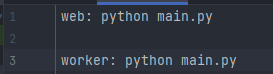
- The requirements.txt has to contain all the packages/versions that are being used on the application. I also forgot to put a "discord==1.0.1" line to invoke the main discord package.
- On Heroku CLI, i had to make a heroku ps:scale web=1 worker=1 after update the Procfile. This line sets the amount of dynos that the application will use. Also, i had to enable the options of web and worker (after commit) on Heroku dashboard resources page.

→ Switch branches and deploy
- Yes, i was in the remote branch master, which was used to be the default branch for Heroku. However, i had to change it to the main branch, using the command line git checkout main. After doing this, the code was able to actually being pushed.
- The code i edit is on master branch (Github), i just switch to main everytime i need to push it to Heroku. So, the first time i deployed, the bot was pinging each 30 seconds, and logging twice. The problem here was the unnecessary use of gunicorn, which runs a new server online, so i just had to remove the line reference "web: gunicorn main:app" of the Procfile, replacing by the python main.py that was mentioned before. I've added the worker dyno, edited some lines of the code and pushed it. The bot is on, working fine.

I'll update every change or issue on the application, this .readme just tells the things i did to solve some problems. If there's something that can be changed or solved in a better way, i can edit the text anytime, so it can be helpful to others.
Texto em Português
Cruzeiro
Esse é o mesmo bot antigo que foi escrito em C#, rodando no servidor do Discord da CSUL, mas eu mudei o código. Está melhor agora.
Como eu fiz
O bot está rodando agora nos servidores da Heroku, usando só recursos gratuitos. Tem alguns novos comandos na CLI da Heroku que podem causar problemas se você não prestar atenção. Eu vou listar aqui algumas coisas que eu quase esqueci enquanto lia as documentações, na primeira vez que tentei hospedar o bot.
→ Criar referência do Python
- A Heroku não vai habilitar os buildpacks se eles não forem referenciados. Eu usei o heroku buildpacks:set heroku/python pra setar isso.
- Isso pode ser configurado no comando heroku create, criando o aplicativo com o buildpack já inserido.
→ Configurar Procfile e os requirements
- Esses dois arquivos precisam ser criados no mesmo diretório do arquivo .py. O Procfile não pode ter extensão, e vai receber os dynos web/worker pra conectar a aplicação com a Heroku.
- Eu instalei o gunicorn pra usar os dynos, mas no final eu não precisei dele. Só passei o parâmetro python para rodá-los.
- O requirements.txt precisa ter todos os packages (comk as versões) que estão sendo usadas no app. Eu também esqueci de passar o parâmetro "discord==1.0.1" para chamar o pacote principal do Discord.
- Na linha de comando, eu tive que mandar um heroku ps:scale web=1 worker=1 depois de editar o Procfile. Esse comando configura a quantidade de dynos que vão ser usados. Depois eu também precisei habilitar os dois dynos na página de resources da Heroku, dentro do Dashboard da aplicação.
→ Trocar branches e fazer o deploy
- Sim, eu estava no branch master, que era o branch padrão da Heroku. Entretanto, eu precisei mudar para o main branch com o comando git checkout main. Depois de fazer isso, eu pude executar o git push.
- O código que eu edito está no master branch (Github), eu só troco para o main toda vez que vou enviar o push para a Heroku. Da primeira vez que eu fiz o deploy, o bot estava dando ping a cada 30 segundos, e logando duas vezes num único push. O problema aqui era o uso desnecessário do gunicorn,que roda um novo servidor online, então eu precisei remover a linha "web: gunicorn main:app" no Procfile, alternando para python main.py que eu havia mencionado antes. Eu adicionei o dyno worker, editei algumas linhas no código principal e executei o git push. O bot está online, funcionando perfeitamente.
Eu vou atualizar toda mudança ou problema da aplicação, esse readme só conta os métodos que eu usei pra resolver alguns problemas. Se tem algo que pode ser mudado ou resolvido de uma maneira melhor, eu posso editar esse texto a qualquer hora, para ser útil para outras pessoas.

 1 Oct 19, 2021
 53 Mar 09, 2022
 23 Dec 11, 2022
 2 Sep 15, 2022
 31 Dec 29, 2022
 1 Nov 16, 2021
 4 Oct 26, 2022
 16 Dec 02, 2022
 66 Dec 07, 2022
 2 Feb 09, 2022
 9 Apr 10, 2022
 4 Feb 18, 2022
 2 Jan 27, 2022
 4 Jan 15, 2022
 1 Oct 11, 2021
 2 Jul 12, 2022
 3.9k Jan 03, 2023
 4 May 18, 2022
 10 Jun 08, 2021
 0 Jan 06, 2022