Photini - A free, easy to use, digital photograph metadata (Exif, IPTC, XMP) editing application for Linux, Windows and MacOS.

Overview

Photini

A free, easy to use, digital photograph metadata (Exif, IPTC, XMP) editing application for Linux, Windows and MacOS.

"Metadata" is said to mean "data about data". In the context of digital photographs this means information that isn't essential in order to display the image, but tells you something about it. For example a title and description of the scene or the date & time and the GPS coordinates of the camera's position when the picture was taken.

"[Photini] doesn't try to be an all-singing, all-dancing image management powerhouse - it just lets you add information to photos, quickly and easily."

Linux Format magazine, January 2013

Why is it called Photini? Read my blog post on how I chose a name.

Features

Text editing screenshot

  • Easy to use graphical interface.
  • Set photo title, description, keywords, copyright and creator fields.
  • Some support for video files.
  • Spell checking of some fields (optional).
  • Can set metadata for multiple images simultaneously.
  • Can adjust picture date & time and time zone (of multiple images simultaneously).
  • Reads Exif, IPTC and XMP metadata, writes all three to maximise compatibility with other software.
  • Writes metadata to image files or to XMP "sidecar" files.
  • Can import photographs from many digital cameras.
  • Upload to Flickr and/or Google Photos with reuse of metadata.
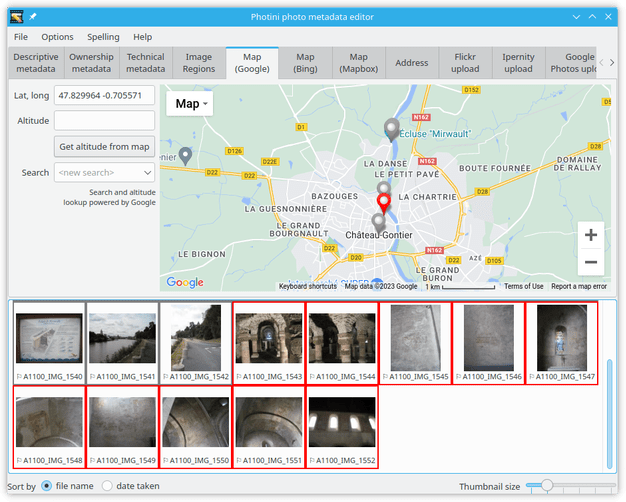
Geotagging screenshot

  • Geotagging - search map to find named places.
  • Choice of map providers - instantly switch to compare details.
  • Drag and drop images on to map to set GPS location.
  • Edit coordinates if required, or clear to unset GPS data.
  • Convert GPS coordinates to street address.
  • Suggestions for further development welcome.

Dependencies

Photini requires at least the following:

For a full list of dependencies, please see the installation documentation.

Documentation

Warning

This program, like all software, may have bugs. Before using it be sure to back up all your photographs (you do this anyway, right?) as I can't guarantee you won't accidentally damage them.

Photini's documentation is at http://photini.readthedocs.io/. It includes detailed installation instructions and a full user manual.

Getting help

If you encounter any problems installing or running Photini, please email [email protected] and I'll respond as soon as I can. There is also an email list or forum for discussions about Photini at https://groups.google.com/forum/#!forum/photini. If you discover a bug and have a GitHub account then please file a bug report on the GitHub "issues" page.

Internationalisation

Work has begun on providing Photini in multiple languages. I rely on users to do the translation, as I am not fluent in any language other than English. If you'd like to help, please join the Photini team on Transifex. For more details, see the localisation documentation.

Licence

Photini - a simple photo metadata editor.
Copyright (C) 2012-21 Jim Easterbrook [email protected]
German translation by Jan Rimmek
Spanish translation by Esteban Martinena & Cristos Ruiz
Polish translation by "itdawid"
Czech translation by Pavel Fric
Catalan translation by Joan Juvanteny

This program is free software: you can redistribute it and/or modify it under the terms of the GNU General Public License as published by the Free Software Foundation, either version 3 of the License, or (at your option) any later version.

This program is distributed in the hope that it will be useful, but WITHOUT ANY WARRANTY; without even the implied warranty of MERCHANTABILITY or FITNESS FOR A PARTICULAR PURPOSE. See the GNU General Public License for more details.

You should have received a copy of the GNU General Public License along with this program. If not, see http://www.gnu.org/licenses/.

Service terms and conditions

Use of the Google map tab is subject to the Google Maps Terms of Use and Google Privacy Policy.

Use of the Bing map tab is subject to the Microsoft Bing Maps Terms of Use and Microsoft Privacy Statement.

Use of the Mapbox map tab is subject to the Mapbox terms of service and Mapbox privacy policy.

The Flickr upload tab uses the Flickr API but is not endorsed or certified by Flickr.

Privacy statement

Photini does not directly gather any information from its users, but the online services it can use (maps, Flickr, and Google Photos) may do so. You should read these services' privacy policies before using them.

Photini stores user preferences in a text file on the user's computer. The default location of this file is $HOME/.config/photini/ (Linux), $HOME/Library/Preferences/photini (MacOS), or %USERPROFILE%\AppData\Local\photini\ (Windows). OAuth access tokens for Flickr and Google Photos are securely stored on the user's computer using Python keyring.

Documentation licence

Permission is granted to copy, distribute and/or modify the Photini documentation under the terms of the GNU Free Documentation License, Version 1.3 or any later version published by the Free Software Foundation; with no Invariant Sections, no Front-Cover Texts, and no Back-Cover Texts. A copy of the license is included in the documentation section entitled "GNU Free Documentation License".

Comments
  • Add support for location description

    Add support for location description

    Please consider adding support for setting a location description as an alternative to specifying geographical coordinates, i.e. something that will be mapped to IPTC's Location Created or Location Shown or the legacy City, Province or State and Country tags. Picture editors often use this information stored in their image databases to find photographers working in a particular area, so it is rather useful to be able to include this information.

    enhancement 
    opened by adamreichold 23
  • Segmentation faults

    Segmentation faults

    Photini may fail to run with some versions of PyQt. If started from a terminal you may get a "Segmentation fault" error message. If this happens, try using the --version option and reporting the details here. For example:

    [email protected]:~> photini
    Segmentation fault (core dumped)
    [email protected]:~> photini --version
    Photini 2017.6.1, build 822 (a668831)
      Python 3.6.1 (default, Mar 23 2017, 13:04:44) [GCC]
      PyGI 3.24.1, GExiv2 0.10.4, GObject 2.0
      PyQt 5.8.2, Qt 5.9.0, using QtWebEngineWidgets
      enchant 1.6.8
      flickrapi 2.2.1
    [email protected]:~> 
    

    My testing so far suggests the problem is with the QtWebEngine replacement for QtWebKit. When this works it's faster, and the Bing map aerial view selector works, so I'd prefer to use it. I think I'm going to have to provide a way of manually disabling it though, as I don't have a definitive list of which PyQt versions are safe.

    bug 
    opened by jim-easterbrook 22
  • Saving fails with 2021.4.0

    Saving fails with 2021.4.0

    I upgraded to 2021.4.0 to test multi-thumbnail reloading (#59) and now photini is useless: It does not save title or copyright anymore into the files, and always creates .xmp files.

    Symptoms

    1. Open file: photini 01.png
    2. Select file in file list
    3. Add title "test" and photographer "test"
    4. Right-click file in file list, "Show changes"
    5. The two changes are visible
    6. Right-click file in file list, "Save changes"
    7. Right-click file in file list, "Close file"
    8. Popup appears: Some files have unsaved meta data. Save?
    9. Confirm by clicking "Save"
    10. Open file with file chooser dialog
    11. Select file
    12. Title and photographer is empty.
    13. A 01.png.xmp file has been created, but that misses the title and photographer as well.

    The same happens when using "Save" in the "File" menu.

    Version

    photini --version
    No module named 'gpxpy'
    Photini 2021.4.0, build 1692 (52cba49)
      Python 3.9.2 (default, Feb 28 2021, 17:03:44) 
    [GCC 10.2.1 20210110]
      PyGObject 3.38.0, GExiv2 0.12.1, GObject 2.0, GLib 2.66.2
      PyQt 5.15.2, Qt 5.15.2, using QtWebEngine
      ffmpeg version 4.3.2-0+deb11u1 Copyright (c) 2000-2021 the FFmpeg developers
      available styles: cleanlooks, gtk2, cde, motif, plastique, qt5ct-style, Windows, Fusion
      using style: qt5ct-style
    

    I'm using a German language setting.

    opened by cweiske 14
  • Error if accents in filename

    Error if accents in filename

    Hello, When I try to save a photo after modifying metadata, I have this error message :

    11:25:30: ERROR: photini.exiv2: GExiv2: D:\Temp\Photini\photo_with_é.jpg.xmp: Failed to open the data source: No such file or directory (errno = 2) (9)
    Traceback (most recent call last):
      File "C:\Program Files (x86)\Photini\msys2\mingw64\lib\python3.7\site-packages\photini\exiv2.py", line 744, in open_new
        self = cls(sc_path)
      File "C:\Program Files (x86)\Photini\msys2\mingw64\lib\python3.7\site-packages\photini\exiv2.py", line 75, in __init__
        self.open_path(self._path)
      File "C:\Program Files (x86)\Photini\msys2\mingw64\lib\python3.7\site-packages\gi\overrides\GExiv2.py", line 44, in open_path
        super(Metadata, self).open_path(path)
    gi.repository.GLib.GError: GExiv2: D:\Temp\Photini\photo_with_é.jpg.xmp: Failed to open the data source: No such file or directory (errno = 2) (9)
    

    There is a accent the the file name. When removing it (photo_with_é.jpg => photo_with_e.jpg), everything works fine. Same issue with other non ascii characters. (And congratulations for the great job !)

    bug 
    opened by Arczt 14
  • Error reading metadata

    Error reading metadata

    When I click on some photos I have this error :

    22:25:16: ERROR: photini.exiv2: 20131205_155439.jpg(description), Exif.Photo.UserComment: 'ascii' codec can't decode byte 0xf8 in position 1: ordinal not in range(128)
    

    I suppose it's because there is maybe a 'ë' character in the metatdata. It's for the word 'Noël' which mean Christmas in French.

    opened by HydrelioxGitHub 14
  • Photini should update the

    Photini should update the "Date Taken" field

    When setting a date taken using the Technical metadata tab, I expected it to have an effect on the "Date Taken" field when I right-click->properties->Details the image.

    This is the field that Google Photo uses to order the images.

    image

    Could you consider changing this field when setting the "Taken" field? For the precision, you can always revert to XXXX-01-01 00:00:00.

    Using Photini for Windows version 2020.4.0 build 1484 (5c0423b)

    bug 
    opened by LordCatzorz 13
  • Are video files supported?

    Are video files supported?

    Hello,

    I see in the changelog "started adding support for video files", and that the Open Images dialog offers to select video files. But Photini crashes ("pythonw.exe has stopped working") as soon as I open a video file. I am using the latest version 2017.6.0 windows installer on Windows 10. I have tried with several AVI and MP4 videos.

    So I wonder if perhaps video support is not complete yet? Or a specific issue with the Windows version? Or is it supposed to work and perhaps something wrong on my machine?

    Thanks in advance.

    bug 
    opened by ericdanan 12
  • In 15.11.0 AttributeError: 'module' object has no attribute 'python_2_unicode_compatible'

    In 15.11.0 AttributeError: 'module' object has no attribute 'python_2_unicode_compatible'

    The previous version 15.10.0 is working fine. However, the latest version 15.11.0 crash upon launch. Here is a terminal dump:

    $ photini Traceback (most recent call last): File "/usr/bin/photini", line 9, in <module> load_entry_point('Photini==15.11.0', 'gui_scripts', 'photini')() File "/usr/lib/python2.7/dist-packages/pkg_resources.py", line 351, in load_entry_point return get_distribution(dist).load_entry_point(group, name) File "/usr/lib/python2.7/dist-packages/pkg_resources.py", line 2363, in load_entry_point return ep.load() File "/usr/lib/python2.7/dist-packages/pkg_resources.py", line 2088, in load entry = __import__(self.module_name, globals(),globals(), ['__name__']) File "/usr/lib/python2.7/dist-packages/photini/editor.py", line 42, in <module> from .bingmap import BingMap File "/usr/lib/python2.7/dist-packages/photini/bingmap.py", line 29, in <module> from .photinimap import PhotiniMap File "/usr/lib/python2.7/dist-packages/photini/photinimap.py", line 30, in <module> from .imagelist import DRAG_MIMETYPE File "/usr/lib/python2.7/dist-packages/photini/imagelist.py", line 31, in <module> from .metadata import Metadata, MetadataHandler File "/usr/lib/python2.7/dist-packages/photini/metadata.py", line 409, in <module> @six.python_2_unicode_compatible AttributeError: 'module' object has no attribute 'python_2_unicode_compatible'

    I am running Ubuntu Trusty 14.04

    I found a similar issue in GitHub in this project along with a solution. I don't know / have time yet to investigate.

    https://github.com/sloria/TextBlob/issues/8

    Well it looks like the trouble comes from line 409 in metadata.py (line 449 as well) @six.python_2_unicode_compatible

    and line 37 in the same file import six

    Basically six has no Attribute 'python_2_unicode_compatible'

    I don't know Python at all, but may be with the other project I mention above you can fix this bug ?

    bug 
    opened by pmo-19 12
  • Google Photo Crash

    Google Photo Crash

    I've just installed Photini and signin my Google account to upload some photos. But when I go to the Google photo tab, I can see my Google profile picture but nothing else is clickable except "Log in" and I have a window with this log :

    18:05:22: ERROR: photini.pyqt: 'title'
    Traceback (most recent call last):
      File "C:\Program Files (x86)\Photini\msys2\mingw64\lib\python3.7\site-packages\photini\pyqt.py", line 113, in wrapper
        return func(*args, **kwds)
      File "C:\Program Files (x86)\Photini\msys2\mingw64\lib\python3.7\site-packages\photini\uploader.py", line 274, in connection_changed
        self.show_album_list(self.session.get_albums())
      File "C:\Program Files (x86)\Photini\msys2\mingw64\lib\python3.7\site-packages\photini\googlephotos.py", line 323, in show_album_list
        self.upload_config.add_album(album)
      File "C:\Program Files (x86)\Photini\msys2\mingw64\lib\python3.7\site-packages\photini\googlephotos.py", line 267, in add_album
        widget = QtWidgets.QCheckBox(album['title'].replace('&', '&&'))
    KeyError: 'title'
    18:07:56: ERROR: photini.pyqt: 'title'
    Traceback (most recent call last):
      File "C:\Program Files (x86)\Photini\msys2\mingw64\lib\python3.7\site-packages\photini\pyqt.py", line 113, in wrapper
        return func(*args, **kwds)
      File "C:\Program Files (x86)\Photini\msys2\mingw64\lib\python3.7\site-packages\photini\uploader.py", line 274, in connection_changed
        self.show_album_list(self.session.get_albums())
      File "C:\Program Files (x86)\Photini\msys2\mingw64\lib\python3.7\site-packages\photini\googlephotos.py", line 323, in show_album_list
        self.upload_config.add_album(album)
      File "C:\Program Files (x86)\Photini\msys2\mingw64\lib\python3.7\site-packages\photini\googlephotos.py", line 267, in add_album
        widget = QtWidgets.QCheckBox(album['title'].replace('&', '&&'))
    KeyError: 'title'
    18:08:05: ERROR: photini.pyqt: 'title'
    Traceback (most recent call last):
      File "C:\Program Files (x86)\Photini\msys2\mingw64\lib\python3.7\site-packages\photini\pyqt.py", line 113, in wrapper
        return func(*args, **kwds)
      File "C:\Program Files (x86)\Photini\msys2\mingw64\lib\python3.7\site-packages\photini\uploader.py", line 274, in connection_changed
        self.show_album_list(self.session.get_albums())
      File "C:\Program Files (x86)\Photini\msys2\mingw64\lib\python3.7\site-packages\photini\googlephotos.py", line 323, in show_album_list
        self.upload_config.add_album(album)
      File "C:\Program Files (x86)\Photini\msys2\mingw64\lib\python3.7\site-packages\photini\googlephotos.py", line 267, in add_album
        widget = QtWidgets.QCheckBox(album['title'].replace('&', '&&'))
    KeyError: 'title'
    

    I use the last all in one windows installer version (2019.10.0)

    bug 
    opened by HydrelioxGitHub 11
  • Crash when batch importing files

    Crash when batch importing files

    I am importing a directory with a couple hundred of photos, photini works for a time (I set it to move the photos), but at the end it stops without any message. All the photos of the directory are moved apparently but I can't be sure. Photini version is current HEAD: c403b5f337cc2a78475419a6bb0a1ed2aa4c740f Kubuntu 20.04 with neon packages Python 3.8.2

    Fatal Python error: Cannot recover from stack overflow. Python runtime state: initialized

    Current thread 0x00007fd664b4f740 (most recent call first): File "/usr/lib/python3/dist-packages/gi/overrides/GExiv2.py", line 44 in open_path File "/usr/local/lib/python3.8/dist-packages/photini/exiv2.py", line 75 in init File "/usr/local/lib/python3.8/dist-packages/photini/exiv2.py", line 566 in init File "/usr/local/lib/python3.8/dist-packages/photini/exiv2.py", line 628 in open_old File "/usr/local/lib/python3.8/dist-packages/photini/metadata.py", line 1095 in init File "/usr/local/lib/python3.8/dist-packages/photini/imagelist.py", line 63 in init File "/usr/local/lib/python3.8/dist-packages/photini/imagelist.py", line 730 in open_file File "/usr/local/lib/python3.8/dist-packages/photini/importer.py", line 632 in file_copied File "/usr/local/lib/python3.8/dist-packages/photini/pyqt.py", line 113 in wrapper File "/usr/local/lib/python3.8/dist-packages/photini/imagelist.py", line 778 in show_thumbnail File "/usr/local/lib/python3.8/dist-packages/photini/imagelist.py", line 732 in open_file File "/usr/local/lib/python3.8/dist-packages/photini/importer.py", line 632 in file_copied File "/usr/local/lib/python3.8/dist-packages/photini/pyqt.py", line 113 in wrapper File "/usr/local/lib/python3.8/dist-packages/photini/imagelist.py", line 778 in show_thumbnail File "/usr/local/lib/python3.8/dist-packages/photini/imagelist.py", line 732 in open_file File "/usr/local/lib/python3.8/dist-packages/photini/importer.py", line 632 in file_copied File "/usr/local/lib/python3.8/dist-packages/photini/pyqt.py", line 113 in wrapper File "/usr/local/lib/python3.8/dist-packages/photini/imagelist.py", line 778 in show_thumbnail File "/usr/local/lib/python3.8/dist-packages/photini/imagelist.py", line 732 in open_file File "/usr/local/lib/python3.8/dist-packages/photini/importer.py", line 632 in file_copied File "/usr/local/lib/python3.8/dist-packages/photini/pyqt.py", line 113 in wrapper File "/usr/local/lib/python3.8/dist-packages/photini/imagelist.py", line 778 in show_thumbnail File "/usr/local/lib/python3.8/dist-packages/photini/imagelist.py", line 732 in open_file File "/usr/local/lib/python3.8/dist-packages/photini/importer.py", line 632 in file_copied File "/usr/local/lib/python3.8/dist-packages/photini/pyqt.py", line 113 in wrapper File "/usr/local/lib/python3.8/dist-packages/photini/imagelist.py", line 778 in show_thumbnail File "/usr/local/lib/python3.8/dist-packages/photini/imagelist.py", line 732 in open_file File "/usr/local/lib/python3.8/dist-packages/photini/importer.py", line 632 in file_copied File "/usr/local/lib/python3.8/dist-packages/photini/pyqt.py", line 113 in wrapper File "/usr/local/lib/python3.8/dist-packages/photini/imagelist.py", line 778 in show_thumbnail File "/usr/local/lib/python3.8/dist-packages/photini/imagelist.py", line 732 in open_file File "/usr/local/lib/python3.8/dist-packages/photini/importer.py", line 632 in file_copied File "/usr/local/lib/python3.8/dist-packages/photini/pyqt.py", line 113 in wrapper File "/usr/local/lib/python3.8/dist-packages/photini/imagelist.py", line 778 in show_thumbnail File "/usr/local/lib/python3.8/dist-packages/photini/imagelist.py", line 732 in open_file File "/usr/local/lib/python3.8/dist-packages/photini/importer.py", line 632 in file_copied File "/usr/local/lib/python3.8/dist-packages/photini/pyqt.py", line 113 in wrapper File "/usr/local/lib/python3.8/dist-packages/photini/imagelist.py", line 778 in show_thumbnail File "/usr/local/lib/python3.8/dist-packages/photini/imagelist.py", line 732 in open_file File "/usr/local/lib/python3.8/dist-packages/photini/importer.py", line 632 in file_copied File "/usr/local/lib/python3.8/dist-packages/photini/pyqt.py", line 113 in wrapper File "/usr/local/lib/python3.8/dist-packages/photini/imagelist.py", line 778 in show_thumbnail File "/usr/local/lib/python3.8/dist-packages/photini/imagelist.py", line 732 in open_file File "/usr/local/lib/python3.8/dist-packages/photini/importer.py", line 632 in file_copied File "/usr/local/lib/python3.8/dist-packages/photini/pyqt.py", line 113 in wrapper File "/usr/local/lib/python3.8/dist-packages/photini/imagelist.py", line 778 in show_thumbnail File "/usr/local/lib/python3.8/dist-packages/photini/imagelist.py", line 732 in open_file File "/usr/local/lib/python3.8/dist-packages/photini/importer.py", line 632 in file_copied File "/usr/local/lib/python3.8/dist-packages/photini/pyqt.py", line 113 in wrapper File "/usr/local/lib/python3.8/dist-packages/photini/imagelist.py", line 778 in show_thumbnail File "/usr/local/lib/python3.8/dist-packages/photini/imagelist.py", line 732 in open_file File "/usr/local/lib/python3.8/dist-packages/photini/importer.py", line 632 in file_copied File "/usr/local/lib/python3.8/dist-packages/photini/pyqt.py", line 113 in wrapper File "/usr/local/lib/python3.8/dist-packages/photini/imagelist.py", line 778 in show_thumbnail File "/usr/local/lib/python3.8/dist-packages/photini/imagelist.py", line 732 in open_file File "/usr/local/lib/python3.8/dist-packages/photini/importer.py", line 632 in file_copied File "/usr/local/lib/python3.8/dist-packages/photini/pyqt.py", line 113 in wrapper File "/usr/local/lib/python3.8/dist-packages/photini/imagelist.py", line 778 in show_thumbnail File "/usr/local/lib/python3.8/dist-packages/photini/imagelist.py", line 732 in open_file File "/usr/local/lib/python3.8/dist-packages/photini/importer.py", line 632 in file_copied File "/usr/local/lib/python3.8/dist-packages/photini/pyqt.py", line 113 in wrapper File "/usr/local/lib/python3.8/dist-packages/photini/imagelist.py", line 778 in show_thumbnail File "/usr/local/lib/python3.8/dist-packages/photini/imagelist.py", line 732 in open_file File "/usr/local/lib/python3.8/dist-packages/photini/importer.py", line 632 in file_copied File "/usr/local/lib/python3.8/dist-packages/photini/pyqt.py", line 113 in wrapper File "/usr/local/lib/python3.8/dist-packages/photini/imagelist.py", line 778 in show_thumbnail File "/usr/local/lib/python3.8/dist-packages/photini/imagelist.py", line 732 in open_file File "/usr/local/lib/python3.8/dist-packages/photini/importer.py", line 632 in file_copied File "/usr/local/lib/python3.8/dist-packages/photini/pyqt.py", line 113 in wrapper File "/usr/local/lib/python3.8/dist-packages/photini/imagelist.py", line 778 in show_thumbnail File "/usr/local/lib/python3.8/dist-packages/photini/imagelist.py", line 732 in open_file File "/usr/local/lib/python3.8/dist-packages/photini/importer.py", line 632 in file_copied File "/usr/local/lib/python3.8/dist-packages/photini/pyqt.py", line 113 in wrapper File "/usr/local/lib/python3.8/dist-packages/photini/imagelist.py", line 778 in show_thumbnail File "/usr/local/lib/python3.8/dist-packages/photini/imagelist.py", line 732 in open_file File "/usr/local/lib/python3.8/dist-packages/photini/importer.py", line 632 in file_copied File "/usr/local/lib/python3.8/dist-packages/photini/pyqt.py", line 113 in wrapper File "/usr/local/lib/python3.8/dist-packages/photini/imagelist.py", line 778 in show_thumbnail File "/usr/local/lib/python3.8/dist-packages/photini/imagelist.py", line 732 in open_file File "/usr/local/lib/python3.8/dist-packages/photini/importer.py", line 632 in file_copied File "/usr/local/lib/python3.8/dist-packages/photini/pyqt.py", line 113 in wrapper File "/usr/local/lib/python3.8/dist-packages/photini/imagelist.py", line 778 in show_thumbnail File "/usr/local/lib/python3.8/dist-packages/photini/imagelist.py", line 732 in open_file File "/usr/local/lib/python3.8/dist-packages/photini/importer.py", line 632 in file_copied File "/usr/local/lib/python3.8/dist-packages/photini/pyqt.py", line 113 in wrapper File "/usr/local/lib/python3.8/dist-packages/photini/imagelist.py", line 778 in show_thumbnail File "/usr/local/lib/python3.8/dist-packages/photini/imagelist.py", line 732 in open_file File "/usr/local/lib/python3.8/dist-packages/photini/importer.py", line 632 in file_copied File "/usr/local/lib/python3.8/dist-packages/photini/pyqt.py", line 113 in wrapper File "/usr/local/lib/python3.8/dist-packages/photini/imagelist.py", line 778 in show_thumbnail File "/usr/local/lib/python3.8/dist-packages/photini/imagelist.py", line 732 in open_file File "/usr/local/lib/python3.8/dist-packages/photini/importer.py", line 632 in file_copied File "/usr/local/lib/python3.8/dist-packages/photini/pyqt.py", line 113 in wrapper File "/usr/local/lib/python3.8/dist-packages/photini/imagelist.py", line 778 in show_thumbnail File "/usr/local/lib/python3.8/dist-packages/photini/imagelist.py", line 732 in open_file File "/usr/local/lib/python3.8/dist-packages/photini/importer.py", line 632 in file_copied File "/usr/local/lib/python3.8/dist-packages/photini/pyqt.py", line 113 in wrapper File "/usr/local/lib/python3.8/dist-packages/photini/imagelist.py", line 778 in show_thumbnail File "/usr/local/lib/python3.8/dist-packages/photini/imagelist.py", line 732 in open_file File "/usr/local/lib/python3.8/dist-packages/photini/importer.py", line 632 in file_copied ... Aborted

    bug 
    opened by aseques 10
  • ValueError: time data '200303        ' does not match format '%Y%m%d%H%M%S'

    ValueError: time data '200303 ' does not match format '%Y%m%d%H%M%S'

    metadata.py from_ISO_8601 raises ValueError for dates not conforming to ISO format. I have several of these, such as the one reported in the above error which only has a year and month.

    Not sure these dates are exif conform, but e.g. Lightroom (which I am trying to replace with a more customizable flow) has no issue.

    bug 
    opened by bboser 9
  • Bugs in v2022.12.0

    Bugs in v2022.12.0

    I apologise for releasing v2022.12.0 with several bugs that I really should have spotted before release. I've issued the following patch releases:

    v2022.12.0.1 fixes TypeError: descriptor 'tr' requires a 'PySide2.QtCore.QObject' object but received a 'str' or TypeError: tr(self, str, disambiguation: str = None, n: int = -1): first argument of unbound method must have type 'QObject' errors when doing "help -> about Photini" or a map tab search.

    v2022.12.0.2 fixes TypeError: can only join an iterable error when writing an XMP "sidecar" file.

    v2022.12.0.3 fixes incorrect "LangAlt" values written to IPTC-IIM metadata.

    bug 
    opened by jim-easterbrook 0
  • WARNING: CPU random generator seem to be failing, disabling hardware random number generation

    WARNING: CPU random generator seem to be failing, disabling hardware random number generation

    As I'm having a CPU like https://askubuntu.com/questions/1264439/warning-cpu-random-generator-seem-to-be-failing-disable-hardware-random-number and this is a well known issue so far, is there a way to force the hardware RNG using alternative method for random number generation (due to some reason I cannot apply BIOS patch on my machine).

    WARNING: CPU random generator seem to be failing, disabling hardware random number generation
    WARNING: RDRND generated: 0xffffffff 0xffffffff 0xffffffff 0xffffffff
    Traceback (most recent call last):
      File "runpy.py", line 196, in _run_module_as_main
      File "runpy.py", line 86, in _run_code
      File "C:\Program Files (Portable & CMD)\python\lib\site-packages\photini\__main__.py", line 25, in <module>
        sys.exit(main())
      File "C:\Program Files (Portable & CMD)\python\lib\site-packages\photini\editor.py", line 573, in main
        main = MainWindow(options, args)
      File "C:\Program Files (Portable & CMD)\python\lib\site-packages\photini\editor.py", line 180, in __init__
        full_screen = window_state & int(
    TypeError: int() argument must be a string, a bytes-like object or a real number, not 'WindowState'
    Exception ignored in atexit callback: <function shutdown at 0x000002674364AEF0>
    Traceback (most recent call last):
      File "logging\__init__.py", line 2182, in shutdown
      File "logging\__init__.py", line 1084, in flush
      File "C:\Program Files (Portable & CMD)\python\lib\site-packages\photini\loggerwindow.py", line 61, in flush
        self.flush_text.emit()
    RuntimeError: Internal C++ object (StreamProxy) already deleted.
    
    opened by Trung0246 11
  • Flickr authentication failing

    Flickr authentication failing

    Flickr have recently made a change in their API that prevents recent versions of Photini from authenticating / logging in. (With Firefox you get an "SSL_ERROR_RX_RECORD_TOO_LONG" error, I don't know how other browsers will respond.)

    A possible solution is to go back to Photini version 2019.5.0 temporarily, authorise Flickr, then change back to a more recent Photini. (Backup your config file before you do this, then restore it afterwards.) As long as you never log out from Flickr the authorisation should remain valid.

    If the Flickr problem persists I'll issue a new release with an alternative authentication strategy.

    bug 
    opened by jim-easterbrook 2
Releases(2022.12.0.3)
Owner
Jim Easterbrook
Former R&D engineer at @bbcrd, now retired.
Jim Easterbrook
Generate your own QR Code and scan it to see the results! Never use it for malicious purposes.

QR-Code-Generator-Python Choose the name of your generated QR .png file. If it happens to open the .py file (the application), there are specific comm

1 Dec 23, 2021
Python library that finds the size / type of an image given its URI by fetching as little as needed

FastImage This is an implementation of the excellent Ruby library FastImage - but for Python. FastImage finds the size or type of an image given its u

Brian Muller 28 Mar 01, 2022
python binding for libvips using cffi

README PyPI package: https://pypi.python.org/pypi/pyvips conda package: https://anaconda.org/conda-forge/pyvips We have formatted docs online here: ht

libvips 467 Dec 30, 2022
A Gtk based Image Selector with Preview

gtk-image-selector This is an attempt to restore Gtk Image Chooser "lost functionality": displaying an image preview when selecting images... This is

Spiros Georgaras 2 Sep 28, 2022
A simple programming language for manipulating images.

f-stop A simple programming language for manipulating images. Examples OPEN "image.png" AS image RESIZE image (300, 300) SAVE image "out.jpg" CLOSE im

F-Stop 6 Oct 27, 2022
ModernGL is a python wrapper over OpenGL 3.3+ core

ModernGL is a python wrapper over OpenGL 3.3+ core that simplifies the creation of simple graphics applications like scientific simulations, games or user interface

ModernGL 1.4k Jan 01, 2023
A collection of python scripts which help you programatically create PNGs or GIFs

A collection of python scripts which help you programatically create PNGs or GIFs and their Metadata in bulk with custom rarity rates, upload them to OpenSea & list them for sale.

Tom 30 Dec 24, 2022
Seeks to remove text from an image in a convincing way.

Text-Removal This is a Computer Vision project that seeks to successfully remove text from an image by covering the text areas in a convincing way. He

6 Nov 22, 2022
Automatic picture transmission(APT) protocol decoder for NOAA weather satellites

Automatic picture transmission(APT) decoder Automatic picture transmission protocol is used by NOAA satellites. They constantly send a frequency modul

Jayachandra Kasarla 25 Aug 05, 2022
Pyconvert is a python script that you can use to convert image files to another image format! (eg. PNG to ICO)

Pyconvert is a python script that you can use to convert image files to another image format! (eg. PNG to ICO)

1 Jan 16, 2022
hashmask reverse lookup

ImageHashMasks Lookup Hashmask NFT index from a picture Setup pip install pillow click imagehash Usage $ python imagehashmasks.py

17 Nov 29, 2021
Convert bitmap images to seeds for Tiny-83 NFT project.

What is this? This tool allows you to convert any 14p high and 22p wide Bitmap (.bmp) to the seed needed for the Tiny-83 NFT project. Project Twitter:

shib_maximalist 1 Oct 31, 2021
imgAnalyser - Un script pour obtenir la liste des pixels d'une image correspondant à plusieurs couleurs

imgAnalyser - Un script pour obtenir la liste des pixels d'une image correspondant à plusieurs couleurs Ce script à pour but, à partir d'une image, de

Théo Migeat 1 Nov 15, 2021
Panel Competition Image Generator

Panel Competition Image Generator This project was build by a member of the NFH community and is open for everyone who wants to try it. Relevant links

Juliano Mendieta 1 Oct 22, 2021
Parking management project which generates barcode parking ticket with user-friendly Tkinter program GUI

Parking-management-system Parking management project which generates barcode parking ticket with user-friendly Tkinter program GUI How to run Download

1 Jul 03, 2022
CadQuery is an intuitive, easy-to-use Python module for building parametric 3D CAD models.

A python parametric CAD scripting framework based on OCCT

1.9k Dec 30, 2022
ScreenTeX is a tool that grabs all text when taking a screenshot rather than getting an image.

The ScreenTeX project By: Seanpm2001 / ScreenTeX, Et; Al. Top README.md Read this article in a different language 🌐 List of languages Sorted by: A-Z

Sean P. Myrick V19.1.7.2 3 Oct 25, 2022
Image generation API.

Image Generator API This is an api im working on Currently its just a test project Im trying to make custom readme images with your discord account pr

Siddhesh Zantye 2 Feb 19, 2022
Png2Jpg tool will help you convert from png image format to jpg images format.

PNG 2 JPG All codes assume running from root directory. Please update the sys path at the beginning of the codes before running. Over View Png2Jpg too

Nguyễn Trường Lâu 2 Dec 27, 2021
FrostedGlass is a translucent frosted glass effect widget, that creates a context with the background behind it.

FrostedGlass FrostedGlass is a translucent frosted glass effect widget, that creates a context with the background behind it. The effect is drawn on t

Kivy Garden 24 Dec 10, 2022