A simple python bot that serves to send some notifications about GitHub events to Slack.

Overview

github alerts slack bot 🤖

What is it? 🔍

This is a simple bot that serves to send some notifications about GitHub events to Slack channels.

These are the features currently developed:

  • notification to inform Pull Requests with conflicts

Others features may be developed in the future.


How it works 🧑‍🏭

  • GitHub webhook send a request to bot to selected event (Pull Request has been opened, per example)
  • It handle the request
    • it check if the request comes from the correct GitHub webhook to avoid fraud
    • it don't send repeated notification with same data on the same day
  • Whether yes, the Slack webhook is called to create a message in on channel with the information (a Pull Request is open)

Configuration ⚙️

Create a access token of GitHub

Navigate to Settings > Developer Settings > Personal access tokens > Generate new token

The permission repo is only need to access necessary datas of yours repositories: image
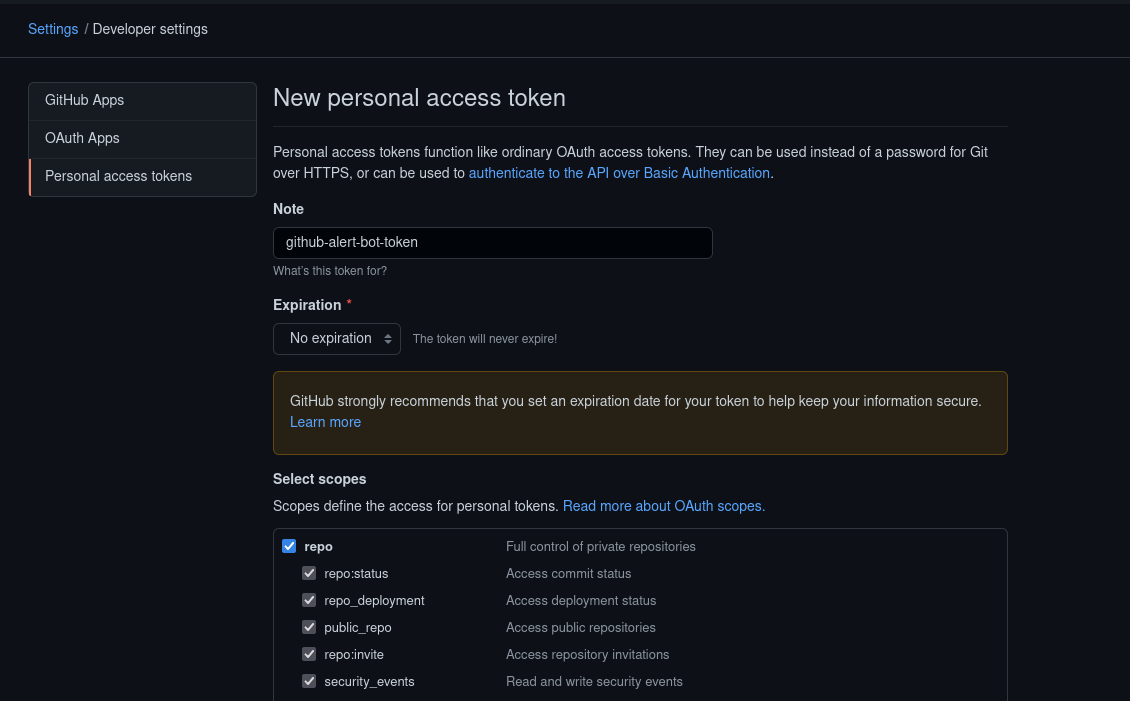
Save the access token after creating it.

Create a workflow in Slack

The workflow is the point used to send the notifications and here there are a tutorial to create one.

The only var required in the text is prs_list.

You can customize the message of your workflow as you wish:

example of workflow

After create, save the workflow webhook.

Deploy the bot

First, create your fork of this project to can perform the deploy.

The our bot is configured to deploy in Heroku. Heroku is a cloud platform to deploy your simple projects, they have a free plan that will be enough for us. You can also choose another cloud platform to do this.

Create a new app > Select the deploy on GitHub > Choose your fork of this project

Greate! If everything is ok, you can see this message:
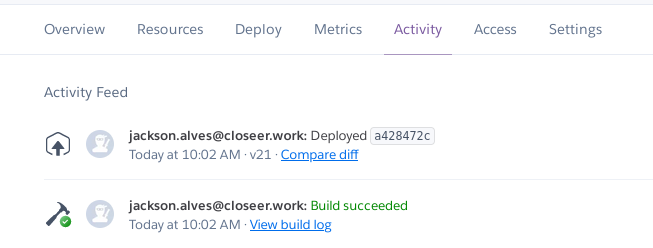
success deploy

Install Redis

Redis is used to check if one message is send in the past day with the same pull requests.

In the dashboard of your project in Heroku, go to Resources > Find more add-ons

Select Redis Enterprise Cloud. It will probably ask you to set up the credit card on your account, but don't worry, the free plan is enough to our bot. After set up your credit card, select the free plan and the project of bot to install the Redis.

It is listed in your add-ons if everything is ok:

redis add-on

Access the add-on and complete the Redis url with the datas: http://rediscloud:[email protected]:port

Like this: http://rediscloud:cofe6kWpNnsdlfkçlç[email protected]:1234

This will be used to connect our bot with the Redis.

Create GitHub webhook

Your repository to track > Settings > Webhooks > add webhook

In the Payload URL, past the URL of your Heroku project and the endpoint check_conflicts. Like this: https://my-heroku-app.herokuapp.com/check_conflicts

The Content type is application/json.

I recommend using a UUID in the Secret. This will ensure the security of the requests. Save this secret to use in virtual environments of the project

In the events, select Let me select individual events. and select Pull requests in the list of events.

Now just save.

Setting envs

Finally, the last step is set the virtual environments in the Heroku project.

Heroku project > Settings > Reveal Config vars.

Now set this envs:

  • SECRET_ACCESS: secret used in GitHub webhook
  • ACCESS_TOKEN: your access token of GitHub
  • PROJECT_TO_TRACK: project of the GitHub webhook. Example: jackson541/github-alerts-slack-bot
  • BRANCH_TO_TRACK: the branch of the project that you want to track. Example: master
  • SLACK_WEBHOOK_LINK: the URL of the workflow created in Slack
  • REDIS_URL: the URL created with the datas of Redis. example: http://rediscloud:cofe6kWpNnsdlfkçlç[email protected]:1234

You can stop and have your coffee, everything is set up!


Contribute

Contribute is always well received! Feel free to open Pull Requests or Issues. 😄

Owner
Jackson Alves
Formação de Técnico em informática pelo IFRN e atualmente cursando Ciência e Tecnologia na UFRN.
Jackson Alves
this synchronizes my appearances with my calendar

Josh's Schedule Synchronizer Here's the "problem:" I use a spreadsheet to maintain all my public appearances. I check the spreadsheet as often as poss

Josh Long 2 Oct 18, 2021
OpenAPI Generator allows generation of API client libraries (SDK generation), server stubs, documentation and configuration automatically given an OpenAPI Spec (v2, v3)

OpenAPI Generator Master (5.3.1): 5.4.x (5.4.x): 6.0.x (6.0.x): ⭐ ⭐ ⭐ If you would like to contribute, please refer to guidelines and a list of open t

OpenAPI Tools 14.8k Jan 04, 2023
A Discord bot written in Python that can be used to control event management on a server.

Event Management Discord Bot A Discord bot written in Python that can be used to control event management on a Discord server. Made originally for GDS

Suvaditya Mukherjee 2 Dec 07, 2021
A Powerfull Userbot Telegram PandaX_Userbot, Vc Music Userbot + Bot Manager based Telethon

Support ☑ CREDITS THANKS YOU VERRY MUCH FOR ALL Telethon Pyrogram TeamUltroid TeamUserge CatUserbot pytgcalls Dan Lainnya

22 Dec 25, 2022
A fun hangman style game to guess random movie names with a short summary about the movie.

hang-movie-man Hangman but for movies 😉 This is a fun hangman style game to guess random movie names from the local database and show some summary ab

Ankit Josh 10 Sep 07, 2022
A Telegram Bot written in Python for mirroring files on the Internet to your Google Drive

No support is going to be provided of any kind, only maintaining this for vps user on request. This is a Telegram Bot written in Python for mirroring

Sunil Kumar 42 Oct 28, 2022
A Python Tumblr API v2 Client

PyTumblr Installation Install via pip: $ pip install pytumblr Install from source: $ git clone https://github.com/tumblr/pytumblr.git $ cd pytumblr $

Tumblr 677 Dec 21, 2022
Music bot for Discord

Treble Music bot for Discord Youtube is after music bots on Discord. So we are here to fill the void. Introducing Treble, the next generation of Disco

Aja Khanal 0 Sep 16, 2022
It's a Discord bot to control your PC using your Discord Channel or using Reco: Discord PC Remote Controller App.

Reco PC Server Reco PC Server is a cross platform PC Controller Discord Bot which is a modified and improved version of Chimera for Reco-Discord PC Re

Arvinth Krishna 12 Aug 31, 2022
Actively maintained, pure Python wrapper for the Twitter API. Supports both normal and streaming Twitter APIs.

Twython Twython is a Python library providing an easy way to access Twitter data. Supports Python 3. It's been battle tested by companies, educational

Ryan McGrath 1.9k Jan 02, 2023
This repository is used to simplify the process of cloning the SSM documents across the AWS regions.

SSM Cloner Introduction This module is created in order to simplify the process of copying the SSM documents from one region to another regions. As an

6 Jun 04, 2022
Bezlik Year Calendar Planner

Bezlik Year Calendar Planner Scribus script for creating year planners on one page A1 paper format. Script is based on Year-Calendar-Script-for-Scribu

Bohdan Bobrowski 2 May 24, 2022
A Python library for the Docker Engine API

Docker SDK for Python A Python library for the Docker Engine API. It lets you do anything the docker command does, but from within Python apps – run c

Docker 6.1k Jan 03, 2023
Is the CoWin website updated for registration?

CoWin-Update Is the CoWin website updated for registration? This is a very hacky PYTHON3 script to lookup the CoWin portal if they re-deployed their J

Yash Jakhotiya 5 May 10, 2021
SIGIT - Simple Information Gathering Toolkit

SIGIT - Simple Information Gathering Toolkit Features userrecon - username reconnaissance facedumper - dump facebook information mailfinder - find ema

Termux Hackers 437 Dec 29, 2022
Ein PY-Skript, mit dem tiled-Editor-Maps bearbeitet werden

tilesetCopyrighter Ein PY-Skript, mit dem tiled-Editor-Maps bearbeitet werden können fügt je Tileset eine custom-Property tilesetCopyright (string) hi

1 Dec 26, 2021
Randomly selects two teams based on who is in a voice channel on Discord

TeamPickerDiscordBot Randomly selects two teams based on who is in a voice channel on Discord What I Learned The ins and outs of Python as this was my

Brecken Enneking 2 Jan 27, 2022
This is a okay that is okay that means none is okay

Owner: Masterolic 🇮🇳 CatUB A Powerful, Smart And Simple Userbot In Telethon. Credits This is A Remix Bot Of Many UserBot. DARKCOBRA FridayUserBot Ja

Masterolic 1 Nov 28, 2021
Baota-docker - Deploying baota panel via docker

baota-docker Deploying baota panel via docker. 通过docker一键部署宝塔面板。 一、前言 好像很多人对这个感兴

Mr. Cat 15 Dec 12, 2022