Convert tables stored as images to an usable .csv file

Overview

Convert an image of numbers to a .csv file

This Python program aims to convert images of array numbers to corresponding .csv files. It uses OpenCV for Python to process the given image and Tesseract for number recognition.
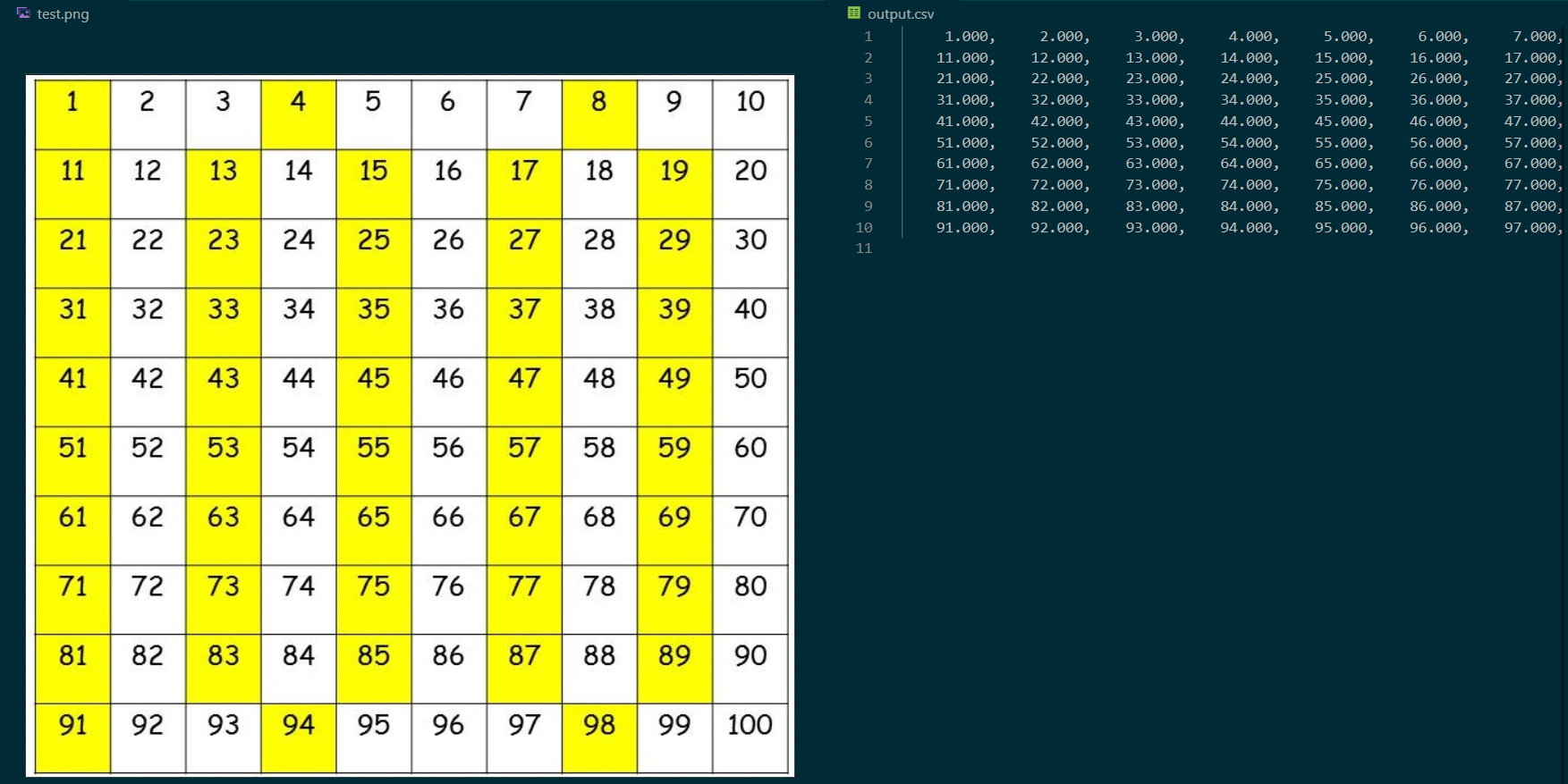
Output Example

The repository includes:

  • the source code of image2csv.py,
  • the tools.py file where useful functions are implemented,
  • the grid_detector.py file to perform automatic grid detection,
  • a folder with some files used for test.

The code is not well documented nor fully efficient as I'm a beginner in programming, and this project is a way for me to improve my skills, in particular in Python programming.

How to use the program

First of all, the user must install the needed packages:

$ pip install -r requirements.txt   

as well as Tesseract.

Then, in a python terminal, use the command line:

$ python image2csv.py --image path/to/image

There are a few optionnal arguments:

  • --path path/to/output/csv/file
  • --grid [False]/True
  • --visualization [y]/n
  • --method [fast]/denoize

and one can find their usage using the command line:

$ python image2csv.py --help

By default, the program will try to detect a grid automatically. This detection uses OpenCV's Hough transformation and Canny detection, so the user can tweak a few parameters for better processing in the grid_detector.py file.

When then program is running with manual grid detection, the user has to interact with it via its mouse and the terminal :

  1. the image is opened in a window for the user to draw a rectangle around the first (top left) number. As this rectangle is used as a base to create a grid afterward, keep in mind that all the numbers should fit into the box.
  2. A new window is opened showing the image with the drawn rectangle. Press any key to close and continue.
  3. Based on the drawn rectangle, a grid is created to extract each number one by one. This grid is controlled by the user via two "offset" values. The user has to enter those values in the terminal, then the image is opened in a window with the created grid. Press any key to close and continue. If the numbers does not fit into the grid, the user can change the offset values and repeat this step. When the grid matches the user's expectations, he can set both of the offset values to 0 to continue.
  4. The numbers are extracted from the image and the results are shown in the terminal. (be carefoul though, the indicated number of errors represents the number of errors encountered by Tesseract, but Tesseract can identify a wrong number which will not be counted as an error !)
  5. The .csv file is created with the numbers identified by Tesseract. If Tesseract finds an error, it will show up on the .csv file as an infinite value.

Hypothesis and limits

For the program to run correctly, the input image must verify some hypothesis (just a few simple ones):

  • for manual selection, the line and row width must be constants, as the build grid is just a repetition of the initial rectangle with offsets;
  • to use automatic grid detection, a full and clear grid, with external borders, must be visible;
  • it is recommended to have a good input image resolution, to control the offsets more easily.

At last, this program is not perfect (I know you thought so, with its smooth workflow and simple hypothesis, sorry to disappoint...) and does not work with decimal numbers... But does a great job on negatives ! Also the user must be careful with the slashed zero which seems to be identified by Tesseract as a six.

Credits

For image pre-processing in the tool.py file I used a useful function implemented by @Nitish9711 for his Automatic-Number-plate-detection (https://github.com/Nitish9711/Automatic-Number-plate-detection.git).

Owner
Beginning in the programming world with the help of @29jm, holy builder of the very special SnowflakeOS. Student at the École Centrale de Lille (FR).
The micro-framework to create dataframes from functions.

The micro-framework to create dataframes from functions.

Stitch Fix Technology 762 Jan 07, 2023
Python package for analyzing behavioral data for Brain Observatory: Visual Behavior

Allen Institute Visual Behavior Analysis package This repository contains code for analyzing behavioral data from the Allen Brain Observatory: Visual

Allen Institute 16 Nov 04, 2022
Supply a wrapper ``StockDataFrame`` based on the ``pandas.DataFrame`` with inline stock statistics/indicators support.

Stock Statistics/Indicators Calculation Helper VERSION: 0.3.2 Introduction Supply a wrapper StockDataFrame based on the pandas.DataFrame with inline s

Cedric Zhuang 1.1k Dec 28, 2022
peptides.py is a pure-Python package to compute common descriptors for protein sequences

peptides.py Physicochemical properties and indices for amino-acid sequences. 🗺️ Overview peptides.py is a pure-Python package to compute common descr

Martin Larralde 32 Dec 31, 2022
Convert tables stored as images to an usable .csv file

Convert an image of numbers to a .csv file This Python program aims to convert images of array numbers to corresponding .csv files. It uses OpenCV for

711 Dec 26, 2022
COVID-19 deaths statistics around the world

COVID-19-Deaths-Dataset COVID-19 deaths statistics around the world This is a daily updated dataset of COVID-19 deaths around the world. The dataset c

Nisa Efendioğlu 4 Jul 10, 2022
Top 50 best selling books on amazon

It's a dashboard that shows the detailed information about each book in the top 50 best selling books on amazon over the last ten years

Nahla Tarek 1 Nov 18, 2021
Tkinter Izhikevich Neuron Model With Python

TKINTER IZHIKEVICH NEURON MODEL WITH PYTHON Hodgkin-Huxley Model It is a mathematical model for the generation and transmission of action potentials i

Rabia KOÇ 8 Jul 16, 2022
Codes for the collection and predictive processing of bitcoin from the API of coinmarketcap

Codes for the collection and predictive processing of bitcoin from the API of coinmarketcap

Teo Calvo 5 Apr 26, 2022
Data Analysis for First Year Laboratory at Imperial College, London.

Data Analysis for First Year Laboratory at Imperial College, London. For personal reference only, and to reference in lab reports and lab books.

Martin He 0 Aug 29, 2022
SNV calling pipeline developed explicitly to process individual or trio vcf files obtained from Illumina based pipeline (grch37/grch38).

SNV Pipeline SNV calling pipeline developed explicitly to process individual or trio vcf files obtained from Illumina based pipeline (grch37/grch38).

East Genomics 1 Nov 02, 2021
Aggregating gridded data (xarray) to polygons

A package to aggregate gridded data in xarray to polygons in geopandas using area-weighting from the relative area overlaps between pixels and polygons. Check out the binder link above for a sample c

Kevin Schwarzwald 42 Nov 09, 2022
Desafio proposto pela IGTI em seu bootcamp de Cloud Data Engineer

Desafio Modulo 4 - Cloud Data Engineer Bootcamp - IGTI Objetivos Criar infraestrutura como código Utuilizando um cluster Kubernetes na Azure Ingestão

Otacilio Filho 4 Jan 23, 2022
:truck: Agile Data Preparation Workflows made easy with dask, cudf, dask_cudf and pyspark

To launch a live notebook server to test optimus using binder or Colab, click on one of the following badges: Optimus is the missing framework to prof

Iron 1.3k Dec 30, 2022
A Pythonic introduction to methods for scaling your data science and machine learning work to larger datasets and larger models, using the tools and APIs you know and love from the PyData stack (such as numpy, pandas, and scikit-learn).

This tutorial's purpose is to introduce Pythonistas to methods for scaling their data science and machine learning work to larger datasets and larger models, using the tools and APIs they know and lo

Coiled 102 Nov 10, 2022
Python scripts aim to use a Random Forest machine learning algorithm to predict the water affinity of Metal-Organic Frameworks

The following Python scripts aim to use a Random Forest machine learning algorithm to predict the water affinity of Metal-Organic Frameworks (MOFs). The training set is extracted from the Cambridge S

1 Jan 09, 2022
Processo de ETL (extração, transformação, carregamento) realizado pela equipe no projeto final do curso da Soul Code Academy.

Processo de ETL (extração, transformação, carregamento) realizado pela equipe no projeto final do curso da Soul Code Academy.

Débora Mendes de Azevedo 1 Feb 03, 2022
ASTR 302: Python for Astronomy (Winter '22)

ASTR 302, Winter 2022, University of Washington: Python for Astronomy Mario Jurić Location When: 2:30-3:50, Monday & Wednesday, Winter quarter 2022 Wh

UW ASTR 302: Python for Astronomy 4 Jan 12, 2022
Example Of Splunk Search Query With Python And Splunk Python SDK

SSQAuto (Splunk Search Query Automation) Example Of Splunk Search Query With Python And Splunk Python SDK installation: ➜ ~ git clone https://github.c

AmirHoseinTangsiriNET 1 Nov 14, 2021