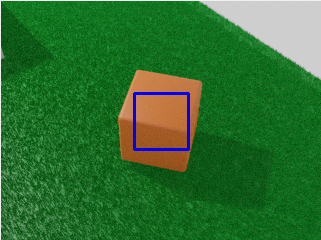
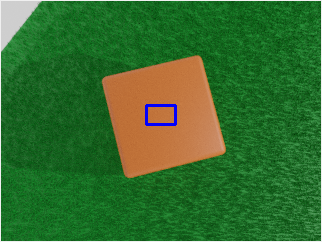
Synthetic data for the people.

Overview

zpy: Synthetic data in Blender.

WebsiteInstallDocsExamplesCLIContributeLicence

Discord Twitter Youtube PyPI Docs

Synthetic raspberry pi

Abstract

Collecting, labeling, and cleaning data for computer vision is a pain. Jump into the future and create your own data instead! Synthetic data is faster to develop with, effectively infinite, and gives you full control to prevent bias and privacy issues from creeping in. We created zpy to make synthetic data easy, by simplifying the scene creation process and providing an easy way to generate synthetic data at scale.

Install

Install: Using Blender GUI

First download the latest zip (you want the one called zpy_addon-v*.zip). Then open up Blender. Navigate to Edit -> Preferences -> Add-ons. You should be able to install and enable the addon from there.

Enabling the addon

Install: Linux: Using Install Script

$ /bin/bash -c "$(curl -fsSL https://raw.githubusercontent.com/ZumoLabs/zpy/main/install.sh)"

Set these environment variables for specific versions:

export BLENDER_VERSION="2.91"
export BLENDER_VERSION_FULL="2.91.0"
export ZPY_VERSION="v1.0.0"

Documentation

More documentation can be found here

Examples

Tutorials

Projects

CLI

We provide a simple CLI, you can find documentation here.

Contributing

We welcome community contributions! Search through the current issues or open your own.

Licence

This release of zpy is under the GPLv3 license, a free copyleft license used by Blender. TLDR: Its free, use it!

BibTeX

If you use zpy in your research, we would appreciate the citation!

@article{zpy,
  title={zpy: Synthetic data for Blender.},
  author={Ponte, H. and Ponte, N. and Karatas, K},
  journal={GitHub. Note: https://github.com/ZumoLabs/zpy},
  volume={1},
  year={2020}
}
Comments
  • Improving Rendering & Processing Speed with AWS

    Improving Rendering & Processing Speed with AWS

    Is your feature request related to a problem? Please describe. I'm frustrated by the time it is taking to process images on my local device (the rendering isn't the worst but the annotations are taking a long time at the end). I would like to use AWS EC2 instances to reduce the time required to create images and annotations (especially the category segmentation which seems to take a long time to encode into the annotation).

    Do you have any suggestions as to the kinds of instances or methods on AWS can be used to reduce rendering and processing time? That would be immensely helpful. Thank you.

    question 
    opened by tgorm1965 14
  • Is it possible to segment parts of an object based on it's material?

    Is it possible to segment parts of an object based on it's material?

    Is your feature request related to a problem? Please describe. I would like to segment a complex mesh that is made up of different components with different materials for every component. Is it possible to segment based off the material? Or do i need to separate the single mesh into multiple components?

    question 
    opened by tgorm1965 13
  • Bounding Box generation Error

    Bounding Box generation Error

    I've created this Blender scene where I have a dice, and I'm using ZPY to generate a dataset composed of images obtained by rotating around the object and jittering both the dice position and the camera. Everything seems to be working properly, but the bounding-boxes generated on the annotation file get progressively worse with each picture.

    For example this is the first image's bounding-box: image
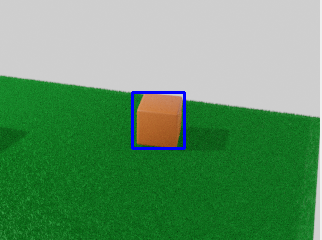
    This one we get halfway through: image

    And this is one of the last ones: image

    This is my code (I've cut some stuff, I can't paste it all for some reason):

    
    def run(num_steps = 20):
        
        # Random seed results in unique behavior
        zpy.blender.set_seed()
    
        # Create the saver object
        saver = zpy.saver_image.ImageSaver(description="Domain randomized dado")
    
        # Add the dado category
        dado_seg_color = zpy.color.random_color(output_style="frgb")
        saver.add_category(name="dado", color=dado_seg_color)
    
        # Segment Suzzanne (make sure a material exists for the object!)
        zpy.objects.segment("dado", color=dado_seg_color)
        
        # Original dice pose
        zpy.objects.save_pose("dado", "dado_pose_og")
        
        #Original camera pose
        zpy.objects.save_pose("Camera", "Camera_pose_og")
    
        # Save the positions of objects so we can jitter them later
        zpy.objects.save_pose("Camera", "cam_pose")
        zpy.objects.save_pose("dado", "dado_pose")
        
        asset_dir = Path(bpy.data.filepath).parent
        texture_paths = [
            asset_dir / Path("textures/madera.png"),
            asset_dir / Path("textures/ladrillo.png"),
        ]
        
    
        # Run the sim.
        for step_idx in range(num_steps):
            # Example logging
            # stp = zpy.blender.step()
            # print("BLENDER STEPS: ", stp.num_steps)
            # log.debug("This is a debug log")
    
            # Return camera and dado to original positions
            zpy.objects.restore_pose("Camera", "cam_pose")
            zpy.objects.restore_pose("dado", "dado_pose")
            
            # Rotate camera
            location = bpy.context.scene.objects["Camera"].location
            angle = step_idx*360/num_steps
            location = rotate(location, angle, axis=(0, 0, 1))
            bpy.data.objects["Camera"].location = location
            
            # Jitter dado pose
            zpy.objects.jitter(
                "dado",
                translate_range=((-300, 300), (-300, 300), (0, 0)),
                rotate_range=(
                    (0, 0),
                    (0, 0),
                    (-math.pi, math.pi),
                ),
            )
    
            # Jitter the camera pose
            zpy.objects.jitter(
                "Camera",
                translate_range=(
                    (-5, 5),
                    (-5, 5),
                    (-5, 5),
                ),
            )
    
            # Camera should be looking at dado
            zpy.camera.look_at("Camera", bpy.data.objects["dado"].location)
            
            texture_path = random.choice(texture_paths)
            
            # HDRIs are like a pre-made background with lighting
            # zpy.hdris.random_hdri()
    
            # Pick a random texture from the 'textures' folder (relative to blendfile)
            # Textures are images that we will map onto a material
            new_mat = zpy.material.make_mat_from_texture(texture_path)
            # zpy.material.set_mat("dado", new_mat)
    
            # Have to segment the new material
            zpy.objects.segment("dado", color=dado_seg_color)
    
            # Jitter the dado material
            # zpy.material.jitter(bpy.data.objects["dado"].active_material)
    
            # Jitter the HSV for empty and full images
            '''
            hsv = (
                random.uniform(0.49, 0.51),  # (hue)
                random.uniform(0.95, 1.1),  # (saturation)
                random.uniform(0.75, 1.2),  # (value)
            )
            '''
    
            # Name for each of the output images
            rgb_image_name = zpy.files.make_rgb_image_name(step_idx)
            iseg_image_name = zpy.files.make_iseg_image_name(step_idx)
            depth_image_name = zpy.files.make_depth_image_name(step_idx)
    
            # Render image
            zpy.render.render(
                rgb_path=saver.output_dir / rgb_image_name,
                iseg_path=saver.output_dir / iseg_image_name,
                depth_path=saver.output_dir / depth_image_name,
                # hsv=hsv,
            )
    
            # Add images to saver
            saver.add_image(
                name=rgb_image_name,
                style="default",
                output_path=saver.output_dir / rgb_image_name,
                frame=step_idx,
            )
            saver.add_image(
                name=iseg_image_name,
                style="segmentation",
                output_path=saver.output_dir / iseg_image_name,
                frame=step_idx,
            )
            saver.add_image(
                name=depth_image_name,
                style="depth",
                output_path=saver.output_dir / depth_image_name,
                frame=step_idx,
            )
    
            # Add annotation to segmentation image
            saver.add_annotation(
                image=rgb_image_name,
                seg_image=iseg_image_name,
                seg_color=dado_seg_color,
                category="dado",
            )
            
    
        # Write out annotations
        saver.output_annotated_images()
        saver.output_meta_analysis()
    
        # ZUMO Annotations
        zpy.output_zumo.OutputZUMO(saver).output_annotations()
    
        # COCO Annotations
        zpy.output_coco.OutputCOCO(saver).output_annotations()
        
        # Volver al estado inicial
        zpy.objects.restore_pose("dado", "dado_pose_og")
        zpy.objects.restore_pose("Camera", "Camera_pose_og")
    

    Is this my fault or an actual bug?

    • OS: Ubuntu 20.04
    • Python 3.9
    • Blender 2.93
    • zpy: latest
    bug 
    opened by franferraz98 7
  • Better Run button

    Better Run button

    To properly run the "run" script, a zpy user has to click the "Run" button under the ZPY panel. If they click the "Run" button in the Blender script panel, it will not save and reset the scene, resulting in simulation drift. We should provide a warning, or simply make the "run" button in the blender script also a valid option.

    bug enhancement 
    opened by hu-po 7
  • Question: Is there a method to obtain the height and width of every pixel of a depth map?

    Question: Is there a method to obtain the height and width of every pixel of a depth map?

    Hi, I would like to obtain this information to accompany the depth maps produced by ZPY. Is this possible using ZPY's implementation? How would I go about this? Thank you!

    question 
    opened by tgorm1965 6
  • Code Formatting

    Code Formatting

    Ran automatic code formatting with the following git pre-commit hooks:

    • black
    • trailing-whitespace-fixer
    • end-of-file-fixer
    • add-trailing-comma

    Added a pre-commit config file in case any contributors would like to use these pre-commit git hooks going forward.

    opened by zkneupper 6
  • Cannot create COCO annotations when RGB and Segmentation images are in Separate folder

    Cannot create COCO annotations when RGB and Segmentation images are in Separate folder

    Hi , I am trying to generate data with annotations, where my output_dir is the parent folder and I save my RGB and ISEG images in the children folders for example data/rgb_images and data/iseg_images. I also have another folder for annotations as data/coco_annotations. I am successfully able to render images however, I cannot generate COCO annotations. As far as I understand from the source code, it parses image path w.r.t. the saver.output_dir + filename instead of the directories where images are actually stored.

    Thanks!!!

    opened by aadi-mishra 4
  • Allow Custom scaling for HDRI Background

    Allow Custom scaling for HDRI Background

    Hi, This is a small feature I'd like to be added to "zpy.hdris.random_hdri()" function. Currently, the function doesn't accept a custom scale from user and renders the HDRI background in the default scale w.r.t the 3D object.

    It would helpful if a parameter can be added to random_hdri() so that it can be passed to load_hdri(). This would allow us to play with the HDRI background scaling.

    hdri enhancement 
    opened by Resh-97 4
  • Give multiple objects the same tag

    Give multiple objects the same tag

    Describe the solution you'd like Not sure if this already exists but I'd like to be able to give numerous object meshes have one label. If it does, please let me know!

    question 
    opened by yashdutt20 4
  • AOV Pass Error

    AOV Pass Error

    Describe the bug A key error is occurring in zpy. Can you help me figure out how to fix this?

    To Reproduce Steps to reproduce the behavior: I have followed the Suzanne script from the first video of the youtube channel.

    Expected behavior To save and render the images.

    Screenshots File "/Applications/Blender.app/Contents/Resources/2.91/python/lib/python3.7/site-packages/zpy/render.py", line 42, in make_aov_pass view_layer['aovs'][-1]['name'] = style KeyError: 'bpy_struct[key]: key "aovs" not found' In call to configurable 'make_aov_pass' (<function make_aov_pass at 0x1576194d0>) In call to configurable 'make_aov_file_output_node' (<function make_aov_file_output_node at 0x15761db00>) In call to configurable 'render_aov' (<function render_aov at 0x157623560>) Error: Python script failed, check the message in the system console Executing script failed with exception Error: Python script failed, check the message in the system console

    Desktop (please complete the following information):

    • OS: Mac OS Catalina 10.15.5
    • latest zpy
    opened by yashdutt20 3
  • KeyError: 'bpy_struct[key]: key

    KeyError: 'bpy_struct[key]: key "aovs" not found'

    Describe the bug I downloaded Suzanne 1 example from your repository and run it using Blender 2.91 and your library.

    I got following error:

    Traceback (most recent call last):
      File "/run.py", line 78, in <module>
      File "/run.py", line 35, in run
      File "/home/piotr/Files/blender/bar/lib/python3.7/site-packages/gin/config.py", line 1069, in gin_wrapper
        utils.augment_exception_message_and_reraise(e, err_str)
      File "/home/piotr/Files/blender/bar/lib/python3.7/site-packages/gin/utils.py", line 41, in augment_exception_message_and_reraise
        raise proxy.with_traceback(exception.__traceback__) from None
      File "/home/piotr/Files/blender/bar/lib/python3.7/site-packages/gin/config.py", line 1046, in gin_wrapper
        return fn(*new_args, **new_kwargs)
      File "/home/piotr/Files/blender/bar/lib/python3.7/site-packages/zpy/render.py", line 204, in render_aov
        output_node = make_aov_file_output_node(style=style)
      File "/home/piotr/Files/blender/bar/lib/python3.7/site-packages/gin/config.py", line 1069, in gin_wrapper
        utils.augment_exception_message_and_reraise(e, err_str)
      File "/home/piotr/Files/blender/bar/lib/python3.7/site-packages/gin/utils.py", line 41, in augment_exception_message_and_reraise
        raise proxy.with_traceback(exception.__traceback__) from None
      File "/home/piotr/Files/blender/bar/lib/python3.7/site-packages/gin/config.py", line 1046, in gin_wrapper
        return fn(*new_args, **new_kwargs)
      File "/home/piotr/Files/blender/bar/lib/python3.7/site-packages/zpy/render.py", line 82, in make_aov_file_output_node
        zpy.render.make_aov_pass(style)
      File "/home/piotr/Files/blender/bar/lib/python3.7/site-packages/gin/config.py", line 1069, in gin_wrapper
        utils.augment_exception_message_and_reraise(e, err_str)
      File "/home/piotr/Files/blender/bar/lib/python3.7/site-packages/gin/utils.py", line 41, in augment_exception_message_and_reraise
        raise proxy.with_traceback(exception.__traceback__) from None
      File "/home/piotr/Files/blender/bar/lib/python3.7/site-packages/gin/config.py", line 1046, in gin_wrapper
        return fn(*new_args, **new_kwargs)
      File "/home/piotr/Files/blender/bar/lib/python3.7/site-packages/zpy/render.py", line 42, in make_aov_pass
        view_layer['aovs'][-1]['name'] = style
    KeyError: 'bpy_struct[key]: key "aovs" not found'
      In call to configurable 'make_aov_pass' (<function make_aov_pass at 0x7f73bfd25f80>)
      In call to configurable 'make_aov_file_output_node' (<function make_aov_file_output_node at 0x7f73bfd25ef0>)
      In call to configurable 'render_aov' (<function render_aov at 0x7f73bfd28f80>)
    Error: Python script failed, check the message in the system console
    

    To Reproduce Steps to reproduce the behavior:

    1. Install Blender 2.91.
    2. Install zpy addon and zpy-zumo Python library.
    3. Download Suzanne 1 run.py script.
    4. Run Suzanne 1 run.py script.

    Expected behavior Suzanne 1 run.py script run without errors.

    bug 
    opened by VictorAtPL 3
  • Material jitter

    Material jitter

    Hi

    How would I got about jittering just one object material, whilst leaving others constant ??

    So for example- say I've got a car object. Car tyres are always matt black, and the taillights are always red- but the paintwork varies- might be gloss red or matt blue.

    Is this to do with the way that materials are assigned in Blender? i.e tyres would be fixed as black & paintwork would be inherited or determined by ZPY

    thank you

    Andrew

    opened by barney2074 0
  • HDRI & texture randomisation

    HDRI & texture randomisation

    Hi,

    thank you for ZPY- loving it & just what I need- thank you..!

    I've worked through the tutorials. Suzanne 3 YouTube content seems to differ from the latest Suzanne 3 python run.py on GitHub. Youtube has a Python list of explicit texture and HDRI paths, whereas Github seems to have moved it into a function ??

    To get it to work- from the documentation I though I just needed to create a \textures directory and a \hdris\1k directory in the same folder as the .blend file ??

    so: path/foo.blend path/textures/1.jpg path/textures/2.jpg path/hdris/1k/a.exr path/hdris/1k/b.exr

    However- I get a bunch of errors- looks like this is not correct I would be very grateful if you could point me in the right direction thanks again

    Andrew

    opened by barney2074 1
  • How to get the Normalised segmentation?

    How to get the Normalised segmentation?

    How to get the normalised segmentation?

    I want to generate the segmentation_float with the zpy.output_coco.OutputCOCO(saver).output_annotations().

    When I changed the code, it doesn't return any segmentation, just return the bbox.

    The reason I want to normalize these is I am using 4K image size for rendering and I am getting a large annotation files. For example for 5 images, the annotation file was 17Mb.

            {
                "category_id": 0,
                "image_id": 0,
                "id": 0,
                "iscrowd": false,
                "bbox": [
                    311.01,
                    239.01,
                    16.980000000000018,
                    240.98000000000002
                ],
                "area": 4091.8404000000046
            },
            {
                "category_id": 1,
                "image_id": 0,
                "id": 1,
                "iscrowd": false,
                "bbox": [
                    279.01,
                    223.01,
                    79.98000000000002,
                    120.98000000000002
                ],
                "area": 9675.980400000004
            },
    
    opened by c3210927 0
Releases(v1.4.1rc9)
Owner
Zumo Labs
The world is a simulation.
Zumo Labs
Use AutoModelForSeq2SeqLM in Huggingface Transformers to train COMET

Training COMET using seq2seq setting Use AutoModelForSeq2SeqLM in Huggingface Transformers to train COMET. The codes are modified from run_summarizati

tqfang 9 Dec 17, 2022
PyTorch Implementation of the paper Single Image Texture Translation for Data Augmentation

SITT The repo contains official PyTorch Implementation of the paper Single Image Texture Translation for Data Augmentation. Authors: Boyi Li Yin Cui T

Boyi Li 52 Jan 05, 2023
ByT5: Towards a token-free future with pre-trained byte-to-byte models

ByT5: Towards a token-free future with pre-trained byte-to-byte models ByT5 is a tokenizer-free extension of the mT5 model. Instead of using a subword

Google Research 409 Jan 06, 2023
NumPy String-Indexed is a NumPy extension that allows arrays to be indexed using descriptive string labels

NumPy String-Indexed NumPy String-Indexed is a NumPy extension that allows arrays to be indexed using descriptive string labels, rather than conventio

Aitan Grossman 1 Jan 08, 2022
An End-to-End Trainable Neural Network for Image-based Sequence Recognition and Its Application to Scene Text Recognition

CRNN paper:An End-to-End Trainable Neural Network for Image-based Sequence Recognition and Its Application to Scene Text Recognition 1. create your ow

Tsukinousag1 3 Apr 02, 2022
The RWKV Language Model

RWKV-LM We propose the RWKV language model, with alternating time-mix and channel-mix layers: The R, K, V are generated by linear transforms of input,

PENG Bo 877 Jan 05, 2023
customer care chatbot made with Rasa Open Source.

Customer Care Bot Customer care bot for ecomm company which can solve faq and chitchat with users, can contact directly to team. 🛠 Features Basic E-c

Dishant Gandhi 23 Oct 27, 2022
A PyTorch implementation of paper "Learning Shared Semantic Space for Speech-to-Text Translation", ACL (Findings) 2021

Chimera: Learning Shared Semantic Space for Speech-to-Text Translation This is a Pytorch implementation for the "Chimera" paper Learning Shared Semant

Chi Han 43 Dec 28, 2022
Question and answer retrieval in Turkish with BERT

trfaq Google supported this work by providing Google Cloud credit. Thank you Google for supporting the open source! 🎉 What is this? At this repo, I'm

M. Yusuf Sarıgöz 13 Oct 10, 2022
Active learning for text classification in Python

Active Learning allows you to efficiently label training data in a small-data scenario.

Webis 375 Dec 28, 2022
LCG T-TEST USING EUCLIDEAN METHOD

This project has been created for statistical usage, purposing for determining ATL takers and nontakers using LCG ttest and Euclidean Method, especially for internal business case in Telkomsel.

2 Jan 21, 2022
CVSS: A Massively Multilingual Speech-to-Speech Translation Corpus

CVSS: A Massively Multilingual Speech-to-Speech Translation Corpus CVSS is a massively multilingual-to-English speech-to-speech translation corpus, co

Google Research Datasets 118 Jan 06, 2023
Concept Modeling: Topic Modeling on Images and Text

Concept is a technique that leverages CLIP and BERTopic-based techniques to perform Concept Modeling on images.

Maarten Grootendorst 120 Dec 27, 2022
A sample project that exists for PyPUG's "Tutorial on Packaging and Distributing Projects"

A sample Python project A sample project that exists as an aid to the Python Packaging User Guide's Tutorial on Packaging and Distributing Projects. T

Python Packaging Authority 4.5k Dec 30, 2022
Mlcode - Continuous ML API Integrations

mlcode Basic APIs for ML applications. Django REST Application Contains REST API

Sujith S 1 Jan 01, 2022
Korea Spell Checker

한국어 문서 koSpellPy Korean Spell checker How to use Install pip install kospellpy Use from kospellpy import spell_init spell_checker = spell_init() # d

kangsukmin 2 Oct 20, 2021
neural network based speaker embedder

Content What is deepaudio-speaker? Installation Get Started Model Architecture How to contribute to deepaudio-speaker? Acknowledge What is deepaudio-s

20 Dec 29, 2022
This project uses word frequency and Term Frequency-Inverse Document Frequency to summarize a text.

Text Summarizer This project uses word frequency and Term Frequency-Inverse Document Frequency to summarize a text. Team Members This mini-project was

1 Nov 16, 2021
Code for "Finetuning Pretrained Transformers into Variational Autoencoders"

transformers-into-vaes Code for Finetuning Pretrained Transformers into Variational Autoencoders (our submission to NLP Insights Workshop 2021). Gathe

Seongmin Park 22 Nov 26, 2022
**NSFW** A chatbot based on GPT2-chitchat

DangBot -- 好怪哦,再来一句 卡群怪话bot,powered by GPT2 for Chinese chitchat Training Example: python train.py --lr 5e-2 --epochs 30 --max_len 300 --batch_size 8

Tommy Yang 11 Jul 21, 2022