

Alternate Python bindings for the Open Asset Import Library (ASSIMP)

Overview

Impasse

Python Test Status codecov

A simple Python wrapper for assimp using cffi to access the library. Requires Python >= 3.7.

It's a fork of PyAssimp, Assimp's official Python port. In contrast to PyAssimp, it strictly targets modern Python 3 and provides type hints. It also aims to allow mutating scenes before exporting by having all wrapper classes operate directly on the underlying C data structures.

Usage

Complete example: 3D viewer

impasse comes with a simple 3D viewer that shows how to load and display a 3D model using a shader-based OpenGL pipeline.
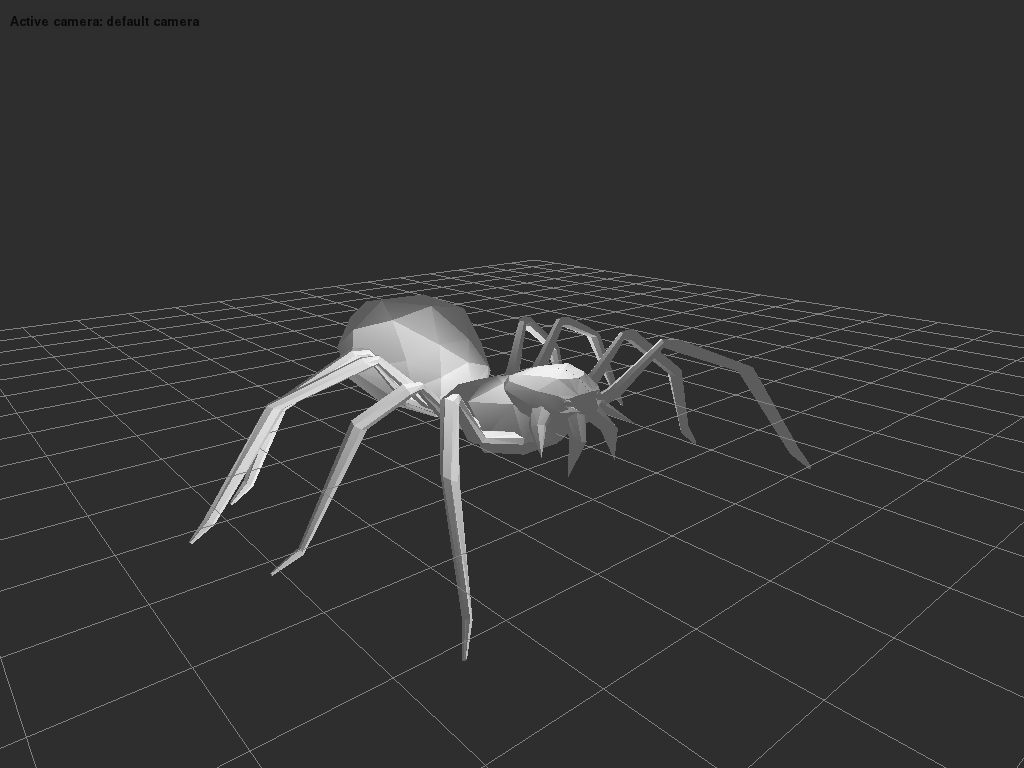
Screenshot

To use it:

python ./scripts/3d_viewer.py <path to your model>

You can use this code as starting point in your applications.

Writing your own code

To get started with impasse, examine the simpler sample.py script in scripts/, which illustrates the basic usage. All Assimp data structures are wrapped using ctypes. All the data+length fields in Assimp's data structures (such as aiMesh::mNumVertices, aiMesh::mVertices) are replaced by list-like wrapper classes, so you can call len() on them to get their respective size and access members using [].

For example, to load a file named hello.3ds and print the first vertex of the first mesh, you would do (proper error handling substituted by assertions ...):

from impasse import load

scene = load('hello.3ds')

assert len(scene.meshes)
mesh = scene.meshes[0]

assert len(mesh.vertices)
print(mesh.vertices[0])

Another example to list the 'top nodes' in a scene:

from impasse import load

scene = load('hello.3ds')
for c in scene.root_node.children:
    print(str(c))

All of assimp's coordinate classes are returned as NumPy arrays, so you can work with them using library for 3d math that handles NumPy arrays. Using transforms.py to modify the scene:

import math

import numpy
import transformations
import impasse

# assimp returns an immutable scene, we have to copy it if we want to change it
scene = impasse.load('hello.3ds').copy_mutable()
transform = scene.root_node.transformation
# Rotate the root node's transform by 180 deg on X
transform = numpy.dot(transformations.rotation_matrix(math.pi, (1, 0, 0)), transform)
scene.root_node.transformation = transform
impasse.export(scene, 'whatever.obj', 'obj')

Installing

Install impasse by running:

pip install impasse

or, if you want to install from the source directory:

pip install -e .

Impasse requires an assimp dynamic library (DLL on Windows, .so on linux, .dynlib on macOS) in order to work. The default search directories are:

  • the current directory
  • on linux additionally: /usr/lib, /usr/local/lib, /usr/lib/ -linux-gnu

To build that library, refer to the Assimp master INSTALL instructions. To look in more places, edit ./impasse/helper.py. There's an additional_dirs list waiting for your entries.

Progress

All features present in PyAssimp are now present in Assimp (plus a few more!) Since the API largely mirrors PyAssimp's, most existing code should work in Impasse with minor changes.

Note that Impasse is not complete. Many assimp features are still missing, mostly around mutating scenes. Notably, anything that would require a new or delete in assimp's C++ API is not supported.

Performance

Impasse tries to avoid unnecessary copies or conversions of data owned by C, and most classes are just thin layers around the underlying CFFI structs. NumPy arrays that directly map to the underlying structs' memory are used for the coordinate structs like Matrix4x4 and Vector3D.

Testing with a similar quicktest.py script against assimp's test model directory:

Impasse

** Loaded 169 models, got controlled errors for 28 files, 0 uncontrolled

real	0m1.460s
user	0m1.676s
sys	0m0.571s

PyAssimp

** Loaded 165 models, got controlled errors for 28 files, 4 uncontrolled

real	0m7.607s
user	0m7.746s
sys	0m0.579s
Comments
  • Nicer way of referring to material property keys

    Nicer way of referring to material property keys

        ('$mat.twosided', 0): [0]
        ('$mat.refracti', 0): [1.]
        ('$mat.bumpscaling', 0): [1.]
        ('$clr.specular', 0): [1. 1. 1.]
    

    Those keys are in the data returned by assimp, but I'm not sure if the prefix is that meaningful. PyAssimp strips off everything before the first .. If they're meaningful or there are collisions without those prefixes, we should keep a string enum of common ones that's easier to refer to.

    enhancement 
    opened by SaladDais 3
  • Rebase on top of original assimp sources to keep PyAssimp's commit history intact

    Rebase on top of original assimp sources to keep PyAssimp's commit history intact

    Now that I think of it, it's preferable to keep the commit history for assimp even if most of it's unrelated to PyAssimp. Make a commit deleting all assimp sources and moving PyAssimp to the repo root, then rebase impasse on top of that.

    Rewriting history isn't nice since I've already based my sources on top of a squashed commit, but impact should be mininal since nobody's using this yet.

    opened by SaladDais 1
  • Make mapping classes mix-ins

    Make mapping classes mix-ins

    Other than name collisions with keys / values, I don't think there's any reason to keep the explicit as_mapping() method rather than just putting them on a mixin for the SerializeableStructs. Can define manual renames for any of those.

    This'd give us a closer API to what PyAssimp already has

    enhancement 
    opened by SaladDais 1
  • Add accessors for mesh and texture that return instances rather than indexes

    Add accessors for mesh and texture that return instances rather than indexes

    All of the struct wrapper have a _scene member that should allow them to transparently look up the texture / material by the index in the attr they wrap.

    enhancement 
    opened by SaladDais 1
  • Get scene mutability working

    Get scene mutability working

    Per the C api you have to create a copy of the scene to get a non-const version: https://github.com/assimp/assimp/blob/master/include/assimp/cexport.h#L109-L123 . Right now all the structs we return have wrappers enforcing the const-ness of scene returned from the the aiImportFile() function. Need to expose the copying functions so people can get a scene they can modify before export.

    enhancement 
    opened by SaladDais 1
  • Package assimp shared library so assimp isn't required to be on the system

    Package assimp shared library so assimp isn't required to be on the system

    Would be nice so people don't have to do some weird conda thing if they want to install the package including assimp.

    I think it should be enough to have osx aarch64, osx x64, linux x64 and windows x64 packages. We don't need to do python version-specific builds, since we'll just be building the assimp library itself and binding against it with cffi. It should be provided in an optional, separate package with the shared library in the package data for the given platform's build.

    enhancement 
    opened by SaladDais 0
  • Add ability to alloc new structs, append to sequences

    Add ability to alloc new structs, append to sequences

    This is tricky since assimp makes liberal use of new[] and delete[] on types that have non-trivial destructors (like aiTexture.) malloc()ing and free()ing those is technically possible but inadvisable, and requires knowledge of the platform / compiler's C++ ABI.

    Likewise, assimp's C API doesn't appear to expose a wrapper around those new[] and delete[] calls. Adding functions to assimp to do those would be the least nasal demon-y approach but wouldn't be available in stable distros' libs.

    A third approach would be to have Scenes keep track of the original values of mutated ptrs, then put everything back in place when the GC happens so anything that'd been internally alloc'd with new could be deleted by assimp. Would also have to keep a list of things we'd malloc()d in our own code to manually free(). Can see a lot of nasty corner cases with this one.

    enhancement help wanted 
    opened by SaladDais 0
Releases(v5.2.0)
Owner
Salad Dais
Code as craft
Salad Dais
Create a random fluent image based on multiple colors.

FluentGenerator Create a random fluent image based on multiple colors. Navigation Example Install Update Usage In Python console FluentGenerator Fluen

1 Feb 02, 2022
Program to export all new icons from the latest Fortnite patch

Assets Exporter This program allows you to generate all new icons of a patch in png! Requierements Python =3.8 (installed on your computer) If you wa

ᴅᴊʟᴏʀ3xᴢᴏ 6 Jun 24, 2022
Png2Jpg tool will help you convert from png image format to jpg images format.

PNG 2 JPG All codes assume running from root directory. Please update the sys path at the beginning of the codes before running. Over View Png2Jpg too

Nguyễn Trường Lâu 2 Dec 27, 2021
Draw a torus passing through three given points.

PyTorusThreePoints Draw a torus passing through three given points. Usage import numpy as np import pyvista as pv from torus_three_points.main import

2 Nov 19, 2021
Script For Importing Image sequences into scrap mechanic via blueprints

To use dowload and extract "video makes.zip" Python has to be installed https://www.python.org/ (may not work on version lower than 3.9) Has to be run

2 Oct 30, 2021
Simple Python image processing & automatization project for a simple web based game

What is this? Simple Python image processing & automatization project for a simple web based game Made using only Github Copilot (except the color and

SGeri 2 Aug 15, 2022
A minimal python script for generating bip39 seed phrases, and corresponding Seed Signer Seed seed phrase qr code ready for offline printing.

A minimal python script for generating bip39 seed phrases, and corresponding Seed Signer Seed seed phrase qr code ready for offline printing.

CypherToad 8 Sep 12, 2022
A little Python tool to convert a TrueType (ttf/otf) font into a PNG for use in demos.

font2png A little Python tool to convert a TrueType (ttf/otf) font into a PNG for use in demos. To use from command line it expects python3 to be at /

Rich Elmes 3 Dec 22, 2021
Python Program that lets you write in your handwriting!

Handwriting with Python Python Program that lets you write in your handwriting! Inspired by: thaisribeiro.in How to run? Install Unidecode and Pillow

Amanda Rodrigues Vieira 2 Oct 25, 2021
A simple Streamlit Component to compare images in Streamlit apps. It integrates Knightlab's JuxtaposeJS

streamlit-image-juxtapose A simple Streamlit Component to compare images in Streamlit apps using Knightlab's JuxtaposeJS. The images are saved to the

Robin 30 Dec 31, 2022
CadQuery is an intuitive, easy-to-use Python module for building parametric 3D CAD models.

A python parametric CAD scripting framework based on OCCT

1.9k Dec 30, 2022
A linear stairs generation add-on for Blender

Linear Stairs Generator Table of Contents Installation Usage Screenshots Important Notes Requirements Blender 3.0 or newer. Installation: Download a z

Elhanan Flesch 4 May 17, 2022
Python wrappers for external BART computational imaging tools and internal libraries

bartpy Python bindings for BART. Overview This repo contains code to generate an updated Python wrapper for the Berkeley Advance Reconstruction Toolbo

Max Litster 7 May 09, 2022
sK1 2.0 cross-platform vector graphics editor

sK1 2.0 sK1 2.0 is a cross-platform open source vector graphics editor similar to CorelDRAW, Adobe Illustrator, or Freehand. sK1 is oriented for prepr

sK1 Project 238 Dec 04, 2022
Transfers a image file(.png) to an Excel file(.xlsx)

Transfers a image file(.png) to an Excel file(.xlsx)

Junu Kwon 7 Feb 11, 2022
A tool and a library for SVG path data transformations.

SVG path data transformation toolkit A tool and a library for SVG path data transformations. Currently it supports a translation and a scaling. Usage

Igor Mikushkin 2 Mar 07, 2022
A sketch like(?) effect for images

lineArt A sketch like(?) effect for images How to run main.py [filename] [option {1,2}] option 1 retains colour option 2 gives gray image #results ori

1 Oct 28, 2021
Easy to use Python module to extract Exif metadata from digital image files.

Easy to use Python module to extract Exif metadata from digital image files.

ianaré sévi 719 Jan 05, 2023
Blue noise image stippling in Processing (requires GPU)

Blue noise image stippling in Processing (requires GPU)

Mike Wong 141 Oct 09, 2022
Panel Competition Image Generator

Panel Competition Image Generator This project was build by a member of the NFH community and is open for everyone who wants to try it. Relevant links

Juliano Mendieta 1 Oct 22, 2021