Lightweight Machine Learning Experiment Logging ๐Ÿ“–

Overview

A Lightweight Logger for ML Experiments ๐Ÿ“–

Pyversions PyPI version Code style: black Colab

Simple logging of statistics, model checkpoints, plots and other objects for your Machine Learning Experiments (MLE). Furthermore, the MLELogger comes with smooth multi-seed result aggregation and combination of multi-configuration runs. For a quickstart checkout the notebook blog ๐Ÿš€
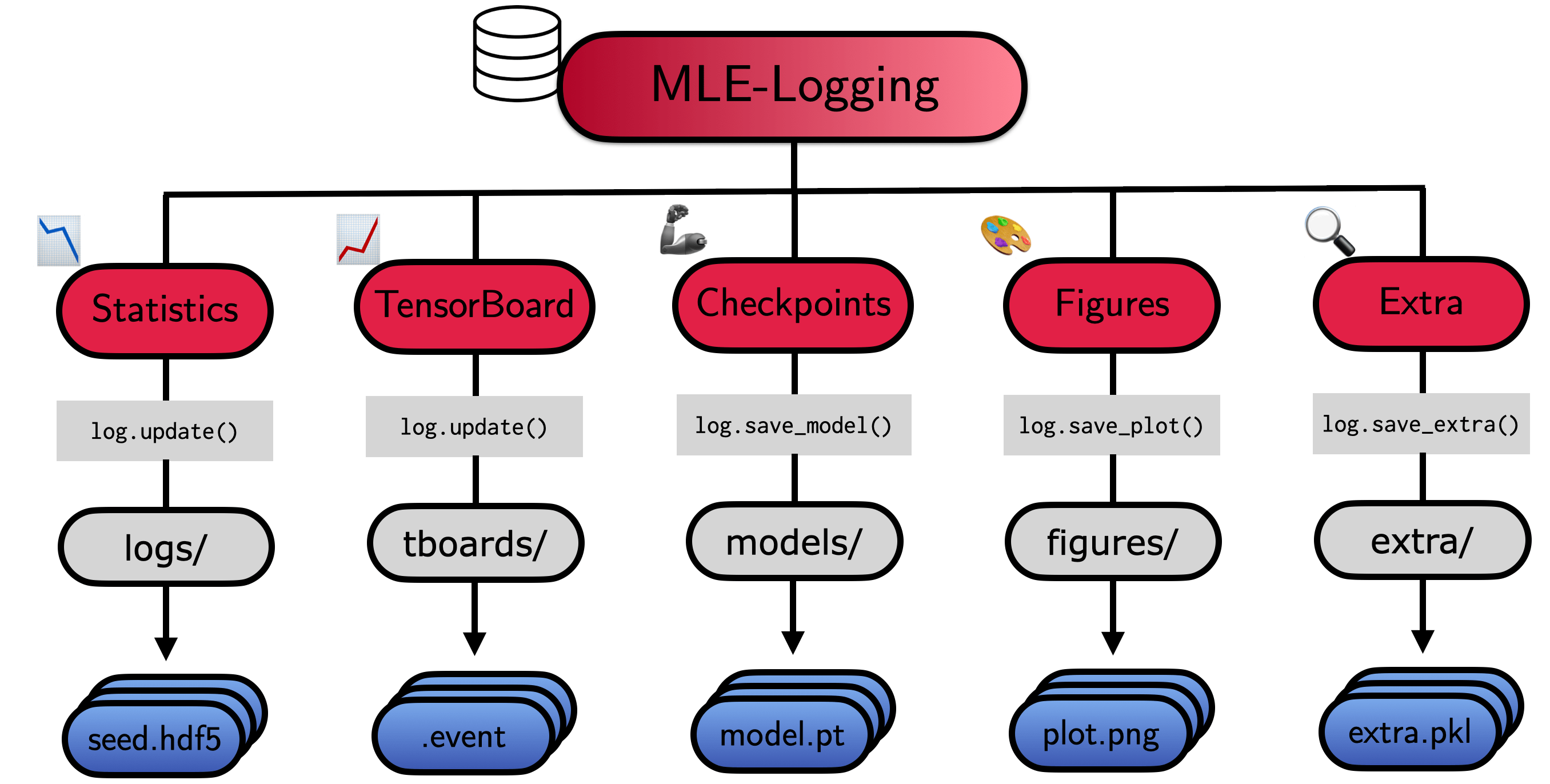
The API ๐ŸŽฎ

from mle_logging import MLELogger

# Instantiate logging to experiment_dir
log = MLELogger(time_to_track=['num_updates', 'num_epochs'],
                what_to_track=['train_loss', 'test_loss'],
                experiment_dir="experiment_dir/",
                model_type='torch')

time_tic = {'num_updates': 10, 'num_epochs': 1}
stats_tic = {'train_loss': 0.1234, 'test_loss': 0.1235}

# Update the log with collected data & save it to .hdf5
log.update(time_tic, stats_tic)
log.save()

You can also log model checkpoints, matplotlib figures and other .pkl compatible objects.

# Save a model (torch, tensorflow, sklearn, jax, numpy)
import torchvision.models as models
model = models.resnet18()
log.save_model(model)

# Save a matplotlib figure as .png
fig, ax = plt.subplots()
log.save_plot(fig)

# You can also save (somewhat) arbitrary objects .pkl
some_dict = {"hi" : "there"}
log.save_extra(some_dict)

Or do everything in a single line...

log.update(time_tic, stats_tic, model, fig, extra, save=True)

File Structure & Re-Loading ๐Ÿ“š

The MLELogger will create a nested directory, which looks as follows:

experiment_dir
โ”œโ”€โ”€ extra: Stores saved .pkl object files
โ”œโ”€โ”€ figures: Stores saved .png figures
โ”œโ”€โ”€ logs: Stores .hdf5 log files (meta, stats, time)
โ”œโ”€โ”€ models: Stores different model checkpoints
    โ”œโ”€โ”€ final: Stores most recent checkpoint
    โ”œโ”€โ”€ every_k: Stores every k-th checkpoint provided in update
    โ”œโ”€โ”€ top_k: Stores portfolio of top-k checkpoints based on performance
โ”œโ”€โ”€ tboards: Stores tensorboards for model checkpointing
โ”œโ”€โ”€ .json: Copy of configuration file (if provided)

For visualization and post-processing load the results via

>> log_out.meta.keys() # odict_keys(['experiment_dir', 'extra_storage_paths', 'fig_storage_paths', 'log_paths', 'model_ckpt', 'model_type']) # >>> log_out.stats.keys() # odict_keys(['test_loss', 'train_loss']) # >>> log_out.time.keys() # odict_keys(['time', 'num_epochs', 'num_updates', 'time_elapsed']) ">
from mle_logging import load_log
log_out = load_log("experiment_dir/")

# The results can be accessed via meta, stats and time keys
# >>> log_out.meta.keys()
# odict_keys(['experiment_dir', 'extra_storage_paths', 'fig_storage_paths', 'log_paths', 'model_ckpt', 'model_type'])
# >>> log_out.stats.keys()
# odict_keys(['test_loss', 'train_loss'])
# >>> log_out.time.keys()
# odict_keys(['time', 'num_epochs', 'num_updates', 'time_elapsed'])

If an experiment was aborted, you can reload and continue the previous run via the reload=True option:

log = MLELogger(time_to_track=['num_updates', 'num_epochs'],
                what_to_track=['train_loss', 'test_loss'],
                experiment_dir="experiment_dir/",
                model_type='torch',
                reload=True)

Installation โณ

A PyPI installation is available via:

pip install mle-logging

Alternatively, you can clone this repository and afterwards 'manually' install it:

git clone https://github.com/RobertTLange/mle-logging.git
cd mle-logging
pip install -e .

Advanced Options ๐Ÿšด

Merging Multiple Logs ๐Ÿ‘ซ

Merging Multiple Random Seeds ๐ŸŒฑ + ๐ŸŒฑ

>> log.eval_ids # ['seed_1', 'seed_2'] ">
from mle_logging import merge_seed_logs
merge_seed_logs("multi_seed.hdf", "experiment_dir/")
log_out = load_log("experiment_dir/")
# >>> log.eval_ids
# ['seed_1', 'seed_2']

Merging Multiple Configurations ๐Ÿ”– + ๐Ÿ”–

>> log.eval_ids # ['config_2', 'config_1'] # >>> meta_log.config_1.stats.test_loss.keys() # odict_keys(['mean', 'std', 'p50', 'p10', 'p25', 'p75', 'p90'])) ">
from mle_logging import merge_config_logs, load_meta_log
merge_config_logs(experiment_dir="experiment_dir/",
                  all_run_ids=["config_1", "config_2"])
meta_log = load_meta_log("multi_config_dir/meta_log.hdf5")
# >>> log.eval_ids
# ['config_2', 'config_1']
# >>> meta_log.config_1.stats.test_loss.keys()
# odict_keys(['mean', 'std', 'p50', 'p10', 'p25', 'p75', 'p90']))

Plotting of Logs ๐Ÿง‘โ€๐ŸŽจ

meta_log = load_meta_log("multi_config_dir/meta_log.hdf5")
meta_log.plot("train_loss", "num_updates")

Storing Checkpoint Portfolios ๐Ÿ“‚

Logging every k-th checkpoint update โ— โฉ ... โฉ โ—

# Save every second checkpoint provided in log.update (stored in models/every_k)
log = MLELogger(time_to_track=['num_updates', 'num_epochs'],
                what_to_track=['train_loss', 'test_loss'],
                experiment_dir='every_k_dir/',
                model_type='torch',
                ckpt_time_to_track='num_updates',
                save_every_k_ckpt=2)

Logging top-k checkpoints based on metric ๐Ÿ”ฑ

# Save top-3 checkpoints provided in log.update (stored in models/top_k)
# Based on minimizing the test_loss metric
log = MLELogger(time_to_track=['num_updates', 'num_epochs'],
                what_to_track=['train_loss', 'test_loss'],
                experiment_dir="top_k_dir/",
                model_type='torch',
                ckpt_time_to_track='num_updates',
                save_top_k_ckpt=3,
                top_k_metric_name="test_loss",
                top_k_minimize_metric=True)

Development & Milestones for Next Release

You can run the test suite via python -m pytest -vv tests/. If you find a bug or are missing your favourite feature, feel free to contact me @RobertTLange or create an issue ๐Ÿค— . Here are some features I want to implement for the next release:

  • Add a progress bar if total number of updates is specified
  • Add Weights and Biases Backend Support
  • Extend Tensorboard logging (for JAX/TF models)
Comments
  • Make `pickle5` requirement Python version dependent

    Make `pickle5` requirement Python version dependent

    The pickle5 dependency forces python < 3.8. If I understand it correctly, pickle5 is only there to backport pickle features that were added with Python 3.8, right? I modified the dependency to only apply for Python < 3.8. With this I was able to install mle-logging in my Python 3.9 environment.

    I also modified the only place where pickle5 was used. Didn't test anything, I was hoping this PR would trigger some tests to make sure I didn't break anything (didn't want to install all those test dependencies locally :P).

    opened by denisalevi 2
  • Missing sample json config files break colab demo

    Missing sample json config files break colab demo

    Hello!

    Just read your blogpost and ~50% of the way through the colab demo, and I have to say that so far it looks like this project has the potential to be profoundly clarifying in how it simplifies & abstracts various pieces of key experiment logic that otherwise suffers from unnecessary complexity. As a PhD student who has had to refactor my whole experimental configuration workflow more times than I would like to admit to even myself, I'm super excited to try out your logger!

    I'd also like to commend you for how to-the-point your choice of explanatory examples were for the blogpost. Too many frameworks fill their docs with a bunch of overly-simplistic toy problems and fail to bridge the gap between these and a real experimental situation (e.g. the elegant layout of your multi-seed, multi-config experiment

    That said, my experience working through your demo was interrupted once I reached the section "Log Different Random Seeds for Same Configuration". It seems this code cell references a file called "config_1.json", which doesnt exist. While I'm sure I could figure out a simple json file with 1-2 example items, this kind of guesswork distracts immensely from the otherwise very elegant flow from simple to complex that you've set up. I also assume your target audience stretches further than experienced coders, so providing a simple demo config file to reduce the time from reading->coding seems worthwhile.

    tldr; the colab needs 1-2 demo config json files

    opened by JacobARose 1
  • Add `wandb` support

    Add `wandb` support

    I want to add a weights&biases backend which performs automatic grouping across seeds/search experiments. The credentials can be passed as options at initialization of MLELogger and a WandbLogger object has to be added.

    When calling log.update this will then automatically forward all info with correct grouping by project/search/config/seed to W&B.

    Think about how to integrate gradients/weights from flax/jax models in a natural way (tree flattening?).

    opened by RobertTLange 0
  • Merge `experiment_dir` for different seeds into single one

    Merge `experiment_dir` for different seeds into single one

    I would like to have utilities for merging two experiments which are identical except for the seed_id they used (probably only for the multiple-configs case). Steps should include something like this:

      1. Check that experiments are actually identical.
      1. Identify different seeds.
      1. Create new results directory.
      1. Copy over extra/, figures/ for different seeds.
      1. Open both logs (for all configs) and combine them.
      1. Clean-up old directories for different experiments.
    opened by RobertTLange 0
  • [Bug]

    [Bug] "OSError: Can't write data" if `what_to_track` has certain Types

    Code to recreate:

    from mle_logging import MLELogger
    
    # Instantiate logging to experiment_dir
    log = MLELogger(time_to_track=['num_updates', 'num_epochs'],
                    what_to_track=['train_loss', 'test_loss'],
                    experiment_dir="experiment_dir/",
                    config_dict={"train_config": {"lrate": 0.01}},
                    use_tboard=False,
                    model_type='torch',
                    print_every_k_updates=1,
                    verbose=True)
    
    # Save some time series statistics
    time_tic = {'num_updates': 10, 'num_epochs': 1}
    stats_tic = {'train_loss': 1, 'test_loss': 1}
    
    # Update the log with collected data & save it to .hdf5
    log.update(time_tic, stats_tic)
    log.save()
    

    Output from the console:

    Traceback (most recent call last):
      File "mle-log-test.py", line 19, in <module>
        log.save()
      File "/home/luc/.local/lib/python3.8/site-packages/mle_logging/mle_logger.py", line 417, in save
        write_to_hdf5(
      File "/home/luc/.local/lib/python3.8/site-packages/mle_logging/utils.py", line 74, in write_to_hdf5
        h5f.create_dataset(
      File "/home/luc/.local/lib/python3.8/site-packages/h5py/_hl/group.py", line 149, in create_dataset
        dsid = dataset.make_new_dset(group, shape, dtype, data, name, **kwds)
      File "/home/luc/.local/lib/python3.8/site-packages/h5py/_hl/dataset.py", line 143, in make_new_dset
        dset_id.write(h5s.ALL, h5s.ALL, data)
      File "h5py/_objects.pyx", line 54, in h5py._objects.with_phil.wrapper
      File "h5py/_objects.pyx", line 55, in h5py._objects.with_phil.wrapper
      File "h5py/h5d.pyx", line 232, in h5py.h5d.DatasetID.write
      File "h5py/_proxy.pyx", line 114, in h5py._proxy.dset_rw
    OSError: Can't write data (no appropriate function for conversion path)
    

    The above code is essentially the Getting Started code with the what_to_track Float values swapped out for Ints. If only 1 of the Floats is swapped for an Int, it still works (I guess it casts the Int to a Float?). I also found the same issue if the what_to_track values are Floats from a DeviceArray.

    Please let me know if you have any suggestions or questions!

    opened by DiamonDiva 0
Releases(v0.0.4)
  • v0.0.4(Dec 7, 2021)

    • [x] Add plot details (title, labels) to meta_log.plot()
    • [x] Get rid of time string in sub directories
    • [x] Make log merging more robust
    • [x] Small fixes for mle-monitor release
    • [x] Fix overwrite and make verbose warning
    Source code(tar.gz)
    Source code(zip)
  • v0.0.3(Sep 11, 2021)

    ๐ŸŽ‰ Mini-release getting rid of small bugs and adding functionality (๐Ÿ› & ๐Ÿ“ˆ ) :

    1. Add function to store initial model checkpoint for post-processing via log.save_init_model(model).

    2. Fix byte decoding for strings stored as arrays in .hdf5 log file. Previously this only worked for multi seed/config settings.

    3. MLELogger got a new optional argument: config_dict, which allows you to provide a (nested) configuration of your experiment. It will be stored as a .yaml file if you don't provide a path to an alternative configuration file. The file can either be a .json or a .yaml:

    log = MLELogger(time_to_track=['num_updates', 'num_epochs'],
                    what_to_track=['train_loss', 'test_loss'],
                    experiment_dir="experiment_dir/",
                    config_dict={"train_config": {"lrate": 0.01}},
                    model_type='torch',
                    verbose=True)
    
    1. The config_dict/ loaded config_fname data will be stored in the meta data of the loaded log and can be easily retrieved:
    log = load_log("experiment_dir/")
    log.meta.config_dict
    
    Source code(tar.gz)
    Source code(zip)
  • v0.0.1(Aug 18, 2021)

Owner
Robert Lange
Deep Something @ TU Berlin ๐Ÿ•ต๏ธ
Robert Lange
Tutorials, examples, collections, and everything else that falls into the categories: pattern classification, machine learning, and data mining

**Tutorials, examples, collections, and everything else that falls into the categories: pattern classification, machine learning, and data mining.** S

Sebastian Raschka 4k Dec 30, 2022
This repository demonstrates the usage of hover to understand and supervise a machine learning task.

Hover Example Apps (works out-of-the-box on Binder) This repository demonstrates the usage of hover to understand and supervise a machine learning tas

Pavel 43 Dec 03, 2021
Simplify stop motion animation with machine learning.

Simplify stop motion animation with machine learning.

Nick Bild 25 Sep 15, 2022
A simple python program that draws a tree for incrementing values using the Collatz Conjecture.

Collatz Conjecture A simple python program that draws a tree for incrementing values using the Collatz Conjecture. Values which can be edited: Length

davidgasinski 1 Oct 28, 2021
MasTrade is a trading bot in baselines3,pytorch,gym

mastrade MasTrade is a trading bot in baselines3,pytorch,gym idea we have for example 1 btc and we buy a crypto with it with market option to trade in

Masoud Azizi 18 May 24, 2022
๐Ÿ’€mummify: a version control tool for machine learning

mummify is a version control tool for machine learning. It's simple, fast, and designed for model prototyping.

Max Humber 43 Jul 09, 2022
Interactive Parallel Computing in Python

Interactive Parallel Computing with IPython ipyparallel is the new home of IPython.parallel. ipyparallel is a Python package and collection of CLI scr

IPython 2.3k Dec 30, 2022
Free MLOps course from DataTalks.Club

MLOps Zoomcamp Our MLOps Zoomcamp course Sign up here: https://airtable.com/shrCb8y6eTbPKwSTL (it's not automated, you will not receive an email immed

DataTalksClub 4.6k Dec 31, 2022
The project's goal is to show a real world application of image segmentation using k means algorithm

The project's goal is to show a real world application of image segmentation using k means algorithm

2 Jan 22, 2022
Python factor analysis library (PCA, CA, MCA, MFA, FAMD)

Prince is a library for doing factor analysis. This includes a variety of methods including principal component analysis (PCA) and correspondence anal

Max Halford 915 Dec 31, 2022
Mars is a tensor-based unified framework for large-scale data computation which scales numpy, pandas, scikit-learn and Python functions.

Mars is a tensor-based unified framework for large-scale data computation which scales numpy, pandas, scikit-learn and many other libraries. Documenta

2.5k Jan 07, 2023
A chain of stores, 10 different stores and 50 different requests a 3-month demand forecast for its product.

Demand-Forecasting Business Problem A chain of stores, 10 different stores and 50 different requests a 3-month demand forecast for its product.

AyลŸe Nur Tรผrkaslan 3 Mar 06, 2022
flexible time-series processing & feature extraction

A corona statistics and information telegram bot.

PreDiCT.IDLab 206 Dec 28, 2022
Dieses Projekt ermรถglicht es den Smartmeter der EVN (Netz Niederรถsterreich) รผber die Kundenschnittstelle auszulesen.

SmartMeterEVN Dieses Projekt ermรถglicht es den Smartmeter der EVN (Netz Niederรถsterreich) รผber die Kundenschnittstelle auszulesen. Smart Meter werden

greenMike 43 Dec 04, 2022
Python module for performing linear regression for data with measurement errors and intrinsic scatter

Linear regression for data with measurement errors and intrinsic scatter (BCES) Python module for performing robust linear regression on (X,Y) data po

Rodrigo Nemmen 56 Sep 27, 2022
A classification model capable of accurately predicting the price of secondhand cars

The purpose of this project is create a classification model capable of accurately predicting the price of secondhand cars. The data used for model building is open source and has been added to this

Akarsh Singh 2 Sep 13, 2022
Responsible AI Workshop: a series of tutorials & walkthroughs to illustrate how put responsible AI into practice

Responsible AI Workshop Responsible innovation is top of mind. As such, the tech industry as well as a growing number of organizations of all kinds in

Microsoft 9 Sep 14, 2022
Credit Card Fraud Detection, used the credit card fraud dataset from Kaggle

Credit Card Fraud Detection, used the credit card fraud dataset from Kaggle

Sean Zahller 1 Feb 04, 2022
About Solve CTF offline disconnection problem - based on python3's small crawler

About Solve CTF offline disconnection problem - based on python3's small crawler, support keyword search and local map bed establishment, currently support Jianshu, xianzhi,anquanke,freebuf,seebug

ๅคฉๆฒณ 32 Oct 25, 2022
Decentralized deep learning in PyTorch. Built to train models on thousands of volunteers across the world.

Hivemind: decentralized deep learning in PyTorch Hivemind is a PyTorch library to train large neural networks across the Internet. Its intended usage

1.3k Jan 08, 2023

