





A GUI-based (PyQt5) tool used to design 2D linkage mechanism.
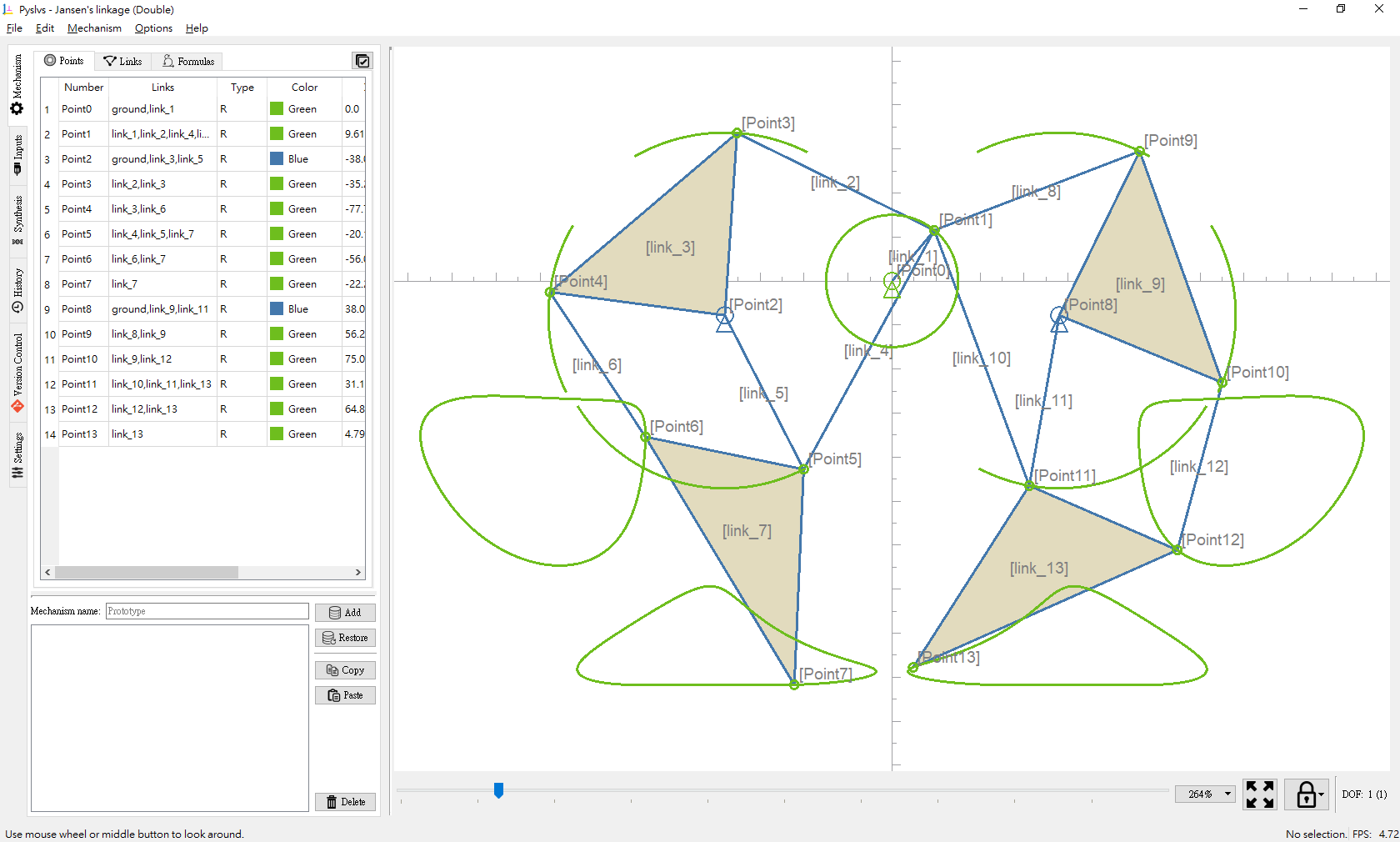
Overview

Build status Build status Documentation Status GitHub repo size in bytes Downloads

Language grade: Python PyPI sourceforge

kernel kernel

pyslvs-icon Pyslvs-UI

A GUI-based (PyQt5) tool used to design 2D linkage mechanism.

  • Planar Linkages Simulation
  • Mechanical Synthesis
    • Number Synthesis: Combine the attributes of mechanism.
    • Structural Synthesis: Cython algorithm used to find out structural possibilities of the mechanism.
    • Dimensional Synthesis: Kernel from the three Cython algorithms (rewrite).
  • Websites
  • Others
    • Cross three platforms.
    • CAD-like user interface.
    • Auto layout of generalized chain.
    • The code is following with Python Enhancement Proposals (PEP):

If you have any question, please post on GitHub issue or contact [email protected].

Getting Started

Executables

Download portable executable file of your platform.

PyPI

pip install pyslvs-ui

Source

Branch master is in development, use stable branch to install stable dependencies directly.

git checkout stable
pip install -e .

There are more detailed instructions in the documentation.

Libraries

Pyslvs has a solver backend that can works without the GUI:

from pyslvs import example_list, parse_vpoints, t_config, expr_solving

# Get example with name
expr, inputs = example_list("Jansen's linkage (Single)")
# Parse the mechanism expression into a list of joint data
vpoints = parse_vpoints(expr)
# Config joint data and control data for the solver
exprs = t_config(vpoints, inputs)
# Solve the position
result = expr_solving(exprs, vpoints, {pair: 0. for pair in inputs})
# Get the result from joint 7
x, y = result[7]
print(x, y)  # -43.170055 -91.753226

Please see the documentation for more information.

Documentation

The documentation of Pyslvs and kernel API. Start it from sources:

pip install mkdocs
pip install -r doc-requirements.txt
mkdocs serve

Cite

Please see the reference.

Comments
  • [AppImage] v18.2.0.glibc2.17 does not work on Debian Stretch 9.3

    [AppImage] v18.2.0.glibc2.17 does not work on Debian Stretch 9.3

    I downloaded the most recent release, pyslvs-18.2.0.glibc2.17-x86_64.AppImage. It does not work on Debian Stretch 9.3.

    $> ./pyslvs-18.2.0.glibc2.17-x86_64.AppImage 
    
    Traceback (most recent call last):
      File "/tmp/.mount_J3kT0G/usr/bin/pyslvs", line 6, in <module>
        from core import *
      File "/tmp/.mount_J3kT0G/usr/bin/core/__init__.py", line 10, in <module>
        from .info import *
      File "/tmp/.mount_J3kT0G/usr/bin/core/info/__init__.py", line 9, in <module>
        from .info import (
      File "/tmp/.mount_J3kT0G/usr/bin/core/info/info.py", line 23, in <module>
        import requests
      File "/tmp/.mount_J3kT0G/usr/lib/python3.5/site-packages/requests/__init__.py", line 43, in <module>
        import urllib3
      File "/tmp/.mount_J3kT0G/usr/lib/python3.5/site-packages/urllib3/__init__.py", line 8, in <module>
        from .connectionpool import (
      File "/tmp/.mount_J3kT0G/usr/lib/python3.5/site-packages/urllib3/connectionpool.py", line 11, in <module>
        from .exceptions import (
      File "/tmp/.mount_J3kT0G/usr/lib/python3.5/site-packages/urllib3/exceptions.py", line 2, in <module>
        from .packages.six.moves.http_client import (
      File "/tmp/.mount_J3kT0G/usr/lib/python3.5/site-packages/urllib3/packages/__init__.py", line 3, in <module>
        from . import ssl_match_hostname
      File "/tmp/.mount_J3kT0G/usr/lib/python3.5/site-packages/urllib3/packages/ssl_match_hostname/__init__.py", line 9, in <module>
        from ssl import CertificateError, match_hostname
      File "/usr/lib/python3.5/ssl.py", line 135, in <module>
        PROTOCOL_SSLv23 = _SSLMethod.PROTOCOL_SSLv23 = _SSLMethod.PROTOCOL_TLS
      File "/usr/lib/python3.5/enum.py", line 274, in __getattr__
        raise AttributeError(name) from None
    AttributeError: PROTOCOL_TLS
    

    Maybe you want to reach out to the IRC channel #AppImage on Freenode. There you'll find AppImage developers who are willing to help fix any problems you may have with packaging and testing your AppImage.

    opened by KurtPfeifle 15
  • [ENH] Extract calculation functions from GUI

    [ENH] Extract calculation functions from GUI

    Hi! First of all I would like to say that this system is amazing, it works great!

    I would like to use this in my thesis with Reinforcement learning in which I am creating mechanism (1-DOF, derived from a fourbar linkage) from python and I need to get the trajectories of those mechanism as fast as possible (3trajectories /second). Is there any way of defining the mechanism in a script and get the trajectories there without using the GUI interface ?

    This is how I define the linkages in python currently image

    Thanks in advance for your help!

    enhancement question 
    opened by juanma9613 10
  • AppImage builds for Linux

    AppImage builds for Linux

    @KmolYuan, thank you for the DEB's produced for KUbuntu 16.04, but it look little incomplete (no dependency information included)

    What about producing AppImages, that could run on near all Linux-based distributives?

    @probonopd, please, take a look and give an instructon how produce AppImage for Pyslvs under KUbuntu 16.04

    • https://github.com/KmolYuan/Pyslvs-PyQt5/releases
    opened by Symbian9 6
  • Can't Maximize program window

    Can't Maximize program window

    When try Maximize (Ctrl+Alt+5) program window size of it just freezed.

    The only way to change window is manually drag each windowborder or use "Filex -> Full screen (Shift+F1)"

    Pyslvs: v0.9.0(beta3) OS: Linux Mint 18 Xfce (64bit)

    opened by Symbian9 4
  • Compilation error on Mac OSX - symbol(s) not found

    Compilation error on Mac OSX - symbol(s) not found

    Hi,

    I would like to try your software but I get the following error during compilation (make build-kernel):

    [...]
     slvs_wrap.o
          SWIG_Py_Void() in slvs_wrap.o
          SWIG_Python_NewShadowInstance(SwigPyClientData*, _object*) in slvs_wrap.o
          SWIG_Python_AppendOutput(_object*, _object*) in slvs_wrap.o
      "__Py_NotImplementedStruct", referenced from:
          SwigPyObject_richcompare(SwigPyObject*, SwigPyObject*, int) in slvs_wrap.o
    ld: symbol(s) not found for architecture x86_64
    clang: error: linker command failed with exit code 1 (use -v to see invocation)
    make[1]: *** [_slvs.so] Error 1
    make: *** [build-solvespace] Error 2
    

    I tried few workaround with no success. Any idea ?

    macOS support 
    opened by matthieu-lapeyre 3
  • Linkage operational functions

    Linkage operational functions

    Let the linkage has more interactions on main canvas just like points.

    • [x] Merge function to move points to another linkage, then delete the original linkage.
    • [x] Select function.
      • Switch selection mode by entities tab widget.
      • Save selected item for each table.
    • [x] Free move function for adjust dimension of linkages.
    enhancement 
    opened by KmolYuan 3
  • [DOC] The docs don't seem to display well in Safari, Firefox, and Chrome (haven't tried more yet)

    [DOC] The docs don't seem to display well in Safari, Firefox, and Chrome (haven't tried more yet)

    When I open the documentation (https://pyslvs-ui.readthedocs.io/en/stable/python-solvespace-api/) I mostly see some huge search and code icons, it does show a menu but returns 404 errors as I navigate through it. I would love to dig in to this documentation though as I'm eager/curious to use the library for a course I am teaching on Algorithmic Folding (lecture = linkage folding)

    so far I tested with Chrome, Firefox, and Safari, happy to test more if that helps

    I love this project, thanks so much for putting this together!

    opened by ThijsRoumen 2
  • Compilation error using MSYS2

    Compilation error using MSYS2

    Traceback (most recent call last):
      File "launch_pyslvs.py", line 12, in <module>
        main()
      File "Y:\tmp\Pyslvs-UI\pyslvs_ui\__init__.py", line 49, in main
        from .core.main_window import MainWindow
      File "Y:\tmp\Pyslvs-UI\pyslvs_ui\core\main_window\__init__.py", line 24, in <module>
        from .io import IOMethodInterface
      File "Y:\tmp\Pyslvs-UI\pyslvs_ui\core\main_window\io.py", line 57, in <module>
        from .actions import ActionMethodInterface
      File "Y:\tmp\Pyslvs-UI\pyslvs_ui\core\main_window\actions.py", line 21, in <module>
        from .storage import StorageMethodInterface
      File "Y:\tmp\Pyslvs-UI\pyslvs_ui\core\main_window\storage.py", line 27, in <module>
        from .solver import SolverMethodInterface
      File "Y:\tmp\Pyslvs-UI\pyslvs_ui\core\main_window\solver.py", line 24, in <module>
        from pyslvs import (
    ImportError: cannot import name 'SolverSystem' from 'pyslvs' 
    
    invalid 
    opened by mdecourse 2
  • Can't run v0.9.0

    Can't run v0.9.0

    Pyslvs-PyQt5 version: 0.9.0 OS: MX Linux MX-17 (Debian 9 "Stretch"), x86_64 (64-bit)

    $ ./pyslvs-0.9.0.glibc2.17-x86_64.AppImage
    zenity, kdialog, Xdialog missing. Skipping /var/tmp/.mount_bbVPnT/usr/bin//pyslvs.wrapper.
    Traceback (most recent call last):
      File "/var/tmp/.mount_bbVPnT/usr/bin/pyslvs", line 6, in <module>
        from core.info.info import INFO, args
      File "/var/tmp/.mount_bbVPnT/usr/bin/core/info/info.py", line 21, in <module>
        import platform
      File "/usr/lib/python3.5/platform.py", line 117, in <module>
        import sys, os, re, subprocess
      File "/usr/lib/python3.5/subprocess.py", line 50, in <module>
        import signal
      File "/usr/lib/python3.5/signal.py", line 3, in <module>
        from functools import wraps as _wraps
      File "/var/tmp/.mount_bbVPnT/usr/lib/python3.5/functools.py", line 23, in <module>
        from weakref import WeakKeyDictionary
      File "/var/tmp/.mount_bbVPnT/usr/lib/python3.5/weakref.py", line 12, in <module>
        from _weakref import (
    ImportError: cannot import name '_remove_dead_weakref'
    $ 
    
    opened by Symbian9 2
  • "bata" (typo mistake in versioning)

    Version 0.9 bata 1

    This typo mistake should be fixed to "Version 0.9 beta 1". But I also recommend write it as "Pyslvs-PyQt5 0.9-beta.1", and as tag use v0.9-beta.1

    Also recommend you read the guide "Semantic Versioning"

    • http://semver.org

    "Semantic Versioning" now is most popular versioning sheme for user software.

    REFERENCE

    • https://www.sitepoint.com/semantic-versioning-why-you-should-using/
    • https://gist.github.com/jashkenas/cbd2b088e20279ae2c8e
    • https://en.wikipedia.org/wiki/Software_versioning
    opened by Symbian9 2
  • [BUG] release v20.08.0 Mac OS 10.15.1 版本启动闪退

    [BUG] release v20.08.0 Mac OS 10.15.1 版本启动闪退

    Describe the bug A clear and concise description of what the bug is. v20.08.0 Mac Release 版本 在 Mac OS 10.15.1 上启动后会直接崩溃退出,没有任何提示.

    PS. 如果哪位恰巧看到这条信息,并想在北京找一份机械设计师的工作请跟看看我们公司,想必喜欢这个软件的人都是能力极强的. http://www.autolabor.com.cn/join

    To Reproduce Steps to reproduce the behavior:

    1. 解压下载的安装包
    2. 点击启动程序
    3. 程序直接退出

    Expected behavior A clear and concise description of what you expected to happen.

    Screenshots If applicable, add screenshots to help explain your problem.

    Desktop (please complete the following information):

    • OS: Mac OS
    • Version: 10.15.1

    Additional context Add any other context about the problem here.

    macOS support 
    opened by apachecd 1
  • [BUG]

    [BUG]

    Not sure if this is the correct place to report this, but

    pip install python-solvespace
    

    does not install on Ubuntu22.04

    In file included from python_solvespace/src/constraint.cpp:7:
          python_solvespace/src/solvespace.h:39:10: fatal error: Eigen/SparseCore: No such file or directory
             39 | #include <Eigen/SparseCore>
                |          ^~~~~~~~~~~~~~~~~~
          compilation terminated.
    
    
    opened by jloveric 0
  • [ENH] Plotting time histories of positions, velocities and accelerations

    [ENH] Plotting time histories of positions, velocities and accelerations

    Hi,

    this software is really great, thank you for sharing it. I just want to suggest an improvement to make it even better. Would it be possible to add an option to plot time histories of positions, velocities and accelerations for selected points ? It seems that currently these variables can be plotted only with respect to position. Such a feature would be very useful in my opinion.

    opened by FEA-eng 0
  • [BUG] Slider-crank mechanism doesn't work with aligned points

    [BUG] Slider-crank mechanism doesn't work with aligned points

    Hi,

    I think that I've encountered a bug. I followed this tutorial: https://www.youtube.com/watch?v=cB5wYyc0J0c

    and modeled a simple slider-crank mechanism:

    slider crank

    The problem is that it doesn't work properly - you can see that the curves showing paths of points belonging to the mechanism are very short and motion of this linkage can't be simulated. However, it happens only when point 0 and point 2 have the same Y coordinate. When I move one of them slightly above or below the other, it starts working:

    slider crank 2

    I also attached the .pyslvs file packed to zip below. Would it be possible to fix this bug ?

    Crank slider problem.zip

    opened by FEA-eng 0
Releases(v22.07.0)
Python framework for creating and scaling up production of vector graphics assets.

Board Game Factory Contributors are welcome here! See the end of readme. This is a vector-graphics framework intended for creating and scaling up prod

Adam Volný 5 Jul 13, 2022
Convert the SVG code to PNG and replace the line by a call to the image in markdown

Convert the SVG code to PNG and replace the line by a call to the image in markdown

6 Sep 06, 2022
Python QR Code image generator

Pure python QR Code generator Generate QR codes. For a standard install (which will include pillow for generating images), run: pip install qrcode[pil

Lincoln Loop 3.5k Dec 31, 2022
Photini - A free, easy to use, digital photograph metadata (Exif, IPTC, XMP) editing application for Linux, Windows and MacOS.

A free, easy to use, digital photograph metadata (Exif, IPTC, XMP) editing application for Linux, Windows and MacOS. "Metadata" is said to mea

Jim Easterbrook 120 Dec 20, 2022
DrawBot is a powerful, free application for macOS that invites you to write Python scripts to generate two-dimensional graphics

DrawBot is a powerful, free application for macOS that invites you to write Python scripts to generate two-dimensional graphics.

Frederik Berlaen 344 Jan 06, 2023
TRREASURE_IMAGE is python lib by which you can hide anything in a .jpg image with Command-Line Interface[cli] feature

TRREASURE_IMAGE TRREASURE_IMAGE is a python third-party library with Command-Line Interface[cli] feature. Table of Contents General Info Python librar

Fatin Shadab 3 Jun 07, 2022
Imutils - A series of convenience functions to make basic image processing operations such as translation, rotation, resizing, skeletonization, and displaying Matplotlib images easier with OpenCV and Python.

imutils A series of convenience functions to make basic image processing functions such as translation, rotation, resizing, skeletonization, and displ

PyImageSearch 4.3k Jan 01, 2023
A simple plugin to view APR images in napari

napari-apr-viewer A simple plugin to view APR images in napari This napari plugin was generated with Cookiecutter using @napari's cookiecutter-napari-

5 Jan 24, 2022
Converting Images Into Minecraft Houses

Converting Images Into Minecraft Houses In this particular project, we turned a 2D Image into Minecraft pixel art and then scaled it in 3D such that i

Mathias Oliver Valdbjørn Jørgensen 1 Feb 02, 2022
Vignette is a Python library to create and manage thumbnails following the FreeDesktop standard.

Vignette Vignette is a Python library to create and manage thumbnails following the FreeDesktop standard. Thumbnails are stored in a shared directory

3 Feb 06, 2022
📷 Python package and CLI utility to create photo mosaics.

📷 Python package and CLI utility to create photo mosaics.

Loic Coyle 7 Oct 29, 2022
LGVL helper script to batch and convert with lvgl offline image converter

script to batch and convert with lvgl offline image converter

Yohann 1 Oct 05, 2022
Simple to use image handler for python sqlite3.

SQLite Image Handler Simple to use image handler for python sqlite3. Functions Function Name Parameters Returns init databasePath : str tableName : st

Mustafa Ozan Çetin 7 Sep 16, 2022
Extract the ISO 11146 beam size from an image file

laserbeamsize Simple and fast calculation of beam sizes from a single monochrome image based on the ISO 11146 method of variances. Some effort has bee

Scott Prahl 21 Jan 06, 2023
㊙️ Create standard barcodes with Python. No external dependencies. 100% Organic Python.

python-barcode python-barcode provides a simple way to create barcodes in Python. There are no external dependencies when generating SVG files. Pillow

Hugo Barrera 419 Dec 26, 2022
ProsePainter combines direct digital painting with real-time guided machine-learning based image optimization.

ProsePainter Create images by painting with words. ProsePainter combines direct digital painting with real-time guided machine-learning based image op

Morphogen 276 Dec 17, 2022
Optimize/Compress images using python

Image Optimization Using Python steps to run the script run the command to install the required libraries pip install -r requirements.txt create a dir

Shekhar Gupta 1 Oct 15, 2021
Paper backup of files using QR codes

Generate paper backups for Linux. Currently command-linux Linux only. Takes any file, and outputs a "paper backup": a printable black-and-white pdf fu

Zachary Vance 27 Dec 28, 2022
Rotates your images in the spirit of rot13

Image Rotator (imrot10) Its like rot13 but for images. Calling the algorithm imrot10 for im = image, rot = rotation, 10 = default magnitude. Unfortuna

Sarah 2 Dec 10, 2021
