Python wrapper for WhatsApp web-based on selenium

Overview

alright

Python wrapper for WhatsApp web made with selenium inspired by PyWhatsApp
Downloads Downloads Downloads

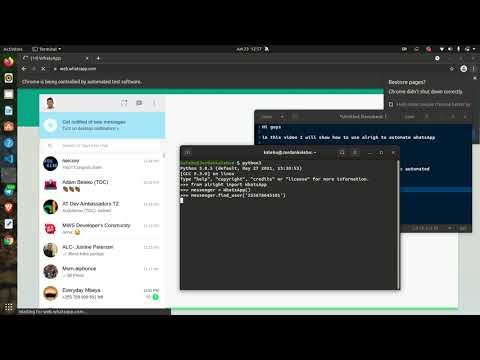
Youtube demo

Why alright ?

I was looking for a way to control and automate WhatsApp web with Python, I came across some very nice libaries and wrappers implementations including;

So I tried pywhatkit, really cool one well crafted to be used by others but its implementations require you to open a new browser tap and scan QR code everytime you send a message no matter if its the same person, which was deal breaker for using it.

I then tried pywhatsapp which is based on yowsup and thus requiring you to do some registration with yowsup before using it of which after bit of googling I got scared of having my number blocked when I do that so I went for the next option

I then went for WebWhatsapp-Wrapper, it has some good documentation and recent commits so I had hopes it gonna work but It didn't for me, and after having couples of errors I abandoned it to look for the next alternative.

Which is PyWhatsapp by shauryauppal, which was more of cli tool than a wrapper which suprisingly worked and it's approach allows you to dynamically send whatsapp message to unsaved contacts without rescanning QR-code everytime.

So what I did is more of a refactoring of the implementation of that tool to be more of wrapper to easily allow people to run different scripts on top of it instead of just using as a tool I then thought of sharing the codebase to people who might struggled to do this as I did.

Getting started

You need to do a little bit of work to get alright to running, but don't worry I gotcha you, everything will work well if you just carefully follow through the documentation.

Installation

We need to have alright installed on our machine to start using which can either be done directly from GitHub or using pip.

installing directly

You first need to clone or download the repo to your local directory and then move into the project directory as shown in the example and then run the below command;

git clone https://github.com/Kalebu/alright
cd alright
alright > python setup.py install 
....

installing from pip

pip install alright 

Setting up Selenium

Underneath alright is Selenium which is one does all the automation work by directly controlling the browser, so you need to have a selenium driver on your machine for alright to work.

So primarly I developed alright and tested on a Chrome browser and therefore it gonna require you to have Chrome and chromedriver other browser support coming soon.

You need to make sure you download the chromedriver compatible with Chrome version you're using otherwise it won't work and also don't forget to extract the zip version of a driver

Here a guide to check the version of chrome you're using

Adding selenium driver to path

One more final step to set up is to add the selenium driver location to path so as it can be discovered by alright, which varies depending on the operating system you're using.

For instance lets say example the current location our driver is in /home/kalebu/chrome-driver (You can view full path to your driver by running pwd command), Here how you would do that.

Linux

For linux to permanently add path to browser do this;

nano ~/.bashrc

and then add the command to export the folder at the very bottom of the file & then Ctrl+X to save it

export PATH="$PATH:/home/kalebu/chrome-driver"
Windows

Windows users follow this guide to actually do that.

Now after that we're now ready to automating and controlling whatsappp web using alright

What you can do with alright?

When you're running your program made with alright, you can only have one controlled browser window at a time, If you run while another window is live it raise an error so make sure to close the controlled window before running another one

Unsaved contact vs saved contacts

Alright allows you to send the messages and media to both unsaved contacts as explained earlier but there is a tiny distinction on how you do that, you will observe this clearly as use the package.

The first step before sending anything to the user is first to locate the user and then you can start sending the informations thats where the main difference lies btn saved and unsaved contacts.

Saved contacts

To saved contact use method find_by_username() to locate saved user,you can also use the same method to locate WhatsApp groups, The parameter can be either be;

  • saved username
  • mobile number
  • group name

Here an Example on how to do that

>>> from alright import WhatsApp
>>> messenger = WhatsApp()
>>> messenger.find_by_username('saved-name or number or group')

Unsaved contacts

In sending message to unsaved whatsapp contacts use find_user() method to locate the user and The parameter can only be users number with country code with (+) omitted as shown below;

>>> from alright import WhatsApp
>>> messenger = WhatsApp()
>>> messenger.find_user('255-74848xxxx')

Now Let's dive in on how we can get started on sending messages and medias

Sending Messages

To send a message with alright, you first need to target a specific user by using find_user() method (include the country code in your number withour '+' symbol) and then after that you can start sending messages to the target user using send_message() method as shown in the example below;

>>> from alright import WhatsApp
>>> messenger = WhatsApp()
>>> messenger.find_user('2557xxxxxz')
>>> messages = ['Morning my love', 'I wish you a good night!']
>>> for message in messages:  
        messenger.send_message(message)    

Multiple numbers

Here how to send a message to multiple users, Let's say we want to wish merry-x mass to all our contacts, our code is going to look like this;

>>> from alright import WhatsApp
>>> messenger = WhatsApp()
>>> numbers = ['2557xxxxxx', '2557xxxxxx', '....']
>>> for number in numbers:
        messenger.find_user(number)
        messenger.send_message("I wish you a Merry X-mass and Happy new year ")

You have to include the country code in your number for this library to work but don't include the (+) symbol

Sending Images

Sending Images is nothing new, its just the fact you have to include a path to your image instead or raw string characters and also you have use send_image(), Here an example;

>>> from alright import WhatsApp
>>> messenger = WhatsApp()
>>> messenger.find_user('mobile')
>>> messenger.send_image('path-to-image')

Sending Videos

Samewise to videos just send_videos() method;

>>> from alright import WhatsApp
>>> messenger = WhatsApp()
>>> messenger.find_user('mobile')
>>> messenger.send_video('path-to-video)

Sending Documents

The rest of the documents such as docx, pdf, audio etc. falls into documents category. You can use send_files() to do that.

>>> from alright import WhatsApp
>>> messenger = WhatsApp()
>>> messenger.find_user('mobile')
>>> messenger.send_file('path-to-file')

Well! thats all for now from the package, to request new feature make an issue.

Contributions

alright is an open-source package under MIT license, so contributions are warmly welcome whether that be a code , docs or typo just fork it.

when contributing to code please make an issue for that before making your changes so that we can have a discussion before implementation.

Issues

If you're facing any issue or difficulty with the usage of the package just raise one so that we can fix it as soon as possible.

Give it a star

Was this useful to you ? Then give it a star so that more people can manke use of this.

Credits

All the credits to:

Comments
  • Unable to send whatsapp messages to unknown/unsaved numbers

    Unable to send whatsapp messages to unknown/unsaved numbers

    Dear Members, please help me regarding whatsapp messages send by ALRIGHT ... it starts happens when whatsapp updates themselves

    i have a unsaved number and i am trying to send messages but error is returning 2022-11-22 11:54:15,478 - root -- [INFO] >> 4

    my code is under

    from alright import WhatsApp messenger = WhatsApp() messenger.find_user('+923461234567')

    i also tried without + sign but unable to send

    opened by syedizhar1979 13
  • error sending message

    error sending message

    hello sir,
    i install your app in my ubuntu machine , and it work , when i use class of find user it work and get the specific user, but when i send message i get exception error. message of exception is:
    element not interactable

    opened by mohamedallam3 11
  • messenger stuck when get_last_message_received is called

    messenger stuck when get_last_message_received is called

    So I was trying out the newly implemented function get_last_message_received which checks for last received message from a specific user but the program stuck when the method is called.

    messenger.get_last_message_received(query="Friend")
    

    @euriconicacio

    opened by Kalebu 11
  • Failed to create data directory

    Failed to create data directory

    Hello, I am having this issue, not sure others having the same issue or not but I just want to let you know this image image

    After surfing on the web and trying different solution it still giving the same issue, so I have commented line 26 in init.py, Now its opening what's app but not sending messages.

    opened by chetan6780 10
  • Doesn't work on raspberry pi

    Doesn't work on raspberry pi

    Hello there, I'm migrating from pywhatkit and I loved your package, but there seems to be a problem whil I was working on a raspberry pi, the chrome driver installation is not being recognised by alright, how do I deal with this issue, please let me know asap.

    opened by therealcyber71 8
  • headless doesn't work.

    headless doesn't work.

    When I change to headless this is what Im getting if I debug the browser.page_source (found it since wait_until wait forever)

    WhatsApp WebWhatsApp WebWhatsApp works with Google Chrome 60+To use WhatsApp, update Chrome or use Mozilla Firefox, Safari, Microsoft Edge or Opera.Update Google ChromeWhatsApp works with Google Chrome 60+To use WhatsApp, update Chrome or use Mozilla Firefox, Safari, Microsoft Edge or Opera.Update Google Chrome
    
    opened by Bennyelg 7
  • send message text error

    send message text error

    Hi I'm currently trying to send a message and a image, but it doesn't sends the message and stands still in that part:

    from alright import WhatsApp messenger = WhatsApp() numbers = ['14155238886'] for number in numbers: messenger.find_user(number) messenger.send_message("I wish you a Merry X-mass and Happy new year ") messenger.send_picture('/Users/matiasgonzalotiberio/Desktop/Whatsapp-Python/1451023683665.jpeg')

    Captura de Pantalla 2021-09-14 a la(s) 12 50 04 Captura de Pantalla 2021-09-14 a la(s) 12 50 13

    As you can see it starts and throws no error, but the message text isn't sent

    opened by matiastiberio 6
  • Can we me have method to fetch all unread chat usernames ?

    Can we me have method to fetch all unread chat usernames ?

    I am just thinking out loud that can we have a method to fetch all unread chat usernames, This will be very useful when it comes to creating auto-response functionality @euriconicacio

    opened by Kalebu 5
  • How to send image with caption

    How to send image with caption

    Is my first time making a coment in github, i am sending an "improvement" of "send_picture()". It is how to send a picture with text on it:

    def send_picture(self, picture, message): try: filename = os.path.realpath(picture) self.find_attachment() # To send an Image imgButton = self.wait.until(EC.presence_of_element_located( (By.XPATH, '//*[@id="main"]/footer//*[@data-icon="attach-image"]/../input'))) imgButton.send_keys(filename) inp_xpath = '//*[@id="app"]/div[1]/div[1]/div[2]/div[2]/span/div[1]/span/div[1]/div/div[2]/div/div[1]/div[3]/div/div/div[2]/div/div[2]' input_box = self.wait.until(EC.presence_of_element_located(( By.XPATH, inp_xpath))) input_box.send_keys(message + Keys.ENTER) self.send_attachment() print(f"Picture has been successfully sent to {self.mobile}") except (NoSuchElementException, Exception) as bug: print(bug) print(f'Failed to send a picture to {self.mobile}')

    opened by victorterancas 5
  • how to disable open WhatsApp application

    how to disable open WhatsApp application

    everytime i run the code (from the examples), a web browser (Chrome) opened and then ask me to open whatsapp application (https://api.whatsapp.com wants to open this application) if I canceled, then the browser do nothing, otherwise the whatsapp application is opened and alright gave me error: raise exception_class(message, screen, stacktrace) selenium.common.exceptions.ElementNotInteractableException: Message: element not interactable

    opened by madzul 5
  • AttributeError: 'WebElement' object has no attribute 'aria_role'

    AttributeError: 'WebElement' object has no attribute 'aria_role'

    ====== WebDriver manager ====== Current google-chrome version is 106.0.5249 Get LATEST chromedriver version for 106.0.5249 google-chrome Driver [C:\Users\mdolm.wdm\drivers\chromedriver\win32\106.0.5249.61\chromedriver.exe] found in cache

    DevTools listening on ws://127.0.0.1:59091/devtools/browser/b75f5f59-4093-4469-a55f-3e0f002fdb45 2022-10-19 19:33:59,520 - root -- [ERROR] >> An exception occurred: 'WebElement' object has no attribute 'aria_role' Traceback (most recent call last): File "C:\Users\mdolm\OneDrive\Документы_python\wa_рассылка_3\alright\alright_init_.py", line 425, in send_message1 if i.aria_role == "textbox": AttributeError: 'WebElement' object has no attribute 'aria_role' 2022-10-19 19:33:59,521 - root -- [INFO] >> 3

    opened by web-triton 4
  • send_message1() is failing with UnboundLocalError

    send_message1() is failing with UnboundLocalError

    send_message1() is constantly failing with an UnboundLocalError message.

    File ~/alright/alright/init.py:453, in WhatsApp.send_message1(self, mobile, message) 450 msg = f"3 " 452 finally: --> 453 LOGGER.info(f"{msg}") 454 return msg

    UnboundLocalError: local variable 'msg' referenced before assignment

    opened by gklein 0
  • Fixes for firefox

    Fixes for firefox

    I'm using firefox and don't have the chrome driver installed. This throws a ModuleNotFound error at this line

    from webdriver_manager.chrome import ChromeDriverManager
    

    I've fixed it by only having this line execute when a custom driver is not provided.

    Also, when doing messenger.send_message on Firefox, only 1 character was being sent. Resolved this by chaining the send_keys and Shift+Enter operations.

    opened by mukund109 0
  • externally initiated conversions

    externally initiated conversions

    im having trouble listening for new messages and responding to that particular message, plus can anyone please explain how do i use the .fetch_all_unread_chats() function and also how do i access the returned chats (what format are they in, datatypes and do i read them)

    opened by nigelbasa 0
  • commands/functions

    commands/functions

    im having trouble in maintaining the driver after a message is sent, i want for example, that after sending a message the driver should then go bac to the whatsapp main menu and watch for new messages and once there is one, it is taken care of. another issue is that there is no clear explanation of how the commands/functions really do, for example the 'fetch_all_unread_chats" is not giving any feedback, i dont know how to access the result of the function. i'd really appreciate any kind of help/assistance here

    opened by nigelbasa 1
  • Chrome is showing alert when sending multiple messages!

    Chrome is showing alert when sending multiple messages!

    When I am trying to send message to multiple users, after it sends the first message, chrome is showing an alert saying “are you sure to exit” so how can we fix that?

    opened by moha-abdi 3
Releases(v1.5)
  • v1.5(Jun 17, 2022)

    What's Changed

    • Updated the XPATH for the go-to web button. by @FranGmz in https://github.com/Kalebu/alright/pull/54
    • Updating the XPATH on the find_by_username method by @euriconicacio in https://github.com/Kalebu/alright/pull/57
    • Improves close_when_message_successfully_sent method, logging, and multiline support. by @euriconicacio in https://github.com/Kalebu/alright/pull/58
    • Created get_first_chat and search_chat_by_name methods! by @euriconicacio in https://github.com/Kalebu/alright/pull/60
    • Update README.md by @euriconicacio in https://github.com/Kalebu/alright/pull/62
    • Update example.py by @theCJMan in https://github.com/Kalebu/alright/pull/63
    • Update init.py by @theCJMan in https://github.com/Kalebu/alright/pull/64
    • Update init.py by @theCJMan in https://github.com/Kalebu/alright/pull/65
    • Creating check_if_given_chat_has_unread_messages method by @euriconicacio in https://github.com/Kalebu/alright/pull/66

    New Contributors

    • @FranGmz made their first contribution in https://github.com/Kalebu/alright/pull/54
    • @euriconicacio made their first contribution in https://github.com/Kalebu/alright/pull/57

    Full Changelog: https://github.com/Kalebu/alright/compare/v1.4...v1.5

    Source code(tar.gz)
    Source code(zip)
  • v1.4(Apr 26, 2022)

    What's Changed

    • Adding ability to send a picture with caption by @badi95 in https://github.com/Kalebu/alright/pull/46
    • Updating README to reflect updates to send_picture by @badi95 in https://github.com/Kalebu/alright/pull/47
    • Update init.py -> Solving opening Desktop WhatsApp by @theCJMan in https://github.com/Kalebu/alright/pull/49
    • Update example.py -> Catering for WhatsApp desktop being installed by @theCJMan in https://github.com/Kalebu/alright/pull/50
    • This is to include the New Send Message 1 by @theCJMan in https://github.com/Kalebu/alright/pull/51

    New Contributors

    • @badi95 made their first contribution in https://github.com/Kalebu/alright/pull/46
    • @theCJMan made their first contribution in https://github.com/Kalebu/alright/pull/49

    Full Changelog: https://github.com/Kalebu/alright/compare/v1.3...v1.4

    Source code(tar.gz)
    Source code(zip)
  • v1.3(Feb 20, 2022)

  • v1.2(Nov 13, 2021)

  • v1.1(Sep 5, 2021)

  • v1.0(Jun 20, 2021)

    All the basic feature implemented able to ;

    • send messages
    • send images
    • send videos
    • send documents

    dynamically using WhatsApp web without having to rescan the QR Code

    Source code(tar.gz)
    Source code(zip)
Owner
Jordan Kalebu
Python Developer | Rust | Javascript | C/C++ | MachineLearning | OpenSource
Jordan Kalebu
471 Dec 24, 2022
Hello i am TELEGRAM GROUP MANAGEMENT BOT MY NAME IS Evil-Inside ⚡ i have both amazing modules

Evil-Inside DEMO BOT - Evil-Inside Hello i am TELEGRAM GROUP MANAGEMENT BOT MY NAME IS Evil-Inside ⚡ i have both amazing modules ℂ𝕆ℕ𝕋𝔸ℂ𝕋 𝕄𝔼 𝕆ℕ

PANDITHAN 52 Nov 20, 2022
thumbor is an open-source photo thumbnail service by globo.com

Survey If you use thumbor, please take 1 minute and answer this survey? It's only 2 questions and one is multiple choice!!! thumbor is a smart imaging

Thumbor (by @globocom) 9.3k Dec 31, 2022
A bot that downloads all the necessary files from WeLearn and lists your assignments, filter due assignments, etc.

Welearn-bot This is a bot which lets you interact with WeLearn from the command line. It can Download all files/resources from your courses and organi

Parth Bibekar 17 Oct 19, 2022
Properly-formatted dynamic timestamps for Discord messages

discord-timestamps discord-timestamps generates properly-formatted dynamic timestamps for Discord messages, with support for Arrow objects. format

Ben Soyka 2 Mar 10, 2022
ShadowClone allows you to distribute your long running tasks dynamically across thousands of serverless functions and gives you the results within seconds where it would have taken hours to complete

ShadowClone allows you to distribute your long running tasks dynamically across thousands of serverless functions and gives you the results within seconds where it would have taken hours to complete

240 Jan 06, 2023
A Python library for the Docker Engine API

Docker SDK for Python A Python library for the Docker Engine API. It lets you do anything the docker command does, but from within Python apps – run c

Docker 6.1k Jan 03, 2023
Implementation of the paper 'Sentence Bottleneck Autoencoders from Transformer Language Models'

Introduction This repository contains the code for the paper Sentence Bottleneck Autoencoders from Transformer Language Models by Ivan Montero, Nikola

Ivan Montero 14 Dec 28, 2022
数字货币BTC量化交易系统-实盘行情服务器,虚拟币自动炒币-火币API-币安交易所-量化交易-网格策略。趋势跟踪策略,最简源码,可在线回测,一键部署,可定制的比特币量化交易框架,3年实盘检验!

huobi_intf 提供火币网的实时行情服务器(支持火币网所有交易对的实时行情),自带API缓存,可用于实盘交易和模拟回测。 行情数据,是一切量化交易的基础,可以获取1min、60min、4hour、1day等数据。数据能进行缓存,可以在多个币种,多个时间段查询的时候,查询速度依然很快。 服务框架

dev 258 Sep 20, 2021
Some random bot for Discord which was created just for fun (Made with Discord.py library)

Ghosty Previously known as 'secondthunder-py-bot' This is repository of some random bot for Discord which was created just for fun and for some educat

Владислав 8 Oct 02, 2022
HTTP API for TON (The Open Network)

HTTP API for The Open Network Since TON nodes uses its own ADNL binary transport protocol, a intermediate service is needed for an HTTP connection. TO

66 Dec 28, 2022
My personal template for a discord bot, including an asynchronous database and colored logging :)

My personal template for a discord bot, including an asynchronous database and colored logging :)

Timothy Pidashev 9 Dec 24, 2022
A slack bot that notifies you when a restaurant is available for orders

Slack Wolt Notifier A Slack bot that notifies you when a Wolt restaurant or venue is available for orders. How does it work? Slack supports bots that

Gil Matok 8 Oct 24, 2022
a public repository helping ML/DL engineers and DS to beautify the notebook with minimal coding.

ml-helper-functions a public repository helping ML/DL engineers and DS to beautify the notebook with minimal coding.

Jesal Patel 4 Jun 24, 2021
Diablo II Resurrected helper

Diablo II Resurrected 快捷施法辅助 功能: + 创建守护进程,注册全局热键 alt+/ 启用和关闭功能 (todo: 播放声音提示) + 按 x 强制移动 + 按 1 ~ 0 快捷施法到鼠标区域 使用 编辑配置 settings.py 技能信息做如下定义: SKILLS:

Wan 2 Nov 06, 2022
This package accesses nitrotype's official api along with its unofficial user api

NitrotypePy This package accesses nitrotype's official api along with its unofficial user api. Currently still in development. Install To install, run

The Moon That Rises 2 Sep 04, 2022
• Create Your Own YouTube Info Api.

youtube_data_api • Create Your Own YouTube Info Api. Deploy How to Use https://{ Heroku App Name }.herokuapp.com/api?link={YouTube link} In local Host

lokaman chendekar 12 Oct 02, 2022
A virus/stealer made in py

python-virus A virus/stealer made in py. Features: Discord token stealer, Password stealer, Windows key stealer, Credit-card stealer, Image grab, Anti

SKYNETMARCI 5 Dec 12, 2022
Discord Token Checker and Info

Discord Token Checker A simple way to check Discord user tokens and their info in bulk. By Roover#7098. https://discord.gg/W8hnMWY6XP Proxy support co

Roover 3 Dec 09, 2021
Change the discord status throught websocket every 5 seconds with an insult

Discord status insult changer Change the discord status throught websocket every 5 seconds with an insult! - pip install httpx - put your tokens in "t

Ѵιcнч 10 Oct 27, 2022