BeeDrive
For privacy and convenience purposes, more and more people try to keep data on their own hardwires instead of third-party cloud services such as Google Drive, OneDrive, and Baidu Drive. While large companies have enough resources to develop their cloud storage services, individual developers and startups are not capable of building a new cloud storage system.
BeeDrive is an open-source file storage and transfer system that you can quickly deploy on your computing station, online cloud servers, and laptops. We provide a new TCP-based protocol to make sure your data safety. The significance between BeeDrive with other TCP-based protocols (e.g., HTTP and FTP) is encrypting data with users' passwords. Moreover, BeeDrive has a built-in NAT service so that you can access your workstation without a stable IP using your laptop.
Features
-
Security &Privacy
In contrast with protocols like HTTP and FTP, BeeDrive keeps your data safe during each time of data transfer based on your password. It means that even if attackers obtain open-source BeeDrive code like you, they can't crack your encrypted data. Specifically, before transferring each piece of your data, BeeDrive first signs your data and password with the MD5 algorithm then applies the AES algorithm to encrypt it with your password as a private key.
-
Efficiency & Scalable
We didn't sacrifice performance for safety. BeeDrive can transfer individual files at a rate of 50MB/s with encryption, while it can even reach over 100MB/s without encryption. This performance is sufficient for typical file transfer scenarios, such as file exchange within the same data center (w/o encryption) and unsafety World Wide Web transfers (w/ encryption).
BeeDrive cloud drive service relies on a multi-processing and multi-threading architecture to support concurrency scenarios. It will automatically launch and destroy new managers (Process-based) and workers (Thread-based) regarding the number of queries. Single Intel i7 CPU (workstation-version) can support ~100 downloading/uploading tasks simultaneously!
-
Free Network Address Translation (NAT)
Most individual developers and startups need to access their personal computers via their laptops. Although LAN Port Forwarding is a common choice, users take risks to be attacked. BeeDrive provides several public forwarding proxies world wild to help you access your data far away from your home. Once you have your cloud service, you can even deploy your own NAT service!
-
User Friendly API Designs
We keep BeeDrive as simple as we can. Firstly, you can obtain BeeDrive in flexible ways, such as PyPi, Source Code, and Executable Files (.exe). More than that, we have automatic strategies to help you manage configurations. To help you follow task progresses, we have rich information on console, and a simplify GUI window! No matter you are an expert or a freshman, you can always find a way that suits your style.
Installation
The easiest way to get BeeDrive is using PyPi!
> pip install BeeDrive
You can launch BeeDrive in CMD with BeeDrive and a GUI interface with BeeDrive-gui.
> BeeDrive -h
BeeDrive Command Line Launcher!

positional arguments:
  {cloud,upload,download,proxy}
                        whice service you need?
  arg1                  the first additional argument (optional)
  arg2                  the second additional argument (optional)

optional arguments:
  -h, --help            show this help message and exit
  -mode {app,cmd}       work on Command Line or Window Application?
  -reset_config {y,n}   reset default configure file [y|n]
  -custom_config CUSTOM_CONFIG
                        launch service with your custom configure file
The GUI interface will show if you are on a Mac/Windows platform.
> BeeDrive-gui
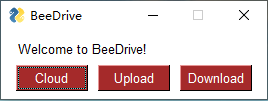
If you can't run above codes, try the followings instead.
> python -m BeeDrive -h
> python -m BeeDrive-gui
BeeDrive relies on two optional dependencies. PySimpleGUI is used to support GUI interface. pycryptodome is used for encrypting. They are not necessary if you don't need on these two purposes.
Examples
-
Personal Drive Service
You ONLY need to setup at the first time running
BeeDrive cloud, it will remember your setting in the future.In this case, we not only launch a local personal drive, but also regist it on our public forwarding servers.
34.94.43.17:8889is running at US, while8.130.53.35:8889is working in China. After we have a name on proxies, our drive can be accessed with this nick name instead of IP address.
> BeeDrive cloud
Setting configurations

[1] Default Cloud Service
1. Authorized users and passwords [user:passwd;user:passwd;...]:BeeDrive:1234;anonymous:0
2. One port to launch the Server [1-65555]:8888
3. A path to save file on your computer: c:\\
4. How many minutes your want to keep the cloud alive? [1-30000]: 30000
5. Sign your data during transfering (maybe slow down transfering)? [y|n] y
6. Encrypto your data during transfering (maybe slow down transfering)? [y|n] y
7. How many CPUs the service can use at most? 8
8. How many tasks can each CPU accept at most? 8

[2] Free NAT Service [y|n]: y
9. Accessible Forwarding servers [ip:port;ip;port;...]: 34.94.43.17:8889;8.130.53.35:8889
10. A public name on the Forwarding server [anything]: wxsPC
11. One port to launch the local Proxy server [1-65555]: 8890
[Sun Jan 23 05:26:25 2022] INFO: Update BeeDrive-cloud default config at c:\.ProgramData\BeeDrive\cloud.bee
[Sun Jan 23 05:26:25 2022] INFO: Server has been launched at ('0.0.0.0', 8888)
[Sun Jan 23 05:26:25 2022] INFO: Registed at Proxy 34.94.43.17:8889 with nickname wxsPC:8888
[Sun Jan 23 05:26:26 2022] INFO: Registed at Proxy 8.130.53.35:8889 with nickname wxsPC:8888
Maybe you are more interested in running with a Window.
> BeeDrive cloud -mode app

-
Upload File/Folder
Here is the example to help you upload
myfile.txtto the cloud drive we just setup. Again, you will have to fill out these settings at the first time ONLY.
> BeeDrive upload myfile.txt
Setup default config
1. Username to login the Cloud: BeeDrive
2. Password to login the Cloud:
3. Cloud service address [ip:port]: wxsPC:8888
4. Forwarding Proxy service addresses [ip:port;ip;port;...]: 34.94.43.17:8889
5. Maximum numer of concurrently transferring files: 4
6. Sign transfering data (may slow down speed) [y|n]:y
7. Encrypto transfering data (may slow down speed) [y|n]:y
[Sun Jan 23 05:36:08 2022] INFO: Update BeeDrive-upload default config at c:\.ProgramData\BeeDrive\upload.bee
[Sun Jan 23 05:36:11 2022] INFO: - using proxy 34.94.43.17:8889 to connect target wxsPC:8888
Upload:myfile.txt: ================================================== 100.0% | 0.00KB/s |  0
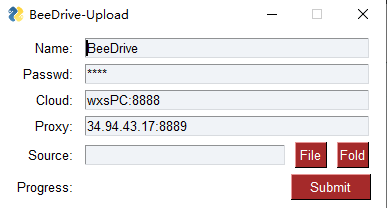
Of course, we have GUI for this service again.
> BeeDrive upload -mode app
-
Download File
Downloading is similar to uploading. The only different is we need to assign an address to save file.
> mkdir temp_download
> BeeDrive download myfile.txt temp_download
Setup default config
1. Username to login the Cloud: BeeDrive
2. Password to login the Cloud:
3. Cloud service address [ip:port]: wxsPC:8888
4. Forwarding Proxy service addresses [ip:port;ip;port;...]: 34.94.43.17:8889
5. Maximum numer of concurrently transferring files: 4
6. Sign transfering data (may slow down speed) [y|n]:y
7. Encrypto transfering data (may slow down speed) [y|n]:y
[Sun Jan 23 05:53:28 2022] INFO: Update BeeDrive-download default config at c:\.ProgramData\BeeDrive\download.bee
[Sun Jan 23 05:53:31 2022] INFO: - using proxy 34.94.43.17:8889 to connect target wxsPC:8888
Download:myfile.txt: ================================================== 100.0% | 0.06KB/s |  0
Here is the code to help you run this service with a GUI.
> BeeDrive download -mode app
-
Forwarding Proxy (Free NAT)
Forwarding proxy doesn't support GUI because we think it should work on servers only. This service only relies on one single argument! That is the port you need.
> BeeDrive proxy 8889
[Sun Jan 23 03:49:58 2022] INFO: Public Host Proxy is launched at port 8889
[Sun Jan 23 03:50:03 2022] INFO: Registration 198.137.18.12:8888 with Nickname=BeeDrive
[Sun Jan 23 03:50:32 2022] INFO: Forwarding 198.137.18.12:1557 to BeeDrive:8888
[Sun Jan 23 03:53:01 2022] INFO: Forwarding 64.136.145.66:2961 to BeeDrive:8888
[Sun Jan 23 03:53:54 2022] INFO: Forwarding 198.137.18.12:45652 to BeeDrive:8888

 43 Dec 16, 2022
 0 Sep 20, 2022
 57 Nov 12, 2022
 1 Oct 28, 2021
 1 Jun 08, 2022
 7 Oct 28, 2022
 5 Oct 19, 2022
 8 Feb 16, 2022
 2 May 11, 2022
 977 Jan 05, 2023
 1 Jan 02, 2022
 3 Jun 08, 2021
 1 Jan 04, 2022
 1 Feb 10, 2022
 5 Apr 28, 2022
 10 May 03, 2022
 379 Dec 24, 2022
 7 Feb 01, 2022
 15 Dec 26, 2022
 614 Dec 26, 2022